Introduction In this chapter we'll cover one of the most photorealistic lights present in V-Ray - IES light. IES stands for Illuminating Engineering Society. The plugin implements measured real world lights defined through an .IES profile, which shape can be overridden. The .IES profile generally represents the shape and the direction (generally the distribution) of the emitted light from a real world light source. The format also contains info on real intensity, distance attenuation and color temperature. A lot of .IES files can be found online, provided by the manufacturers.
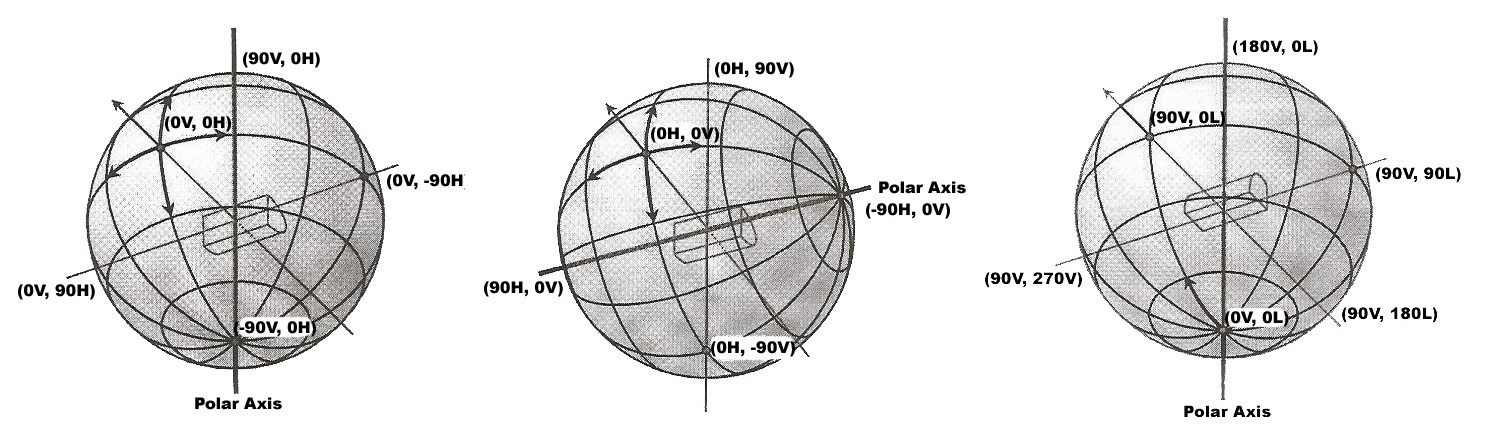
Light and light units Luminous intensity – candela: Luminous flux – lumen: Illuminance – lux: Luminance – cd/m2 (nit): Measurement Far field photometry Assumes that the light is a point source. It happens with a devices called goniophotometers. The first ones were using a light sensor, which is rotated on 360 degrees around the light source. There are three standards for measurement - Type A, Type B, Type C. All of them result in the same file type. The measurement result is the total luminous flux.
Near field photometry Takes into account the shape of the light source. One way to achieve this is when the sensor is closer to the light source. The other ways usually produce too large for practical usage files.
Relative vs absolute photometry Relative photometry - the luminous intensity distribution is scaled by the total luminous flux. Absolute photometry – the total luminous flux is not present. Further reading We won't cover the IES format in detail, but you can learn more for the photometric reports format in the following paper:
"IES LM-63-1986: IES Recommended Standard File Format for Electronic Transfer of Photometric Data." Revised 1991, 1995, 2001, 2002 ANSI/IESNA LM-63-02
Other standards which can be used are CIBSE TM14:1988, EULUMDAT.
For more information on the topic you can search for the paper "Thinking Photometrically" by Ian Ashdown, P. Eng., LC, FIES, published on LIGHTFAIR 2001 Pre-Conference Workshop.
Parameters Along with the common light parameters, the IES lights are affected by the following specific LightIES plugin parameters:
ies_file - Path to the file describing the light source filter_color - Use to tint the light. The default is white (1.0, 1.0, 1.0). Light color is defined by color temperature in the IES file. soft_shadows - Set to 0 (default) to cast hard shadows as point light; 1 to use the shape of the light for shadows; 2 to also use the shape for illumination power - Overrides the power specified in the file if > 0. The unit is lumens. ies_light_shape - Overrides the shape in the file if set to ≥ 0. Possible enumerated values: see table below. ies_light_width - Used if ies_light_shape override is on. ies_light_length - Used if ies_light_shape override is on. ies_light_height - Used if ies_light_shape override is on. ies_light_diameter - Used if ies_light_shape override is on. Here's a table with the possible shape values and their parameters' constraints:
Shape
Width
Length
Height
Diameter
Shape
Width
Length
Height
Diameter
0=point
0
0
0
0
1=rectangle
≥ 0
≥ 0
0
0
2=circle
0
0
0
< 0
3=sphere
0
0
0
< 0
4=vertical cylinder
0
0
> 0
< 0
5=horizontal cylinder (length)
0
> 0
0
< 0
6=horizontal cylinder (width)
> 0
0
0
< 0
7=ellipse (length)
< 0
> 0
0
0
8=ellipse (width)
> 0
< 0
0
0
9=ellipsoid (length)
< 0
> 0
< 0
0
10=ellipsoid (width)
> 0
< 0
< 0
0
For the full list of parameters, please refer to the LightIES plugin description in API Reference Guides .
Example The following code uses the example IES file included in the AppSDK installation package in the scenes/assets folder:
Python <code data-v-c2b1f83f=""><span data-v-c2b1f83f="" class="line"># Compatibility with Python 2.7.</span><span data-v-c2b1f83f="" class="line">from __future__ import print_function</span><span data-v-c2b1f83f="" class="line"></span><span data-v-c2b1f83f="" class="line"># The directory containing the vray shared object should be present in the PYTHONPATH environment variable.</span><span data-v-c2b1f83f="" class="line"># Try to import the vray module from VRAY_SDK/python, if it is not in PYTHONPATH</span><span data-v-c2b1f83f="" class="line">import sys, os</span><span data-v-c2b1f83f="" class="line">VRAY_SDK = os.environ.get('VRAY_SDK')</span><span data-v-c2b1f83f="" class="line">if VRAY_SDK:</span><span data-v-c2b1f83f="" class="line"> sys.path.append(os.path.join(VRAY_SDK, 'python'))</span><span data-v-c2b1f83f="" class="line">import vray</span><span data-v-c2b1f83f="" class="line"></span><span data-v-c2b1f83f="" class="line">SCENE_PATH = os.path.join(os.environ.get('VRAY_SDK'), 'scenes')</span><span data-v-c2b1f83f="" class="line"># Change process working directory to SCENE_PATH in order to be able to load relative scene resources.</span><span data-v-c2b1f83f="" class="line">os.chdir(SCENE_PATH)</span><span data-v-c2b1f83f="" class="line"></span><span data-v-c2b1f83f="" class="line"># The renderer is automatically closed after the `with` block.</span><span data-v-c2b1f83f="" class="line">with vray.VRayRenderer() as renderer:</span><span data-v-c2b1f83f="" class="line"> # Register a simple log callback. Always useful for debugging.</span><span data-v-c2b1f83f="" class="line"> def dumpMsg(renderer, message, level, instant):</span><span data-v-c2b1f83f="" class="line"> if level == vray.LOGLEVEL_ERROR:</span><span data-v-c2b1f83f="" class="line"> print("[ERROR]", message)</span><span data-v-c2b1f83f="" class="line"> elif level == vray.LOGLEVEL_WARNING:</span><span data-v-c2b1f83f="" class="line"> print("[Warning]", message)</span><span data-v-c2b1f83f="" class="line"> elif level == vray.LOGLEVEL_INFO:</span><span data-v-c2b1f83f="" class="line"> print("[info]", message)</span><span data-v-c2b1f83f="" class="line"> # Uncomment for testing, but you might want to ignore these in real code</span><span data-v-c2b1f83f="" class="line"> #else: print("[debug]", message)</span><span data-v-c2b1f83f="" class="line"> renderer.setOnLogMessage(dumpMsg)</span><span data-v-c2b1f83f="" class="line"> # Load scene from a file.</span><span data-v-c2b1f83f="" class="line"> renderer.load(os.path.join(SCENE_PATH, 'lighting.vrscene'))</span><span data-v-c2b1f83f="" class="line"> # Remove original light source from the scene.</span><span data-v-c2b1f83f="" class="line"> del renderer.plugins["VRayLightDomeShape1"]</span><span data-v-c2b1f83f="" class="line"> # LightIES is a light source plugin that can be used to create physically accurate area lights </span><span data-v-c2b1f83f="" class="line"> # from .IES files produced by metering real life light fixtures.</span><span data-v-c2b1f83f="" class="line"> # It also allows specifying a simple custom shape like a cylinder or box.</span><span data-v-c2b1f83f="" class="line"> light = renderer.classes.LightIES()</span><span data-v-c2b1f83f="" class="line"> # Specify the light position, rotation and scale.</span><span data-v-c2b1f83f="" class="line"> light.transform = vray.Transform(</span><span data-v-c2b1f83f="" class="line"> vray.Matrix(</span><span data-v-c2b1f83f="" class="line"> vray.Vector(0.9745879, 0.2240055, 0),</span><span data-v-c2b1f83f="" class="line"> vray.Vector(1.110223e-016, -4.440892e-016, -1),</span><span data-v-c2b1f83f="" class="line"> vray.Vector(-0.2240055, 0.9745879, -4.440892e-016)),</span><span data-v-c2b1f83f="" class="line"> vray.Vector(227.955764705938, 112.5306789507133, 112.2503672299417))</span><span data-v-c2b1f83f="" class="line"> # Specify the color of the light in RGB float values and alpha(1.0f)</span><span data-v-c2b1f83f="" class="line"> light.color = vray.AColor(0.712, 0.9335393, 1)</span><span data-v-c2b1f83f="" class="line"> # Specify the path to the .IES file to use for the light.</span><span data-v-c2b1f83f="" class="line"> light.ies_file = os.path.join(SCENE_PATH, 'assets', 'IES_Example_3.IES')</span><span data-v-c2b1f83f="" class="line"> # Multiplies the light color and intensity. (Can be used as an intensity control).</span><span data-v-c2b1f83f="" class="line"> light.filter_color = vray.Color(4, 4, 4)</span><span data-v-c2b1f83f="" class="line"> # Override the shape of the light.</span><span data-v-c2b1f83f="" class="line"> # Depending on the shape of the light some of the following properties have to be specified:</span><span data-v-c2b1f83f="" class="line"> # ies_light_width - Light shape width in metres.</span><span data-v-c2b1f83f="" class="line"> # ies_light_height - Light shape height in metres.</span><span data-v-c2b1f83f="" class="line"> # ies_light_length - Light shape length in metres.</span><span data-v-c2b1f83f="" class="line"> # ies_light_diameter - Light shape diameter in metres.</span><span data-v-c2b1f83f="" class="line"> # Possible values are:</span><span data-v-c2b1f83f="" class="line"> # -1 (default shape from IES file) - default</span><span data-v-c2b1f83f="" class="line"> # 0 (Point)</span><span data-v-c2b1f83f="" class="line"> # 1 (Rectangular)</span><span data-v-c2b1f83f="" class="line"> # 2 (Circular)</span><span data-v-c2b1f83f="" class="line"> # 3 (Sphere)</span><span data-v-c2b1f83f="" class="line"> # 4 (Vertical Cylinder)</span><span data-v-c2b1f83f="" class="line"> # 5 (Horizontal cylinder oriented along lum.lenght)</span><span data-v-c2b1f83f="" class="line"> # 6 (Horizontal cylinder oriented along lum.width)</span><span data-v-c2b1f83f="" class="line"> # 7 (Ellipse oriented along lum.lenght)</span><span data-v-c2b1f83f="" class="line"> # 8 (Ellipse oriented along lum.width)</span><span data-v-c2b1f83f="" class="line"> light.ies_light_shape = 0</span><span data-v-c2b1f83f="" class="line"> # Specify shadow offset from the surface. Helps to prevent polygonal shadow artifacts on low-poly surfaces.</span><span data-v-c2b1f83f="" class="line"> light.shadowBias = 0.02</span><span data-v-c2b1f83f="" class="line"> # Specify that the bumped normal should be used to check if the light direction is below the surface.</span><span data-v-c2b1f83f="" class="line"> light.bumped_below_surface_check = True</span><span data-v-c2b1f83f="" class="line"> # Start rendering.</span><span data-v-c2b1f83f="" class="line"> renderer.startSync()</span><span data-v-c2b1f83f="" class="line"> # Wait for rendering to end.</span><span data-v-c2b1f83f="" class="line"> renderer.waitForRenderEnd()</span></code>
C++ <code data-v-c2b1f83f=""><span data-v-c2b1f83f="" class="line">#define VRAY_RUNTIME_LOAD_PRIMARY</span><span data-v-c2b1f83f="" class="line"></span><span data-v-c2b1f83f="" class="line">#include "vraysdk.hpp"</span><span data-v-c2b1f83f="" class="line">#include "vrayplugins.hpp"</span><span data-v-c2b1f83f="" class="line">#include "utils.h"</span><span data-v-c2b1f83f="" class="line"></span><span data-v-c2b1f83f="" class="line">using namespace VRay;</span><span data-v-c2b1f83f="" class="line">using namespace VRay::Plugins;</span><span data-v-c2b1f83f="" class="line">using namespace std;</span><span data-v-c2b1f83f="" class="line"></span><span data-v-c2b1f83f="" class="line">const char *BASE_PATH = getenv("VRAY_SDK");</span><span data-v-c2b1f83f="" class="line">string SCENE_PATH = (BASE_PATH ? string(BASE_PATH) : string(".")) + PATH_DELIMITER + "scenes";</span><span data-v-c2b1f83f="" class="line"></span><span data-v-c2b1f83f="" class="line">int main() {</span><span data-v-c2b1f83f="" class="line"> // Change process working directory to SCENE_PATH in order to be able to load relative scene resources.</span><span data-v-c2b1f83f="" class="line"> changeCurrentDir(SCENE_PATH.c_str());</span><span data-v-c2b1f83f="" class="line"> // Load V-Ray SDK library.</span><span data-v-c2b1f83f="" class="line"> VRayInit init(NULL, true);</span><span data-v-c2b1f83f="" class="line"> // Create an instance of VRayRenderer with default options.</span><span data-v-c2b1f83f="" class="line"> // The renderer is automatically closed at the end of the current scope.</span><span data-v-c2b1f83f="" class="line"> VRayRenderer renderer;</span><span data-v-c2b1f83f="" class="line"> // It's recommended to always have a console log</span><span data-v-c2b1f83f="" class="line"> renderer.setOnLogMessage(logMessage);</span><span data-v-c2b1f83f="" class="line"> // Load scene from a file.</span><span data-v-c2b1f83f="" class="line"> renderer.load("lighting.vrscene");</span><span data-v-c2b1f83f="" class="line"> // Remove original light source from the scene.</span><span data-v-c2b1f83f="" class="line"> renderer.deletePlugin("VRayLightDomeShape1");</span><span data-v-c2b1f83f="" class="line"> // LightIES is a light source plugin that can be used to create physically accurate area lights </span><span data-v-c2b1f83f="" class="line"> // from .IES files produced by metering real life light fixtures.</span><span data-v-c2b1f83f="" class="line"> // It also allows specifying a simple custom shape like a cylinder or box.</span><span data-v-c2b1f83f="" class="line"> LightIES light = renderer.newPlugin<LightIES>();</span><span data-v-c2b1f83f="" class="line"> // Specify the light position, rotation and scale.</span><span data-v-c2b1f83f="" class="line"> light.set_transform(Transform(</span><span data-v-c2b1f83f="" class="line"> Matrix(</span><span data-v-c2b1f83f="" class="line"> Vector(0.9745879, 0.2240055, 0.0),</span><span data-v-c2b1f83f="" class="line"> Vector(1.110223e-016, -4.440892e-016, -1.0),</span><span data-v-c2b1f83f="" class="line"> Vector(-0.2240055, 0.9745879, -4.440892e-016)),</span><span data-v-c2b1f83f="" class="line"> Vector(227.955764705938, 112.5306789507133, 112.2503672299417)));</span><span data-v-c2b1f83f="" class="line"> // Specify the color of the light in RGB float values and alpha(1.0f)</span><span data-v-c2b1f83f="" class="line"> light.set_color(AColor(0.712, 0.9335393, 1.0));</span><span data-v-c2b1f83f="" class="line"> // Specify the path to the .IES file to use for the light.</span><span data-v-c2b1f83f="" class="line"> light.set_ies_file("assets/IES_Example_3.IES");</span><span data-v-c2b1f83f="" class="line"> // Multiplies the light color and intensity. (Can be used as an intensity control).</span><span data-v-c2b1f83f="" class="line"> light.set_filter_color(Color(4.0, 4.0, 4.0));</span><span data-v-c2b1f83f="" class="line"> // Override the shape of the light.</span><span data-v-c2b1f83f="" class="line"> // Depending on the shape of the light some of the following properties have to be specified :</span><span data-v-c2b1f83f="" class="line"> // ies_light_width - Light shape width in metres.</span><span data-v-c2b1f83f="" class="line"> // ies_light_height - Light shape height in metres.</span><span data-v-c2b1f83f="" class="line"> // ies_light_length - Light shape length in metres.</span><span data-v-c2b1f83f="" class="line"> // ies_light_diameter - Light shape diameter in metres.</span><span data-v-c2b1f83f="" class="line"> // Possible values are :</span><span data-v-c2b1f83f="" class="line"> // -1 (default shape from .IES file) - default</span><span data-v-c2b1f83f="" class="line"> // 0 (Point)</span><span data-v-c2b1f83f="" class="line"> // 1 (Rectangular)</span><span data-v-c2b1f83f="" class="line"> // 2 (Circular)</span><span data-v-c2b1f83f="" class="line"> // 3 (Sphere)</span><span data-v-c2b1f83f="" class="line"> // 4 (Vertical Cylinder)</span><span data-v-c2b1f83f="" class="line"> // 5 (Horizontal cylinder oriented along lum.lenght)</span><span data-v-c2b1f83f="" class="line"> // 6 (Horizontal cylinder oriented along lum.width)</span><span data-v-c2b1f83f="" class="line"> // 7 (Ellipse oriented along lum.lenght)</span><span data-v-c2b1f83f="" class="line"> // 8 (Ellipse oriented along lum.width)</span><span data-v-c2b1f83f="" class="line"> light.set_ies_light_shape(0);</span><span data-v-c2b1f83f="" class="line"> // Specify shadow offset from the surface. Helps to prevent polygonal shadow artifacts on low-poly surfaces.</span><span data-v-c2b1f83f="" class="line"> light.set_shadowBias(0.02f);</span><span data-v-c2b1f83f="" class="line"> // Specify that the bumped normal should be used to check if the light direction is below the surface.</span><span data-v-c2b1f83f="" class="line"> light.set_bumped_below_surface_check(true);</span><span data-v-c2b1f83f="" class="line"> // Start rendering.</span><span data-v-c2b1f83f="" class="line"> renderer.startSync();</span><span data-v-c2b1f83f="" class="line"> // Wait for rendering to end.</span><span data-v-c2b1f83f="" class="line"> renderer.waitForRenderEnd();</span><span data-v-c2b1f83f="" class="line"> return 0;</span><span data-v-c2b1f83f="" class="line">}</span></code>
C#.NET <code data-v-c2b1f83f=""><span data-v-c2b1f83f="" class="line">using System;</span><span data-v-c2b1f83f="" class="line">using System.IO;</span><span data-v-c2b1f83f="" class="line">using VRay;</span><span data-v-c2b1f83f="" class="line">using VRay.Plugins;</span><span data-v-c2b1f83f="" class="line"></span><span data-v-c2b1f83f="" class="line">namespace _05_ies</span><span data-v-c2b1f83f="" class="line">{</span><span data-v-c2b1f83f="" class="line"> class Program</span><span data-v-c2b1f83f="" class="line"> {</span><span data-v-c2b1f83f="" class="line"> static void Main(string[] args)</span><span data-v-c2b1f83f="" class="line"> {</span><span data-v-c2b1f83f="" class="line"> string SCENE_PATH = Path.Combine(Environment.GetEnvironmentVariable("VRAY_SDK"), "scenes");</span><span data-v-c2b1f83f="" class="line"> // Change process working directory to SCENE_PATH in order to be able to load relative scene resources.</span><span data-v-c2b1f83f="" class="line"> Directory.SetCurrentDirectory(SCENE_PATH);</span><span data-v-c2b1f83f="" class="line"></span><span data-v-c2b1f83f="" class="line"> // Create an instance of VRayRenderer with default options. The renderer is automatically closed after the `using` block.</span><span data-v-c2b1f83f="" class="line"> using (VRayRenderer renderer = new VRayRenderer())</span><span data-v-c2b1f83f="" class="line"> {</span><span data-v-c2b1f83f="" class="line"> // Add a listener for any type of log message.</span><span data-v-c2b1f83f="" class="line"> renderer.LogMessage += new EventHandler<MessageEventArgs>((source, e) =></span><span data-v-c2b1f83f="" class="line"> {</span><span data-v-c2b1f83f="" class="line"> // You can remove the if for testing, but you might want to ignore Debug in real code</span><span data-v-c2b1f83f="" class="line"> if (e.LogLevel != LogLevelType.Debug)</span><span data-v-c2b1f83f="" class="line"> {</span><span data-v-c2b1f83f="" class="line"> Console.WriteLine(String.Format("[{0}] {1}", e.LogLevel.ToString(), e.Message));</span><span data-v-c2b1f83f="" class="line"> }</span><span data-v-c2b1f83f="" class="line"> });</span><span data-v-c2b1f83f="" class="line"> // Load scene from a file.</span><span data-v-c2b1f83f="" class="line"> renderer.Load("lighting.vrscene");</span><span data-v-c2b1f83f="" class="line"> // Remove original light source from the scene.</span><span data-v-c2b1f83f="" class="line"> renderer.DeletePlugin("VRayLightDomeShape1");</span><span data-v-c2b1f83f="" class="line"> // LightIES is a light source plugin that can be used to create physically accurate area lights </span><span data-v-c2b1f83f="" class="line"> // from .IES files produced by metering real life light fixtures.</span><span data-v-c2b1f83f="" class="line"> // It also allows specifying a simple custom shape like a cylinder or box.</span><span data-v-c2b1f83f="" class="line"> LightIES light = renderer.NewPlugin<LightIES>();</span><span data-v-c2b1f83f="" class="line"> // Specify the light position, rotation and scale.</span><span data-v-c2b1f83f="" class="line"> light.Transform = new Transform(</span><span data-v-c2b1f83f="" class="line"> new Matrix(</span><span data-v-c2b1f83f="" class="line"> new Vector(0.9745879, 0.2240055, 0),</span><span data-v-c2b1f83f="" class="line"> new Vector(1.110223e-016, -4.440892e-016, -1),</span><span data-v-c2b1f83f="" class="line"> new Vector(-0.2240055, 0.9745879, -4.440892e-016)),</span><span data-v-c2b1f83f="" class="line"> new Vector(227.955764705938, 112.5306789507133, 112.2503672299417));</span><span data-v-c2b1f83f="" class="line"> // Specify the color of the light in RGB float values and alpha = 1.</span><span data-v-c2b1f83f="" class="line"> light.Color = new AColor(0.712, 0.9335393, 1);</span><span data-v-c2b1f83f="" class="line"> // Specify the path to the .IES file to use for the light.</span><span data-v-c2b1f83f="" class="line"> light.IesFile = Path.Combine("assets", "IES_Example_3.IES");</span><span data-v-c2b1f83f="" class="line"> // Multiplies the light color and intensity. (Can be used as an intensity control).</span><span data-v-c2b1f83f="" class="line"> light.FilterColor = new Color(4, 4, 4);</span><span data-v-c2b1f83f="" class="line"> // Override the shape of the light.</span><span data-v-c2b1f83f="" class="line"> // Depending on the shape of the light some of the following properties have to be specified:</span><span data-v-c2b1f83f="" class="line"> // ies_light_width - Light shape width in metres.</span><span data-v-c2b1f83f="" class="line"> // ies_light_height - Light shape height in metres.</span><span data-v-c2b1f83f="" class="line"> // ies_light_length - Light shape length in metres.</span><span data-v-c2b1f83f="" class="line"> // ies_light_diameter - Light shape diameter in metres.</span><span data-v-c2b1f83f="" class="line"> // Possible values are:</span><span data-v-c2b1f83f="" class="line"> // -1 (default shape from IES file) - default</span><span data-v-c2b1f83f="" class="line"> // 0 (Point)</span><span data-v-c2b1f83f="" class="line"> // 1 (Rectangular)</span><span data-v-c2b1f83f="" class="line"> // 2 (Circular)</span><span data-v-c2b1f83f="" class="line"> // 3 (Sphere)</span><span data-v-c2b1f83f="" class="line"> // 4 (Vertical Cylinder)</span><span data-v-c2b1f83f="" class="line"> // 5 (Horizontal cylinder oriented along lum.lenght)</span><span data-v-c2b1f83f="" class="line"> // 6 (Horizontal cylinder oriented along lum.width)</span><span data-v-c2b1f83f="" class="line"> // 7 (Ellipse oriented along lum.lenght)</span><span data-v-c2b1f83f="" class="line"> // 8 (Ellipse oriented along lum.width)</span><span data-v-c2b1f83f="" class="line"> light.IesLightShape = 0;</span><span data-v-c2b1f83f="" class="line"> // Specify shadow offset from the surface. Helps to prevent polygonal shadow artifacts on low-poly surfaces.</span><span data-v-c2b1f83f="" class="line"> light.ShadowBias = 0.02F;</span><span data-v-c2b1f83f="" class="line"> // Specify that the bumped normal should be used to check if the light direction is below the surface.</span><span data-v-c2b1f83f="" class="line"> light.BumpedBelowSurfaceCheck = true;</span><span data-v-c2b1f83f="" class="line"> // Specify the number of parameter samples for motion blur.</span><span data-v-c2b1f83f="" class="line"> light.Nsamples = 1;</span><span data-v-c2b1f83f="" class="line"> // Start rendering.</span><span data-v-c2b1f83f="" class="line"> renderer.StartSync();</span><span data-v-c2b1f83f="" class="line"> // Wait for rendering to end.</span><span data-v-c2b1f83f="" class="line"> renderer.WaitForRenderEnd();</span><span data-v-c2b1f83f="" class="line"> }</span><span data-v-c2b1f83f="" class="line"> }</span><span data-v-c2b1f83f="" class="line"> }</span><span data-v-c2b1f83f="" class="line">}</span></code>
Node.js <code data-v-c2b1f83f=""><span data-v-c2b1f83f="" class="line">var path = require('path');</span><span data-v-c2b1f83f="" class="line">var vray = require(path.join(process.env.VRAY_SDK, 'node', 'vray'));</span><span data-v-c2b1f83f="" class="line"></span><span data-v-c2b1f83f="" class="line">var SCENE_PATH = path.join(process.env.VRAY_SDK, 'scenes');</span><span data-v-c2b1f83f="" class="line">// Change process working directory to SCENE_PATH in order to be able to load relative scene resources.</span><span data-v-c2b1f83f="" class="line">process.chdir(SCENE_PATH);</span><span data-v-c2b1f83f="" class="line"></span><span data-v-c2b1f83f="" class="line">// Create an instance of VRayRenderer with default options.</span><span data-v-c2b1f83f="" class="line">var renderer = vray.VRayRenderer();</span><span data-v-c2b1f83f="" class="line">// It's recommended to always have a console log callback</span><span data-v-c2b1f83f="" class="line">renderer.on("logMessage", function(message, level, instant) {</span><span data-v-c2b1f83f="" class="line"> if (level == vray.LOGLEVEL_ERROR)</span><span data-v-c2b1f83f="" class="line"> console.log("[ERROR] ", message);</span><span data-v-c2b1f83f="" class="line"> else if (level == vray.LOGLEVEL_WARNING)</span><span data-v-c2b1f83f="" class="line"> console.log("[Warning] ", message);</span><span data-v-c2b1f83f="" class="line"> else if (level == vray.LOGLEVEL_INFO)</span><span data-v-c2b1f83f="" class="line"> console.log("[info] ", message);</span><span data-v-c2b1f83f="" class="line"> // Uncomment for testing, but you might want to ignore these in real code</span><span data-v-c2b1f83f="" class="line"> //else console.log("[debug] ", message);</span><span data-v-c2b1f83f="" class="line">});</span><span data-v-c2b1f83f="" class="line">// Load scene from a file asynchronously.</span><span data-v-c2b1f83f="" class="line">renderer.load("lighting.vrscene", function(err) {</span><span data-v-c2b1f83f="" class="line"> if (err) throw err;</span><span data-v-c2b1f83f="" class="line"> // Remove original light source from the scene.</span><span data-v-c2b1f83f="" class="line"> delete renderer.plugins["VRayLightDomeShape1"];</span><span data-v-c2b1f83f="" class="line"> // LightIES is a light source plugin that can be used to create physically accurate area lights</span><span data-v-c2b1f83f="" class="line"> // from .IES files produced by metering real life light fixtures.</span><span data-v-c2b1f83f="" class="line"> // It also allows specifying a simple custom shape like a cylinder or box.</span><span data-v-c2b1f83f="" class="line"> var light = renderer.classes.LightIES();</span><span data-v-c2b1f83f="" class="line"> // Specify the light position, rotation and scale.</span><span data-v-c2b1f83f="" class="line"> light.transform = vray.Transform(</span><span data-v-c2b1f83f="" class="line"> vray.Matrix(</span><span data-v-c2b1f83f="" class="line"> vray.Vector(0.9745879, 0.2240055, 0),</span><span data-v-c2b1f83f="" class="line"> vray.Vector(1.110223e-016, -4.440892e-016, -1),</span><span data-v-c2b1f83f="" class="line"> vray.Vector(-0.2240055, 0.9745879, -4.440892e-016)),</span><span data-v-c2b1f83f="" class="line"> vray.Vector(227.955764705938, 112.5306789507133, 112.2503672299417));</span><span data-v-c2b1f83f="" class="line"> // Specify the color of the light in RGB float values and alpha(1.0f)</span><span data-v-c2b1f83f="" class="line"> light.color = vray.AColor(0.712, 0.9335393, 1);</span><span data-v-c2b1f83f="" class="line"> // Specify the path to the .IES file to use for the light.</span><span data-v-c2b1f83f="" class="line"> light.ies_file = path.join(SCENE_PATH, 'assets', 'IES_Example_3.IES');</span><span data-v-c2b1f83f="" class="line"> // Multiplies the light color and intensity. (Can be used as an intensity control).</span><span data-v-c2b1f83f="" class="line"> light.filter_color = vray.Color(4, 4, 4);</span><span data-v-c2b1f83f="" class="line"> // Override the shape of the light.</span><span data-v-c2b1f83f="" class="line"> // Depending on the shape of the light some of the following properties have to be specified:</span><span data-v-c2b1f83f="" class="line"> // ies_light_width - Light shape width in metres.</span><span data-v-c2b1f83f="" class="line"> // ies_light_height - Light shape height in metres.</span><span data-v-c2b1f83f="" class="line"> // ies_light_length - Light shape length in metres.</span><span data-v-c2b1f83f="" class="line"> // ies_light_diameter - Light shape diameter in metres.</span><span data-v-c2b1f83f="" class="line"> // Possible values are:</span><span data-v-c2b1f83f="" class="line"> // -1 (default shape from IES file) - default</span><span data-v-c2b1f83f="" class="line"> // 0 (Point)</span><span data-v-c2b1f83f="" class="line"> // 1 (Rectangular)</span><span data-v-c2b1f83f="" class="line"> // 2 (Circular)</span><span data-v-c2b1f83f="" class="line"> // 3 (Sphere)</span><span data-v-c2b1f83f="" class="line"> // 4 (Vertical Cylinder)</span><span data-v-c2b1f83f="" class="line"> // 5 (Horizontal cylinder oriented along lum.lenght)</span><span data-v-c2b1f83f="" class="line"> // 6 (Horizontal cylinder oriented along lum.width)</span><span data-v-c2b1f83f="" class="line"> // 7 (Ellipse oriented along lum.lenght)</span><span data-v-c2b1f83f="" class="line"> // 8 (Ellipse oriented along lum.width)</span><span data-v-c2b1f83f="" class="line"> light.ies_light_shape = 0;</span><span data-v-c2b1f83f="" class="line"> // Specify shadow offset from the surface. Helps to prevent polygonal shadow artifacts on low-poly surfaces.</span><span data-v-c2b1f83f="" class="line"> light.shadowBias = 0.02;</span><span data-v-c2b1f83f="" class="line"> // Specify that the bumped normal should be used to check if the light direction is below the surface.</span><span data-v-c2b1f83f="" class="line"> light.bumped_below_surface_check = true;</span><span data-v-c2b1f83f="" class="line"> // Start rendering.</span><span data-v-c2b1f83f="" class="line"> renderer.start(function(err) {</span><span data-v-c2b1f83f="" class="line"> if (err) throw err;</span><span data-v-c2b1f83f="" class="line"> // Wait for rendering to end.</span><span data-v-c2b1f83f="" class="line"> renderer.waitForRenderEnd(function() {</span><span data-v-c2b1f83f="" class="line"> renderer.close();</span><span data-v-c2b1f83f="" class="line"> });</span><span data-v-c2b1f83f="" class="line"> });</span><span data-v-c2b1f83f="" class="line">});</span></code>
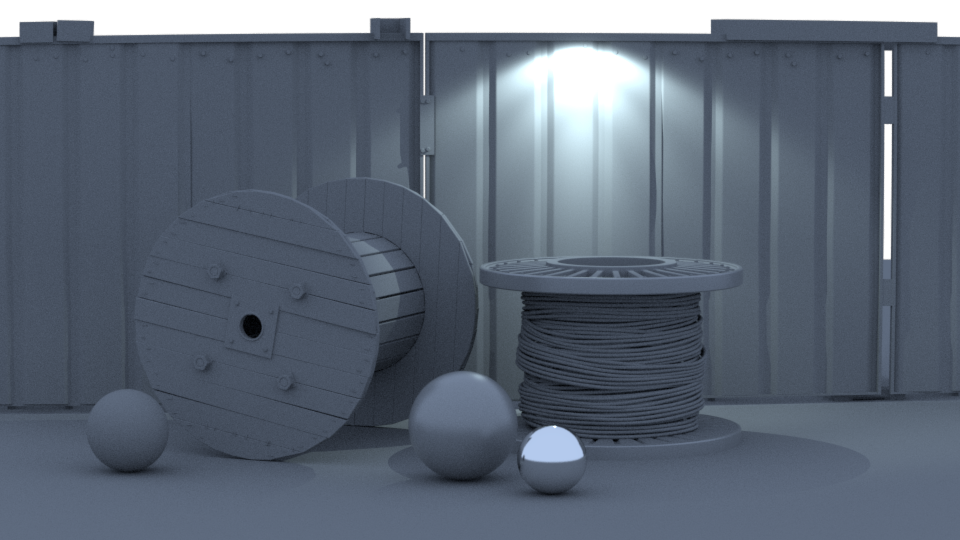
Result The scene used for this render is called "Lighting_IES.vrscene" and can be found in the scene bundle (comments on the different parameters available inside).
To test this locally, you'll need to change the absolute path to the IES profile (located in the included scene: "vrscenes/light_ies.vrscene").