Application SDK
Legacy Materials
This page provides information about the legacy V-Ray materials. It is recommended to use their latest counterparts instead.
Last updated 1 September 2026
This page provides information about the legacy V-Ray materials. It is recommended to use their latest counterparts instead.
V-Ray Car Paint Material
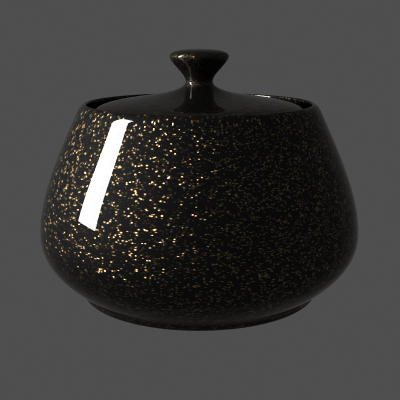
The VRayCarPaintMtl material is a material that simulates a metallic car paint. It is a complex material with four layers: a base diffuse layer, a base glossy layer, metallic flakes layer, and clear coat layer. The material allows the adjustment of each of these layers separately.
If you just want to use the metallic flakes and make your own layered materials, you can use the Car Paint Flakes Material | BRDFFlakes or the newer BRDFStochasticFlakes material, which we'll cover later in this chapter

The above example can be rendered using this scene bundle, check the comments inside as there are important details about the internals of the material.
Parameters
Base Layer Parameters
- base_color – the diffuse color for the base layer.
- base_reflection – the reflectivity of the base layer. The reflection color itself is the same as the Base color.
- base_glossiness – reflection glossiness for the base layer.
- base_traceReflections – when off, the base layer only produces specular highlights, but no (glossy) reflections.
Flake Layer Parameters
- flake_color – the color of the metal flakes.
- flake_glossiness – the glossiness of the metal flakes. It is not recommended to set this above 0.9 as it may produce artifacts.
- flake_orientation – controls the orientation of the flakes relative to the surface normal. When this is 0.0, all flakes are perfectly aligned with the surface. When it is 1.0, the flakes are rotated completely randomly with respect to the normal. Values above 0.5 are not recommended as they can produce artifacts.
- flake_density – the density (number of flakes) for a certain area. Lower values produce less flakes and higher values produce more flakes. Set this to 0.0 to produce a material without flakes. For more information, see The Flake Density Parameter example below.
- flake_scale – scales the entire flake structure. For more information, see The Flake Scale Parameter example below.
- flake_size – the size of the flakes relative to the distance between them. Higher values produce bigger flakes and lower values produce smaller flakes. For more information, see The Flake Size Parameter example below.
- flake_seed – the random seed for the flakes. Changing this produces different flake patterns.
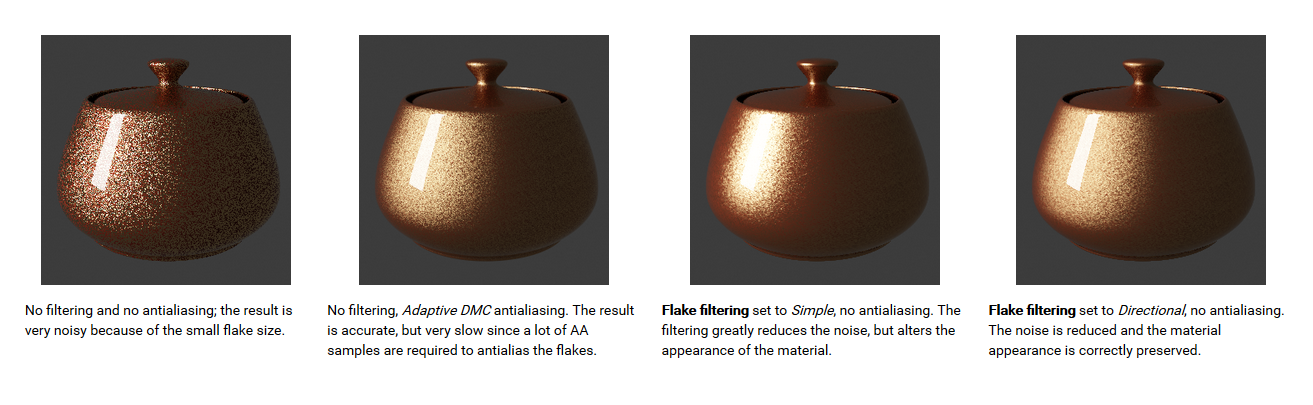
- flake_filtering_mode – determines the way the flakes are filtered. Filtering is extremely important to reduce the work required to produce a clean image. The possible values are:
- Simple (0) – this method is faster and uses less RAM but is less accurate. It averages the orientation of the flakes together, which may alter the appearance of the material when viewed from a distance.
- Directional (1) – this method is slightly slower and uses more RAM, but is more accurate. It groups the flakes based on their orientation before performing the filtering, so that the material appearance is preserved. For more information, see The Flake Filtering Parameter example below.
- flake_map_size – internally the material creates several bitmaps to store the generated flakes. This parameter determines the size of the bitmaps. Lower values reduce RAM usage, but may produce noticeable tiling in the flake structure. Higher values require more RAM, but tiling is reduced. Be careful when using the Directional filtering method, as it may quickly take up gigabytes of RAM for larger map sizes. For more information, see Antialiasing Filters example below.
- mapping_type – specifies the method for mapping the flakes. The possible values are:
- Explicit UVW channel (0) – the flakes are mapped using the specified channel.
- Triplanar from Object XYZ (1) – the material automatically computes mapping coordinates in object space based on the surface normals.
- mapping_channel – the mapping channel for the flakes when the Flake mapping type is set to Explicit UVW channel.
- flake_traceReflections – when off, the flakes will only produce specular highlights, but no actual reflections will be traced.
Coat Layer Parameters
- coat_color – the color of the coat layer.
- coat_strength – the strength of the coat reflections when the surface is viewed directly from the front.
- coat_glossiness – glossiness of the coat reflections.
- coat_traceReflections – when off, the clear coat will only produce specular highlights, but no actual reflections
Options
- traceReflections – when disabled, reflections from the different layers are not traced (they will only produce specular highlights).
- trace_depth – allows you to control the maximum number of times a ray is going to be reflected by the material (-1 is controlled by the global options).
- doubleSided – when enabled, the material is double-sided.
- subdivs – determines the amount of samples for the glossy reflections of the different layers.
- cutoff_threshold – cutoff threshold for the reflections of the different layers.
- environment_priority – specifies the environment priority for the environment override texture for this material. See the VRayMtl material for more information on this parameter.
Examples
The Flake Orientation Parameter
This set of images demonstrate the effect of the Flake orientation parameter. Note how lower values produce flakes more aligned with the surface normal, so that light is reflected more uniformly. Higher values produce more random flakes leading to more variation in the flake illumination.

The Flake Density Parameter
This set of images shows the effect of the Flake density parameter. Note how larger values produce more flakes, but do not change the flake size.

The Flake Scale Parameter
This set of images demonstrate the effect of the Flake scale parameter. Note how lower values scale the entire flake structure.

The Flake Size Parameter
This set of images shows the effect of the Flake size parameter. Note how larger values make the individual flakes larger, but do not change their count.

The Flake Filtering Parameter
This example shows the effect of the Flake filtering parameter.
Antialiasing Filters
Here is an example briefly demonstrating the effect of different antialiasing filters on the final result.
Note that rendering with a particular filter is not the same as rendering without a filter and then blurring the image in a post-processing program like Adobe Photoshop. Filters are applied on a sub-pixel level, over the individual sub-pixel samples. Therefore, applying the filter at render time produces a much more accurate and subtle result than applying it as a post effect. V-Ray can use all standard 3ds Max filters (with the exception of the Plate match filter) and produces similar results to the scanline renderer.
The Adaptive image sampler was used for the images below, with Min/Max rate of -1/3 and the Rand option on.

V-Ray Skin
BRDFSkinComplex is a material specifically designed for rendering skin. In comparison to the Subsurface Scattering Material | BRDFSSS2 material, which can also be used for the same purpose, the goal of the BRDFSkinComplex material is to provide artists with greater control and to simplify the setup of the material.
The material is composed of several different layers which are added together: a diffuse layer, three sub-surface scattering layers, and two reflection layers. The contribution of each layer relative to the other layers is controlled by an "amount" value. Additionally, the sub-surface layers are grouped so that their total contribution can be clamped. The same is implemented for the two reflection layers.

See the comments in the file "Skin.vrscene" from the scene bundle.
Parameters
General
- scale – allows the user to quickly scale the sub-surface scattering effect up or down. This is a multiplier for the individual shallow, medium, and deep radius values.
- max_sss_amount – limits the total contribution of the sub-surface scattering layers to the specified value. If the sum of the individual shallow, medium, and deep scattering layers exceeds the Max sss amount value, the amounts are renormalized so that their sum is the same as the Max sss amount.
- max_reflection_amount – limits the total contribution of the reflection layers to the specified value. If the sum of the Primary reflection amount and the Secondary reflection amount exceeds this value, the amounts are renormalized so that their sum is the same as Max reflection amount.
Diffuse
- diffuse_color – the color for the diffuse layer.
- diffuse_amount – the relative contribution of the diffuse layer to the material.
Shallow Scattering
- shallow_color – the color for the shallow scattering layer.
- shallow_amount – the relative contribution of the shallow scattering layer to the material.
- shallow_radius – the distance that light is scattered within the shallow layer in cm.
Medium Scattering
- medium_color – the color for the medium scattering layer.
- medium_amount – the relative contribution of the medium scattering layer to the material.
- medium_radius – the distance that light is scattered within the medium layer in cm.
Deep Scattering
- deep_color – the color for the deep scattering layer.
- deep_amount – the relative contribution of the deep scattering layer to the material.
- deep_radius – the distance that light is scattered within the deep layer in cm.
Primary Reflection
- primary_reflection_color – the color for the primary reflections.
- primary_reflection_amount – the relative contribution of the primary reflection layer to the material.
- primary_reflection_glossiness – the glossiness value for the primary reflection.
- primary_reflection_subdivs – determines the number of samples used for computing glossy reflections from the primary reflection layer.
- primary_reflection_fresnel – if on, a Fresnel term will be applied to the strength of the reflection.
- primary_reflection_fresnel_ior – the IOR value used to compute reflection strength if Primary reflection fresnel is enabled.
Secondary Reflection
- secondary_reflection_color – the color for the secondary reflections.
- secondary_reflection_amount – the relative contribution of the secondary reflection layer to the material.
- secondary_reflection_glossiness – the glossiness value for the secondary reflection.
- secondary_reflection_subdivs – determines the number of samples used for computing glossy reflections from the secondary reflection layer.
- secondary_reflection_fresnel – if on, a Fresnel term will be applied to the strength of the reflection.
- secondary_reflection_fresnel_ior – the IOR value used to compute reflection strength if Secondary reflection fresnel is enabled.
Multiple Scattering Options
There are several different algorithms for calculating multiple scattering in the sub-surface layers. This section allows the user to select an algorithm and adjust its parameters.
- multiple_scattering – selects the type of algorithm:
- Prepass-based illumination map (0) – this algorithm approximates sub-surface scattering by precomputing an illumination map on the surface of the object; this map is built using V-Ray's prepass system (the same one used for the irradiance map and interpolated glossy reflections/refractions). The advantage of this method is that it is quite fast, since the illumination map is only computed for the portions of objects that are visible to the camera. Also, the amount of calculations is proportional to the screen space taken up by the object. A disadvantage is that no information is generated for parts of objects outside the screen, which may lead to incorrect results for objects which are only partially visible. Since the distribution of the samples depends on the camera position, flickering is possible in animation. Finally, objects that are far away from the camera may be sampled insufficiently, leading to incorrect results.
- Object-based illumination map (1) – this algorithm also approximates sub-surface scattering by precomputing illumination on the object's surface; however the points are distributed directly on the surface on the object with a specified density. This method avoids the problems of flickering and insufficient sampling for far-away objects, however it may calculate a lot more illumination points that are needed strictly to render the image.
- Raytraced (2) – this method uses raytracing to distribute points on the object's surface. It does not require precomputation and is suitable for use with the Progressive image sampler. The only disadvantage of this method is that it can introduce noise in the image if the raytraced samples are insufficient.
- None (3) - diffuse approximation
- scatter_gi – when this option is enabled, GI is taken into account when calculating multiple scattering. Otherwise, GI is approximated as if the surface is diffuse. Turning this option on leads to more accurate results when using GI, but may slow down the rendering.
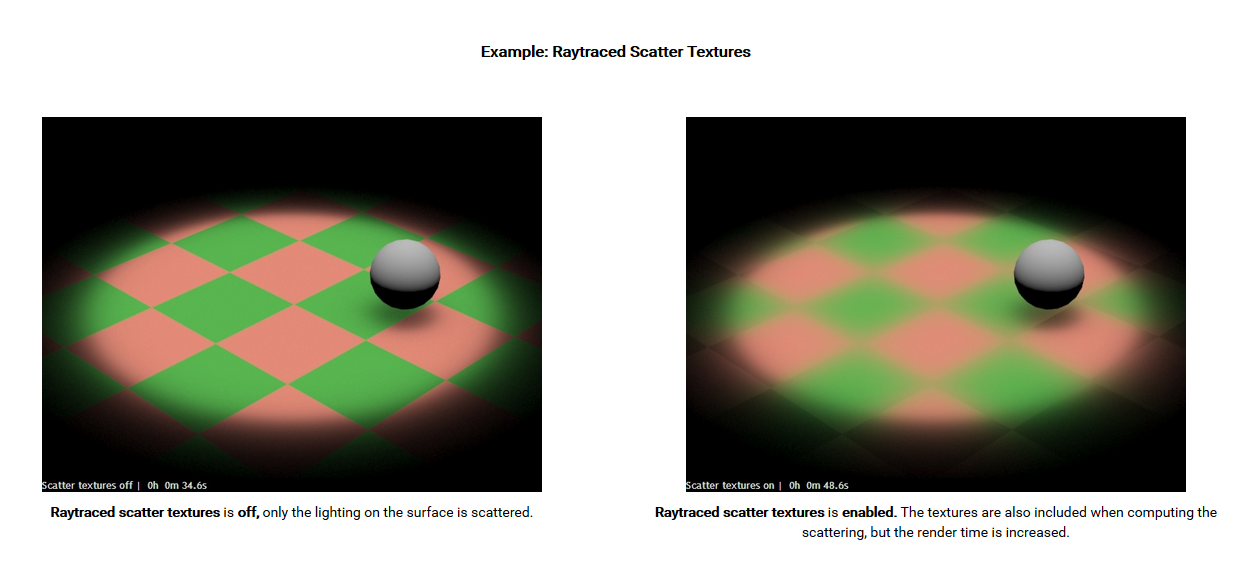
- raytraced_scatter_textures – this option controls whether the textures for the sub-surface scattering layers taken into account when computing the scattering. Turning this option may lead to more accurate results, but adds quite a bit of render time. For more information, see Raytraced Scatter Textures example below.
- raytraced_subdivs – determines the number of samples used to compute multiple sub-surface scattering when the type is set to Raytraced. Larger values decrease the noise, but take longer to compute.
- prepass_rate – this parameter determines the resolution of the prepass used to compute the helper illumination map when the type is set to Prepass-based illumination map. Larger values produce more accurate results, but take longer to compute. For example, a value of -1 means that the prepass will be done at half the image resolution, 0 means that the prepass will be done with the full image resolution etc., and 1 means twice the image resolution etc.
- prepass_id – different BRDFSkinComplex materials with the same value of the Prepass ID parameter share the same illumination map. This is useful if different materials are applied to parts of the same object, but a smooth transition between them is required. A value of 0 means that the particular BRDFSkinComplex material uses its own illumination map.
- prepass_interpolation_accuracy – this parameter controls the quality of the approximation of the multiple scattering effect when the type is Prepass-based illumination map or Object-based illumination map. Larger values produce more accurate results, but are slower to render. Lower values render faster, but too low values may produce blocky artifacts on the surface.
- geom_auto_density – this parameter is used with the Object-based illumination map, and it tells the material to attempt to automatically determine the required density of the illumination samples. Note: currently this option does not work very reliably.
- geom_samples_per_unit_area – when multiple scattering is computed with an Object-based illumination map, this parameter determines the number of illumination samples per unit area of the object. Larger values produce more samples and more dense sampling that captures surface illumination details better, but may slow down the rendering and take more RAM. Lower values render faster, but too low values may not capture the surface illumination accurately leading to artifacts. The Preview samples option can be used to visualize the position of the samples.
- geom_surface_offset – used with Object-based illumination map; this parameter specifies a small distance above the surface of the object where the illumination is actually computed, in order to avoid "surface acne" artifacts.
- geom_preview_samples – this option can be used to visualize the samples in the Object-based illumination map.
- geom_max_distance – used with the Preview samples option and specifies how large the visualized samples will be.
- geom_background_color – used with the Preview samples option to specify the background against which the samples are visualized.
- geom_samples_color – used with the Preview samples option to specify the color of the individual samples.
Options
- option_reflections_trace – this option enables tracing of reflections from the primary and secondary reflection layers. When disabled, only highlights are computed. This can be used to speed up the shader calculations when reflections do not contribute significantly to the shader's appearance.
- option_reflections_maxDepth – specifies the maximum reflection depth for the primary and secondary reflection layers.
- option_reflections_cutoff – allows the user to skip the calculation of very dim reflections the contribution of which is below the cutoff value.
Example
Raytraced Scatter Textures
V-Ray Vrmat Material
The VRmat material allows us to load and use .vrmat materials that were exported from 3dsMax, Maya, Rhino or SketchUp. There is a V-Ray .vrmat converter that can be used to convert materials in different host applications to .vrmat files that can be loaded using the MtlVRmat material.
MtlVRmat is an XML-based file designed for interoperability and flexibility.
Parameters
It's loaded by a plugin called MtlVRmat. It has only 2 properties:
- filename - A .vrmat, .vismat or .vrscene file
- mtlname - Which material tree to use. Top-level <Asset> name or MtlSingleBRDF name if .vrscene
- param_override - (xml only) Override for a specific instance of a parameter. Requires full asset path plus '/paramname'. Valid XML and vrmat syntax for the respective parameter is expected. Multiple overrides can be specified with colons. Example: "/Paint/Diffuse/color=<r>0.8</r><g>0.4</g><b>0.4</b>;/Paint/Diffuse/roughness=0.8"
- param_override_all - (xml only) Override for all instances of a parameter. Requires only plugin type plus '/paramname'. Valid XML and vrmat syntax for the respective parameter is expected. Multiple overrides can be specified with colons. Example: "MtlASGVIS/bump_units=1;BitmapBuffer/color_space=2"