Application SDK
Sun Sky
In this chapter we'll cover a peculiar form of lighting - the sun and sky system in V-Ray. The goal of the plugin is to represent precise physical model of the sunlight. It simulates parallel rays. One can achieve soft shadows by modifying the intensity and the dimension of the rays. The color of the simulation is a...
Last updated 1 September 2026
Introduction
In this chapter we'll cover a peculiar form of lighting - the sun and sky system in V-Ray. The goal of the plugin is to represent precise physical model of the sunlight. It simulates parallel rays. One can achieve soft shadows by modifying the intensity and the dimension of the rays. The color of the simulation is adapted to the physical model of a real sun, depending on the angle on which the rays are falling on the ground.
One can also use Sphere light to simulate sunlight, as this type of light contributes to the IrradianceMap, as opposed to SunLight. Despite, we'll talk only about SunLight in this chapter.
Goal
The ideal goal of a sun-sky system will be to find a function of the form:
- Sun
(view location, date, time, conditions) → spectral radiance (sun direction, conditions) → spectral radiance
- Sky
(view direction, view location, date, time, conditions) → spectral radiance (view direction, sun direction, conditions) → spectral radiance
Sun
The following picture illustrates common terms around the topic of sun:
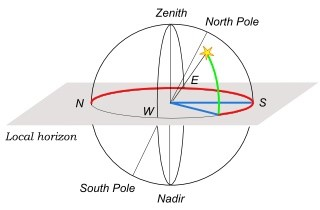
- Green - altitude
- Red - azimuth
We'll talk a little bit about sun's physical properties, because they affect its light spectrum:
- Radius - 695000 km
- Distance to Earth - 149140000 km
- Total Solar Irradiance upon Earth - 1366 (1413 – 1321) W/m2
- Solid Angle - 6x10⁻⁵ steradians
Here's a picture of the Solar Spectrum. The blue line represents the light coming to the Earth, the orange is what is left from it after passing through the atmosphere:

Atmospheric Phenomena
Scattering
Light may scatter several times on the way to the viewer, although primary scattering typically dominates. Scattering is related to the particle size. Without the scattering in the atmosphere the sky would be black, as on the Moon.

Scattering
- Reyleigh scattering
For particles (atoms and molecules) much smaller than the wavelength of the light (< 0.1λ). Basically the scattering is proportinal to λ−4

Scattering
- Mie scattering
- For particles bigger than molecules, but smaller than fog (haze, haze aerosol)
- Scattering is more uniform with the wave length and causes whitening of the sky.
- Sources - volcanic eruptions, forest fires, cosmic bombardment, oceans.
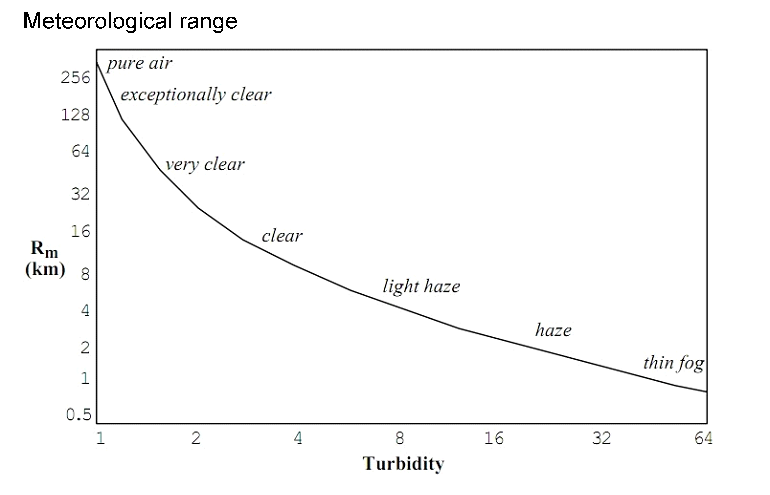
- Parametrization - turbidity. In the following formula tm is the turbidity from the molecules, th is from the humidity.

- Spectral Absorbtion
Different gases in the atmosphere have different frequencies of absorption. Here we see the different elements - oxygen, ozone, vapor, carbon dioxide.

Sky models
- Use measured sky data directly - International Daylight Measurement Program; has no spectral data
- Full simulation - One has to work with arbitrarily complex atmospheric conditions and the simulation is very slow
- Analytic model - Faster to calculate and controlled via a small number of parameters
Model Types
Hosek et al – When selected, the Sky procedural texture is generated based on the Hosek et al. method and uses a different ground and sky gradient.
Preetham et al. – When selected, the Sky procedural texture is generated based on the Preetham et al. method.
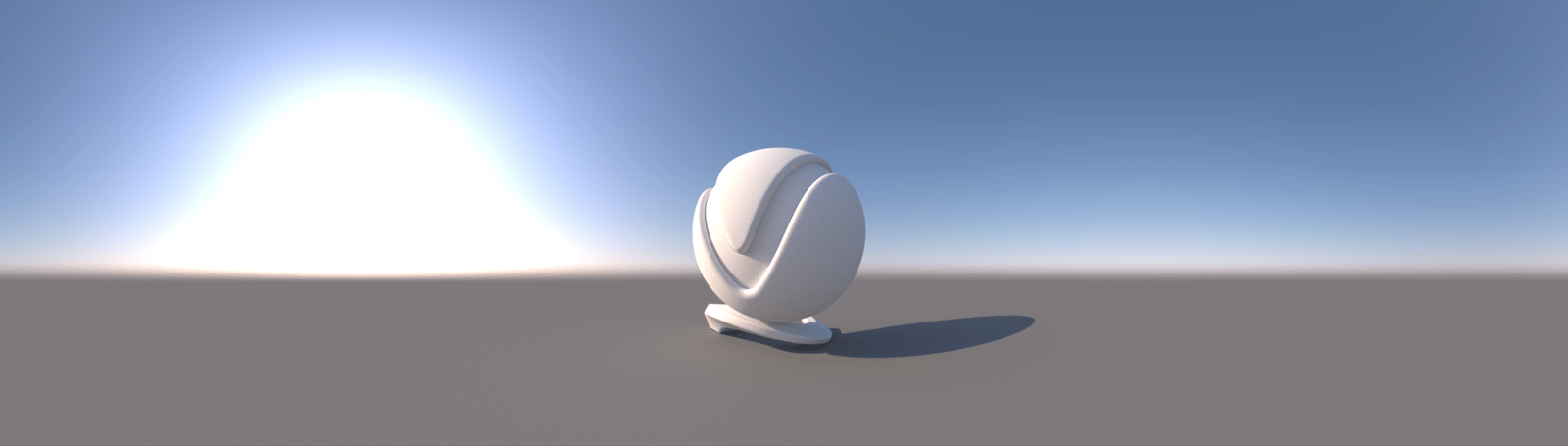
CIE Clear – When selected, the Sky procedural texture is generated based on the CIE method for clear sky.
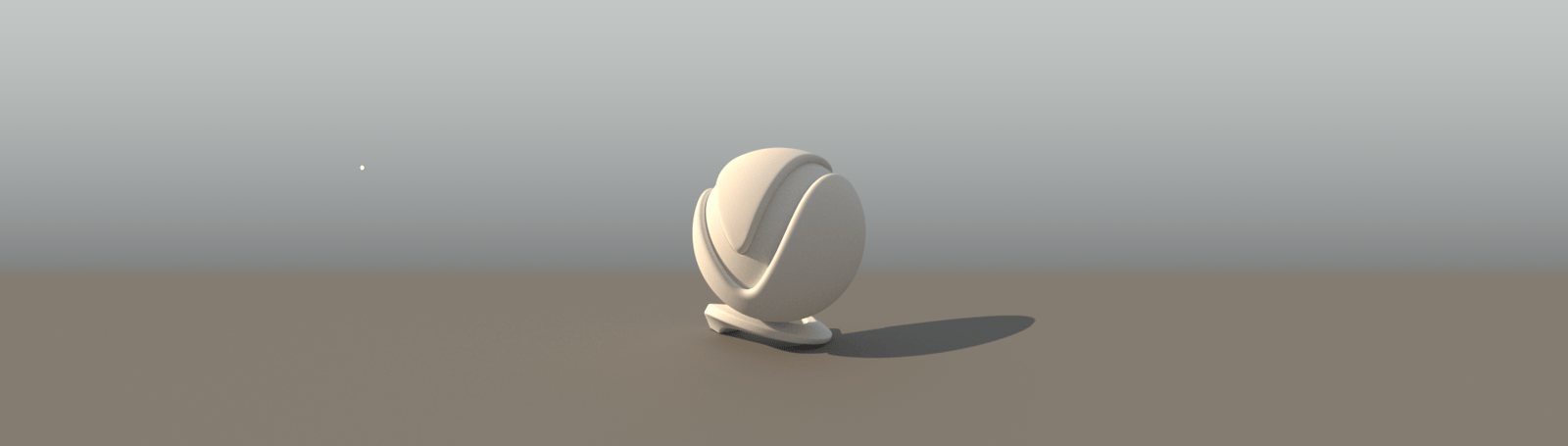
CIE Overcast – When selected, the Sky procedural texture is generated based on the CIE method for cloudy sky.
PRG Clear Sky – The Sky procedural texture is generated based on the PRG Clear Sky method, which has enhanced sunrise and sunset sky.
Example: Sky Models
The examples below show the different sky model types, in these examples default values for the Sky have been used.

Hosek et al.

Preetham et al.
CIE Clear
CIE Overcast

PRG Clear Sky
Luminance
Here's illustration of the Perez et al. Parameter model for luminance:

- v - input view direction
- Θ and Θs - the azimuth angles
- γ - angle between the view and the sun directions With these input parameters our goal is to find the spectrum in a given point.
The model takes into account the following parameters: * Darkening or brightening of the horizont * Luminance gradient near the horizont * Relative intensity of the circumsolar region * Width of the circumsolar region * Relative backscattering light
Chromacity
There are also models for calculating the color of the sun light, which we won't cover in detail
Transmissivity
Final step of the simulation is to determine the amount of direct extraterrestrial light transmitted to the earth surface, taking into account:
- Reyleigh scattering
- Aerosol scattering (turbidity)
- Ozone absorbtion
- Mixed gases absorbtion
- Water vapor absorbtion
Aerial perspective model
In V-Ray we also take atmospheric perspective effects into account, but we won't cover them here.
Code Example
Python
<code data-v-c2b1f83f=""><span data-v-c2b1f83f="" class="line"># Compatibility with Python 2.7.</span><span data-v-c2b1f83f="" class="line">from __future__ import print_function</span><span data-v-c2b1f83f="" class="line"></span><span data-v-c2b1f83f="" class="line"># The directory containing the vray shared object should be present in the PYTHONPATH environment variable.</span><span data-v-c2b1f83f="" class="line"># Try to import the vray module from VRAY_SDK/python, if it is not in PYTHONPATH</span><span data-v-c2b1f83f="" class="line">import sys, os</span><span data-v-c2b1f83f="" class="line">VRAY_SDK = os.environ.get('VRAY_SDK')</span><span data-v-c2b1f83f="" class="line">if VRAY_SDK:</span><span data-v-c2b1f83f="" class="line"> sys.path.append(os.path.join(VRAY_SDK, 'python'))</span><span data-v-c2b1f83f="" class="line">import vray</span><span data-v-c2b1f83f="" class="line"></span><span data-v-c2b1f83f="" class="line">SCENE_PATH = os.path.join(os.environ.get('VRAY_SDK'), 'scenes')</span><span data-v-c2b1f83f="" class="line"># Change process working directory to SCENE_PATH in order to be able to load relative scene resources.</span><span data-v-c2b1f83f="" class="line">os.chdir(SCENE_PATH)</span><span data-v-c2b1f83f="" class="line"></span><span data-v-c2b1f83f="" class="line"># Create an instance of VRayRenderer with default options.</span><span data-v-c2b1f83f="" class="line"># The renderer is automatically closed after the `with` block.</span><span data-v-c2b1f83f="" class="line">with vray.VRayRenderer() as renderer:</span><span data-v-c2b1f83f="" class="line"> # Register a simple log callback. Always useful for debugging.</span><span data-v-c2b1f83f="" class="line"> def dumpMsg(renderer, message, level, instant):</span><span data-v-c2b1f83f="" class="line"> if level == vray.LOGLEVEL_ERROR:</span><span data-v-c2b1f83f="" class="line"> print("[ERROR]", message)</span><span data-v-c2b1f83f="" class="line"> elif level == vray.LOGLEVEL_WARNING:</span><span data-v-c2b1f83f="" class="line"> print("[Warning]", message)</span><span data-v-c2b1f83f="" class="line"> elif level == vray.LOGLEVEL_INFO:</span><span data-v-c2b1f83f="" class="line"> print("[info]", message)</span><span data-v-c2b1f83f="" class="line"> # Uncomment for testing, but you might want to ignore these in real code</span><span data-v-c2b1f83f="" class="line"> #else: print("[debug]", message)</span><span data-v-c2b1f83f="" class="line"> renderer.setOnLogMessage(dumpMsg)</span><span data-v-c2b1f83f="" class="line"> # Load scene from a file.</span><span data-v-c2b1f83f="" class="line"> renderer.load(os.path.join(SCENE_PATH, 'lighting.vrscene'))</span><span data-v-c2b1f83f="" class="line"> # Remove original light source from the scene.</span><span data-v-c2b1f83f="" class="line"> del renderer.plugins["VRayLightDomeShape1"]</span><span data-v-c2b1f83f="" class="line"> # Add a physical camera and allowed it to affect exposure.</span><span data-v-c2b1f83f="" class="line"> # Otherwise the Sun produces overbright values if not using a physical</span><span data-v-c2b1f83f="" class="line"> # setup and without changing its intensity.</span><span data-v-c2b1f83f="" class="line"> camera = renderer.classes.CameraPhysical.getInstanceOrCreate()</span><span data-v-c2b1f83f="" class="line"> camera.exposure = 1</span><span data-v-c2b1f83f="" class="line"> # The V-Ray Sun light together with the Sky texture plugin provides a</span><span data-v-c2b1f83f="" class="line"> # realistic outdoor illumination system that can be tuned to a specific</span><span data-v-c2b1f83f="" class="line"> # time of day and athmospheric contents (without clouds). The Sun is</span><span data-v-c2b1f83f="" class="line"> # represented as a light source at "infinity" similar to a directional</span><span data-v-c2b1f83f="" class="line"> # light, but with a real radius causing soft shadows.</span><span data-v-c2b1f83f="" class="line"> sun = renderer.classes.SunLight()</span><span data-v-c2b1f83f="" class="line"> # Specify the sun rotation.</span><span data-v-c2b1f83f="" class="line"> # The rotation matrix defines the direction vector of the light. Even</span><span data-v-c2b1f83f="" class="line"> # though it should be an omni light very far away, it's set as a directional light.</span><span data-v-c2b1f83f="" class="line"> # Note: The translation vector does NOT affect position as the Sun light</span><span data-v-c2b1f83f="" class="line"> # source is positioned at "infinity". It is only used by some 3D</span><span data-v-c2b1f83f="" class="line"> # applications to represent the Sun within the scene with an OpenGL gizmo.</span><span data-v-c2b1f83f="" class="line"> sun.transform = vray.Transform(</span><span data-v-c2b1f83f="" class="line"> vray.Matrix(</span><span data-v-c2b1f83f="" class="line"> vray.Vector(0.9563327, 0, 0.2922803),</span><span data-v-c2b1f83f="" class="line"> vray.Vector(0.2010161, 0.7259465, -0.6577188),</span><span data-v-c2b1f83f="" class="line"> vray.Vector(-0.2121799, 0.6877511, 0.6942464)),</span><span data-v-c2b1f83f="" class="line"> vray.Vector(-94.70224040070444, 306.9639183671097, 309.8629632135933))</span><span data-v-c2b1f83f="" class="line"> # Initialize the target position.</span><span data-v-c2b1f83f="" class="line"> # It is used only for caustic effects. Only the translation vector matters.</span><span data-v-c2b1f83f="" class="line"> sun.target_transform = vray.Transform(</span><span data-v-c2b1f83f="" class="line"> vray.Matrix(</span><span data-v-c2b1f83f="" class="line"> vray.Vector(1, 0, 0),</span><span data-v-c2b1f83f="" class="line"> vray.Vector(0, 1, 0),</span><span data-v-c2b1f83f="" class="line"> vray.Vector(0, 0, 1)),</span><span data-v-c2b1f83f="" class="line"> vray.Vector(0, 0, 0))</span><span data-v-c2b1f83f="" class="line"> # Specify the amount of dust in the air.</span><span data-v-c2b1f83f="" class="line"> # This property affects the color of the sun and the sky. Smaller values</span><span data-v-c2b1f83f="" class="line"> # produce a clear and blue sky and sun as you get in the country, while</span><span data-v-c2b1f83f="" class="line"> # larger values make them yellow and orange as, for example, in a big city.</span><span data-v-c2b1f83f="" class="line"> sun.turbidity = 2.5</span><span data-v-c2b1f83f="" class="line"> # Specify the reflective property of the "ground".</span><span data-v-c2b1f83f="" class="line"> # This property affects sky-dome brightness and color.</span><span data-v-c2b1f83f="" class="line"> sun.ground_albedo = vray.Color(0.5, 0.5, 0.5)</span><span data-v-c2b1f83f="" class="line"> # Specify the rotation of the sky texture based on a up vector.</span><span data-v-c2b1f83f="" class="line"> sun.up_vector = vray.Vector(0, 1, 0)</span><span data-v-c2b1f83f="" class="line"> # Specify the procedural model that will be used to generate the V-Ray Sky texture.</span><span data-v-c2b1f83f="" class="line"> # Possible values are:</span><span data-v-c2b1f83f="" class="line"> # 0 (Preethem)</span><span data-v-c2b1f83f="" class="line"> # 1 (CIE Clear)</span><span data-v-c2b1f83f="" class="line"> # 2 (CIE Overcast)</span><span data-v-c2b1f83f="" class="line"> # 3 (Hosek)</span><span data-v-c2b1f83f="" class="line"> sun.sky_model = 3</span><span data-v-c2b1f83f="" class="line"> # Specify shadow offset from the surface. Helps to prevent polygonal shadow artifacts on low-poly surfaces.</span><span data-v-c2b1f83f="" class="line"> sun.shadowBias = 0.02</span><span data-v-c2b1f83f="" class="line"> # Specify a color texture for shadows. Overrides the 'shadowColor' parameter.</span><span data-v-c2b1f83f="" class="line"> sun.shadow_color_tex = vray.AColor(0, 0, 0, 1)</span><span data-v-c2b1f83f="" class="line"> # The Sky texture emits blue (or warm around dusk and dawn) light from all</span><span data-v-c2b1f83f="" class="line"> # directions and it is used as an environment texture.</span><span data-v-c2b1f83f="" class="line"> texture = renderer.classes.TexSky()</span><span data-v-c2b1f83f="" class="line"> # The Sky texture takes its parameters from a SunLight through this connection.</span><span data-v-c2b1f83f="" class="line"> # If you don't want a Sun you can set the same parameters on this plugin.</span><span data-v-c2b1f83f="" class="line"> texture.sun = sun</span><span data-v-c2b1f83f="" class="line"> # Environment plugin with the V-Ray Sky texture used as an input.</span><span data-v-c2b1f83f="" class="line"> # It is recommended to use the 'getInstanceOrCreate' method when a settings</span><span data-v-c2b1f83f="" class="line"> # plugin is needed because there should be at most one instance of its type in the scene.</span><span data-v-c2b1f83f="" class="line"> environment = renderer.classes.SettingsEnvironment.getInstanceOrCreate()</span><span data-v-c2b1f83f="" class="line"> environment.bg_tex = texture</span><span data-v-c2b1f83f="" class="line"> environment.gi_tex = texture</span><span data-v-c2b1f83f="" class="line"> environment.reflect_tex = texture</span><span data-v-c2b1f83f="" class="line"> environment.refract_tex = texture</span><span data-v-c2b1f83f="" class="line"> # Start rendering.</span><span data-v-c2b1f83f="" class="line"> renderer.startSync()</span><span data-v-c2b1f83f="" class="line"> # Wait for rendering to end.</span><span data-v-c2b1f83f="" class="line"> renderer.waitForRenderEnd()</span></code>
C++
<code data-v-c2b1f83f=""><span data-v-c2b1f83f="" class="line">#define VRAY_RUNTIME_LOAD_PRIMARY</span><span data-v-c2b1f83f="" class="line"></span><span data-v-c2b1f83f="" class="line">#include "vraysdk.hpp"</span><span data-v-c2b1f83f="" class="line">#include "vrayplugins.hpp"</span><span data-v-c2b1f83f="" class="line">#include "utils.h"</span><span data-v-c2b1f83f="" class="line"></span><span data-v-c2b1f83f="" class="line">using namespace VRay;</span><span data-v-c2b1f83f="" class="line">using namespace VRay::Plugins;</span><span data-v-c2b1f83f="" class="line">using namespace std;</span><span data-v-c2b1f83f="" class="line"></span><span data-v-c2b1f83f="" class="line">const char *BASE_PATH = getenv("VRAY_SDK");</span><span data-v-c2b1f83f="" class="line">string SCENE_PATH = (BASE_PATH ? string(BASE_PATH) : string(".")) + PATH_DELIMITER + "scenes";</span><span data-v-c2b1f83f="" class="line"></span><span data-v-c2b1f83f="" class="line">int main() {</span><span data-v-c2b1f83f="" class="line"> // Change process working directory to SCENE_PATH in order to be able to load relative scene resources.</span><span data-v-c2b1f83f="" class="line"> changeCurrentDir(SCENE_PATH.c_str());</span><span data-v-c2b1f83f="" class="line"> // Load V-Ray SDK library.</span><span data-v-c2b1f83f="" class="line"> VRayInit init(NULL, true);</span><span data-v-c2b1f83f="" class="line"> // Create an instance of VRayRenderer with default options.</span><span data-v-c2b1f83f="" class="line"> // The renderer is automatically closed at the end of the current scope.</span><span data-v-c2b1f83f="" class="line"> VRayRenderer renderer;</span><span data-v-c2b1f83f="" class="line"> // It's recommended to always have a console log</span><span data-v-c2b1f83f="" class="line"> renderer.setOnLogMessage(logMessage);</span><span data-v-c2b1f83f="" class="line"> // Load scene from a file.</span><span data-v-c2b1f83f="" class="line"> renderer.load("lighting.vrscene");</span><span data-v-c2b1f83f="" class="line"> // Remove original light source from the scene.</span><span data-v-c2b1f83f="" class="line"> renderer.deletePlugin("VRayLightDomeShape1");</span><span data-v-c2b1f83f="" class="line"> // Add a physical camera and allowed it to affect exposure.</span><span data-v-c2b1f83f="" class="line"> // Otherwise the Sun produces overbright values if not using a physical</span><span data-v-c2b1f83f="" class="line"> // setup and without changing its intensity.</span><span data-v-c2b1f83f="" class="line"> CameraPhysical camera = renderer.getInstanceOrCreate<CameraPhysical>();</span><span data-v-c2b1f83f="" class="line"> camera.set_exposure(1);</span><span data-v-c2b1f83f="" class="line"> // The V-Ray Sun light together with the Sky texture plugin provides a</span><span data-v-c2b1f83f="" class="line"> // realistic outdoor illumination system that can be tuned to a specific</span><span data-v-c2b1f83f="" class="line"> // time of day and athmospheric contents (without clouds). The Sun is</span><span data-v-c2b1f83f="" class="line"> // represented as a light source at "infinity" similar to a directional</span><span data-v-c2b1f83f="" class="line"> // light, but with a real radius causing soft shadows.</span><span data-v-c2b1f83f="" class="line"> SunLight sun = renderer.newPlugin<SunLight>();</span><span data-v-c2b1f83f="" class="line"> // Specify the light rotation.</span><span data-v-c2b1f83f="" class="line"> // The rotation matrix defines the direction vector of the light. Even</span><span data-v-c2b1f83f="" class="line"> // though it should be an omni light very far away, it's set as a directional light.</span><span data-v-c2b1f83f="" class="line"> // Note: The translation vector does NOT affect position as the Sun light</span><span data-v-c2b1f83f="" class="line"> // source is positioned at "infinity". It is only used by some 3D</span><span data-v-c2b1f83f="" class="line"> // applications to represent the Sun within the scene with an OpenGL gizmo.</span><span data-v-c2b1f83f="" class="line"> sun.set_transform(Transform(</span><span data-v-c2b1f83f="" class="line"> Matrix(</span><span data-v-c2b1f83f="" class="line"> Vector(0.9563327, 0.0, 0.2922803),</span><span data-v-c2b1f83f="" class="line"> Vector(0.2010161, 0.7259465, -0.6577188),</span><span data-v-c2b1f83f="" class="line"> Vector(-0.2121799, 0.6877511, 0.6942464)),</span><span data-v-c2b1f83f="" class="line"> Vector(-94.70224040070444, 306.9639183671097, 309.8629632135933)));</span><span data-v-c2b1f83f="" class="line"> // Initialize the target position.</span><span data-v-c2b1f83f="" class="line"> // It is used only for caustic effects.Only the translation vector matters.</span><span data-v-c2b1f83f="" class="line"> sun.set_target_transform(Transform(</span><span data-v-c2b1f83f="" class="line"> Matrix(</span><span data-v-c2b1f83f="" class="line"> Vector(1.0, 0.0, 0.0),</span><span data-v-c2b1f83f="" class="line"> Vector(0.0, 1.0, 0.0),</span><span data-v-c2b1f83f="" class="line"> Vector(0.0, 0.0, 1.0)),</span><span data-v-c2b1f83f="" class="line"> Vector(0.0, 0.0, 0.0)));</span><span data-v-c2b1f83f="" class="line"> // Specify the amount of dust in the air.</span><span data-v-c2b1f83f="" class="line"> // This property affects the color of the sun and the sky. Smaller values</span><span data-v-c2b1f83f="" class="line"> // produce a clear and blue sky and sun as you get in the country, while</span><span data-v-c2b1f83f="" class="line"> // larger values make them yellow and orange as, for example, in a big city.</span><span data-v-c2b1f83f="" class="line"> sun.set_turbidity(2.5);</span><span data-v-c2b1f83f="" class="line"> // Specify the reflective property of the "ground".</span><span data-v-c2b1f83f="" class="line"> // This property affects sky-dome brightness and color.</span><span data-v-c2b1f83f="" class="line"> sun.set_ground_albedo(Color(0.5, 0.5, 0.5));</span><span data-v-c2b1f83f="" class="line"> // Specify the rotation of the sky texture based on a up vector.</span><span data-v-c2b1f83f="" class="line"> sun.set_up_vector(Vector(0.0, 1.0, 0.0));</span><span data-v-c2b1f83f="" class="line"> // Specify the procedural model that will be used to generate the V-Ray Sky texture.</span><span data-v-c2b1f83f="" class="line"> // Possible values are:</span><span data-v-c2b1f83f="" class="line"> // 0 (Preethem) - default</span><span data-v-c2b1f83f="" class="line"> // 1 (CIE Clear)</span><span data-v-c2b1f83f="" class="line"> // 2 (CIE Overcast)</span><span data-v-c2b1f83f="" class="line"> // 3 (Hosek)</span><span data-v-c2b1f83f="" class="line"> sun.set_sky_model(3);</span><span data-v-c2b1f83f="" class="line"> // Specify shadow offset from the surface. Helps to prevent polygonal shadow artifacts on low-poly surfaces.</span><span data-v-c2b1f83f="" class="line"> sun.set_shadowBias(0.02f);</span><span data-v-c2b1f83f="" class="line"> // Specify a color texture for shadows. Overrides the 'shadowColor' parameter.</span><span data-v-c2b1f83f="" class="line"> sun.set_shadow_color_tex(AColor(0.0, 0.0, 0.0, 1.0));</span><span data-v-c2b1f83f="" class="line"> // The Sky texture emits blue(or warm around dusk and dawn) light from all</span><span data-v-c2b1f83f="" class="line"> // directions and it is used as an environment texture.</span><span data-v-c2b1f83f="" class="line"> TexSky texture = renderer.newPlugin<TexSky>();</span><span data-v-c2b1f83f="" class="line"> // The Sky texture takes its parameters from a SunLight through this connection.</span><span data-v-c2b1f83f="" class="line"> // If you don't want a Sun you can set the same parameters on this plugin.</span><span data-v-c2b1f83f="" class="line"> texture.set_sun(sun);</span><span data-v-c2b1f83f="" class="line"> // Environment plugin with the V-Ray Sky texture used as an input.</span><span data-v-c2b1f83f="" class="line"> // It is recommended to use the 'getInstanceOrCreate' method when a settings</span><span data-v-c2b1f83f="" class="line"> // plugin is needed because there should be at most one instance of its type in the scene.</span><span data-v-c2b1f83f="" class="line"> SettingsEnvironment environment = renderer.getInstanceOrCreate<SettingsEnvironment>();</span><span data-v-c2b1f83f="" class="line"> environment.set_bg_tex(texture);</span><span data-v-c2b1f83f="" class="line"> environment.set_gi_tex(texture);</span><span data-v-c2b1f83f="" class="line"> environment.set_reflect_tex(texture);</span><span data-v-c2b1f83f="" class="line"> environment.set_refract_tex(texture);</span><span data-v-c2b1f83f="" class="line"> // Start rendering.</span><span data-v-c2b1f83f="" class="line"> renderer.startSync();</span><span data-v-c2b1f83f="" class="line"> // Wait for rendering to end.</span><span data-v-c2b1f83f="" class="line"> renderer.waitForRenderEnd();</span><span data-v-c2b1f83f="" class="line"> return 0;</span><span data-v-c2b1f83f="" class="line">}</span></code>
C#
<code data-v-c2b1f83f=""><span data-v-c2b1f83f="" class="line">using System;</span><span data-v-c2b1f83f="" class="line">using System.IO;</span><span data-v-c2b1f83f="" class="line">using VRay;</span><span data-v-c2b1f83f="" class="line">using VRay.Plugins;</span><span data-v-c2b1f83f="" class="line"></span><span data-v-c2b1f83f="" class="line">namespace _11_sun</span><span data-v-c2b1f83f="" class="line">{</span><span data-v-c2b1f83f="" class="line"> class Program</span><span data-v-c2b1f83f="" class="line"> {</span><span data-v-c2b1f83f="" class="line"> static void Main(string[] args)</span><span data-v-c2b1f83f="" class="line"> {</span><span data-v-c2b1f83f="" class="line"> string SCENE_PATH = Path.Combine(Environment.GetEnvironmentVariable("VRAY_SDK"), "scenes");</span><span data-v-c2b1f83f="" class="line"> // Change process working directory to SCENE_PATH in order to be able to load relative scene resources.</span><span data-v-c2b1f83f="" class="line"> Directory.SetCurrentDirectory(SCENE_PATH);</span><span data-v-c2b1f83f="" class="line"></span><span data-v-c2b1f83f="" class="line"> // Create an instance of VRayRenderer with default options. The renderer is automatically closed after the `using` block.</span><span data-v-c2b1f83f="" class="line"> using (VRayRenderer renderer = new VRayRenderer())</span><span data-v-c2b1f83f="" class="line"> {</span><span data-v-c2b1f83f="" class="line"> // Add a listener for any type of log message.</span><span data-v-c2b1f83f="" class="line"> renderer.LogMessage += new EventHandler<MessageEventArgs>((source, e) =></span><span data-v-c2b1f83f="" class="line"> {</span><span data-v-c2b1f83f="" class="line"> // You can remove the if for testing, but you might want to ignore Debug in real code</span><span data-v-c2b1f83f="" class="line"> if (e.LogLevel != LogLevelType.Debug)</span><span data-v-c2b1f83f="" class="line"> {</span><span data-v-c2b1f83f="" class="line"> Console.WriteLine(String.Format("[{0}] {1}", e.LogLevel.ToString(), e.Message));</span><span data-v-c2b1f83f="" class="line"> }</span><span data-v-c2b1f83f="" class="line"> });</span><span data-v-c2b1f83f="" class="line"> // Load scene from a file.</span><span data-v-c2b1f83f="" class="line"> renderer.Load("lighting.vrscene");</span><span data-v-c2b1f83f="" class="line"> // Remove original light source from the scene.</span><span data-v-c2b1f83f="" class="line"> renderer.DeletePlugin("VRayLightDomeShape1");</span><span data-v-c2b1f83f="" class="line"> // Add a physical camera and allowed it to affect exposure.</span><span data-v-c2b1f83f="" class="line"> // Otherwise the Sun produces overbright values if not using a physical</span><span data-v-c2b1f83f="" class="line"> // setup and without changing its intensity.</span><span data-v-c2b1f83f="" class="line"> CameraPhysical camera = renderer.GetInstanceOrCreate<CameraPhysical>();</span><span data-v-c2b1f83f="" class="line"> camera.Exposure = 1;</span><span data-v-c2b1f83f="" class="line"> // The V-Ray Sun light together with the Sky texture plugin provides a</span><span data-v-c2b1f83f="" class="line"> // realistic outdoor illumination system that can be tuned to a specific</span><span data-v-c2b1f83f="" class="line"> // time of day and athmospheric contents (without clouds). The Sun is</span><span data-v-c2b1f83f="" class="line"> // represented as a light source at "infinity" similar to a directional</span><span data-v-c2b1f83f="" class="line"> // light, but with a real radius causing soft shadows.</span><span data-v-c2b1f83f="" class="line"> SunLight sun = renderer.NewPlugin<SunLight>();</span><span data-v-c2b1f83f="" class="line"> // Specify the sun rotation.</span><span data-v-c2b1f83f="" class="line"> // The rotation matrix defines the direction vector of the light. Even</span><span data-v-c2b1f83f="" class="line"> // though it should be an omni light very far away, it's set as a directional light.</span><span data-v-c2b1f83f="" class="line"> // Note: The translation vector does NOT affect position as the Sun light</span><span data-v-c2b1f83f="" class="line"> // source is positioned at "infinity". It is only used by some 3D</span><span data-v-c2b1f83f="" class="line"> // applications to represent the Sun within the scene with an OpenGL gizmo.</span><span data-v-c2b1f83f="" class="line"> sun.Transform = new Transform(</span><span data-v-c2b1f83f="" class="line"> new Matrix(</span><span data-v-c2b1f83f="" class="line"> new Vector(0.9563327, 0, 0.2922803),</span><span data-v-c2b1f83f="" class="line"> new Vector(0.2010161, 0.7259465, -0.6577188),</span><span data-v-c2b1f83f="" class="line"> new Vector(-0.2121799, 0.6877511, 0.6942464)),</span><span data-v-c2b1f83f="" class="line"> new Vector(-94.70224040070444, 306.9639183671097, 309.8629632135933));</span><span data-v-c2b1f83f="" class="line"> // Initialize the target position.</span><span data-v-c2b1f83f="" class="line"> // It is used only for caustic effects. Only the translation vector matters.</span><span data-v-c2b1f83f="" class="line"> sun.TargetTransform = new Transform(</span><span data-v-c2b1f83f="" class="line"> new Matrix(</span><span data-v-c2b1f83f="" class="line"> new Vector(1, 0, 0),</span><span data-v-c2b1f83f="" class="line"> new Vector(0, 1, 0),</span><span data-v-c2b1f83f="" class="line"> new Vector(0, 0, 1)),</span><span data-v-c2b1f83f="" class="line"> new Vector(0, 0, 0));</span><span data-v-c2b1f83f="" class="line"> // Specify the amount of dust in the air.</span><span data-v-c2b1f83f="" class="line"> // This property affects the color of the sun and the sky. Smaller values</span><span data-v-c2b1f83f="" class="line"> // produce a clear and blue sky and sun as you get in the country, while</span><span data-v-c2b1f83f="" class="line"> // larger values make them yellow and orange as, for example, in a big city.</span><span data-v-c2b1f83f="" class="line"> sun.Turbidity = 2.5F;</span><span data-v-c2b1f83f="" class="line"> // Specify the reflective property of the "ground".</span><span data-v-c2b1f83f="" class="line"> // This property affects sky-dome brightness and color.</span><span data-v-c2b1f83f="" class="line"> sun.GroundAlbedo = new Color(0.5, 0.5, 0.5);</span><span data-v-c2b1f83f="" class="line"> // Specify the rotation of the sky texture based on a up vector.</span><span data-v-c2b1f83f="" class="line"> sun.UpVector = new Vector(0, 1, 0);</span><span data-v-c2b1f83f="" class="line"> // Specify the procedural model that will be used to generate the V-Ray Sky texture.</span><span data-v-c2b1f83f="" class="line"> // Possible values are:</span><span data-v-c2b1f83f="" class="line"> // 0 (Preethem)</span><span data-v-c2b1f83f="" class="line"> // 1 (CIE Clear)</span><span data-v-c2b1f83f="" class="line"> // 2 (CIE Overcast)</span><span data-v-c2b1f83f="" class="line"> // 3 (Hosek)</span><span data-v-c2b1f83f="" class="line"> sun.SkyModel = 3;</span><span data-v-c2b1f83f="" class="line"> // Specify shadow offset from the surface. Helps to prevent polygonal shadow artifacts on low-poly surfaces.</span><span data-v-c2b1f83f="" class="line"> sun.ShadowBias = 0.02F;</span><span data-v-c2b1f83f="" class="line"> // Specify a color texture for shadows. Overrides the 'shadowColor' parameter.</span><span data-v-c2b1f83f="" class="line"> sun.ShadowColorTex = new AColor(0, 0, 0, 1);</span><span data-v-c2b1f83f="" class="line"> // The Sky texture emits blue (or warm around dusk and dawn) light from all</span><span data-v-c2b1f83f="" class="line"> // directions and it is used as an environment texture.</span><span data-v-c2b1f83f="" class="line"> TexSky texture = renderer.NewPlugin<TexSky>();</span><span data-v-c2b1f83f="" class="line"> // The Sky texture takes its parameters from a SunLight through this connection.</span><span data-v-c2b1f83f="" class="line"> // If you don't want a Sun you can set the same parameters on this plugin.</span><span data-v-c2b1f83f="" class="line"> texture.Sun = sun;</span><span data-v-c2b1f83f="" class="line"> // Environment plugin with the V-Ray Sky texture used as an input.</span><span data-v-c2b1f83f="" class="line"> // It is recommended to use the 'GetInstanceOrCreate' method when a settings</span><span data-v-c2b1f83f="" class="line"> // plugin is needed because there should be at most one instance of its type in the scene.</span><span data-v-c2b1f83f="" class="line"> SettingsEnvironment environment = renderer.GetInstanceOrCreate<SettingsEnvironment>();</span><span data-v-c2b1f83f="" class="line"> environment.BgTex = texture;</span><span data-v-c2b1f83f="" class="line"> environment.GiTex = texture;</span><span data-v-c2b1f83f="" class="line"> environment.ReflectTex = texture;</span><span data-v-c2b1f83f="" class="line"> environment.RefractTex = texture;</span><span data-v-c2b1f83f="" class="line"> // Start rendering.</span><span data-v-c2b1f83f="" class="line"> renderer.StartSync();</span><span data-v-c2b1f83f="" class="line"> // Wait for rendering to end.</span><span data-v-c2b1f83f="" class="line"> renderer.WaitForRenderEnd();</span><span data-v-c2b1f83f="" class="line"> }</span><span data-v-c2b1f83f="" class="line"> }</span><span data-v-c2b1f83f="" class="line"> }</span><span data-v-c2b1f83f="" class="line">}</span></code>
Node.js
<code data-v-c2b1f83f=""><span data-v-c2b1f83f="" class="line">var path = require('path');</span><span data-v-c2b1f83f="" class="line">var vray = require(path.join(process.env.VRAY_SDK, 'node', 'vray'));</span><span data-v-c2b1f83f="" class="line"></span><span data-v-c2b1f83f="" class="line">var SCENE_PATH = path.join(process.env.VRAY_SDK, 'scenes');</span><span data-v-c2b1f83f="" class="line">// Change process working directory to SCENE_PATH in order to be able to load relative scene resources.</span><span data-v-c2b1f83f="" class="line">process.chdir(SCENE_PATH);</span><span data-v-c2b1f83f="" class="line"></span><span data-v-c2b1f83f="" class="line">// Create an instance of VRayRenderer with default options.</span><span data-v-c2b1f83f="" class="line">var renderer = vray.VRayRenderer();</span><span data-v-c2b1f83f="" class="line">// It's recommended to always have a console log callback</span><span data-v-c2b1f83f="" class="line">renderer.on("logMessage", function(message, level, instant) {</span><span data-v-c2b1f83f="" class="line"> if (level == vray.LOGLEVEL_ERROR)</span><span data-v-c2b1f83f="" class="line"> console.log("[ERROR] ", message);</span><span data-v-c2b1f83f="" class="line"> else if (level == vray.LOGLEVEL_WARNING)</span><span data-v-c2b1f83f="" class="line"> console.log("[Warning] ", message);</span><span data-v-c2b1f83f="" class="line"> else if (level == vray.LOGLEVEL_INFO)</span><span data-v-c2b1f83f="" class="line"> console.log("[info] ", message);</span><span data-v-c2b1f83f="" class="line"> // Uncomment for testing, but you might want to ignore these in real code</span><span data-v-c2b1f83f="" class="line"> //else console.log("[debug] ", message);</span><span data-v-c2b1f83f="" class="line">});</span><span data-v-c2b1f83f="" class="line">// Load scene from a file asynchronously.</span><span data-v-c2b1f83f="" class="line">renderer.load("lighting.vrscene", function(err) {</span><span data-v-c2b1f83f="" class="line"> if (err) throw err;</span><span data-v-c2b1f83f="" class="line"> // Remove original light source from the scene.</span><span data-v-c2b1f83f="" class="line"> delete renderer.plugins["VRayLightDomeShape1"];</span><span data-v-c2b1f83f="" class="line"> // Add a physical camera and allowed it to affect exposure.</span><span data-v-c2b1f83f="" class="line"> // Otherwise the Sun produces overbright values if not using a physical</span><span data-v-c2b1f83f="" class="line"> // setup and without changing its intensity.</span><span data-v-c2b1f83f="" class="line"> var camera = renderer.classes.CameraPhysical.getInstanceOrCreate();</span><span data-v-c2b1f83f="" class="line"> camera.exposure = 1;</span><span data-v-c2b1f83f="" class="line"> // The V-Ray Sun light together with the Sky texture plugin provides a</span><span data-v-c2b1f83f="" class="line"> // realistic outdoor illumination system that can be tuned to a specific</span><span data-v-c2b1f83f="" class="line"> // time of day and athmospheric contents (without clouds). The Sun is</span><span data-v-c2b1f83f="" class="line"> // represented as a light source at "infinity" similar to a directional</span><span data-v-c2b1f83f="" class="line"> // light, but with a real radius causing soft shadows.</span><span data-v-c2b1f83f="" class="line"> var sun = renderer.classes.SunLight();</span><span data-v-c2b1f83f="" class="line"> // Specify the sun rotation.</span><span data-v-c2b1f83f="" class="line"> // The rotation matrix defines the direction vector of the light. Even</span><span data-v-c2b1f83f="" class="line"> // though it should be an omni light very far away, it's set as a directional light.</span><span data-v-c2b1f83f="" class="line"> // Note: The translation vector does NOT affect position as the Sun light</span><span data-v-c2b1f83f="" class="line"> // source is positioned at "infinity". It is only used by some 3D</span><span data-v-c2b1f83f="" class="line"> // applications to represent the Sun within the scene with an OpenGL gizmo.</span><span data-v-c2b1f83f="" class="line"> sun.transform = vray.Transform(</span><span data-v-c2b1f83f="" class="line"> vray.Matrix(</span><span data-v-c2b1f83f="" class="line"> vray.Vector(0.9563327, 0, 0.2922803),</span><span data-v-c2b1f83f="" class="line"> vray.Vector(0.2010161, 0.7259465, -0.6577188),</span><span data-v-c2b1f83f="" class="line"> vray.Vector(-0.2121799, 0.6877511, 0.6942464)),</span><span data-v-c2b1f83f="" class="line"> vray.Vector(-94.70224040070444, 306.9639183671097, 309.8629632135933));</span><span data-v-c2b1f83f="" class="line"> // Initialize the target position.</span><span data-v-c2b1f83f="" class="line"> // It is used only for caustic effects. Only the translation vector matters.</span><span data-v-c2b1f83f="" class="line"> sun.target_transform = vray.Transform(</span><span data-v-c2b1f83f="" class="line"> vray.Matrix(</span><span data-v-c2b1f83f="" class="line"> vray.Vector(1, 0, 0),</span><span data-v-c2b1f83f="" class="line"> vray.Vector(0, 1, 0),</span><span data-v-c2b1f83f="" class="line"> vray.Vector(0, 0, 1)),</span><span data-v-c2b1f83f="" class="line"> vray.Vector(0, 0, 0));</span><span data-v-c2b1f83f="" class="line"> // Specify the amount of dust in the air.</span><span data-v-c2b1f83f="" class="line"> // This property affects the color of the sun and the sky. Smaller values</span><span data-v-c2b1f83f="" class="line"> // produce a clear and blue sky and sun as you get in the country, while</span><span data-v-c2b1f83f="" class="line"> // larger values make them yellow and orange as, for example, in a big city.</span><span data-v-c2b1f83f="" class="line"> sun.turbidity = 2.5;</span><span data-v-c2b1f83f="" class="line"> // Specify the reflective property of the "ground".</span><span data-v-c2b1f83f="" class="line"> // This property affects sky-dome brightness and color.</span><span data-v-c2b1f83f="" class="line"> sun.ground_albedo = vray.Color(0.5, 0.5, 0.5);</span><span data-v-c2b1f83f="" class="line"> // Specify the rotation of the sky texture based on a up vector.</span><span data-v-c2b1f83f="" class="line"> sun.up_vector = vray.Vector(0, 1, 0);</span><span data-v-c2b1f83f="" class="line"> // Specify the procedural model that will be used to generate the V-Ray Sky texture.</span><span data-v-c2b1f83f="" class="line"> // Possible values are:</span><span data-v-c2b1f83f="" class="line"> // 0 (Preethem)</span><span data-v-c2b1f83f="" class="line"> // 1 (CIE Clear)</span><span data-v-c2b1f83f="" class="line"> // 2 (CIE Overcast)</span><span data-v-c2b1f83f="" class="line"> // 3 (Hosek)</span><span data-v-c2b1f83f="" class="line"> sun.sky_model = 3;</span><span data-v-c2b1f83f="" class="line"> // Specify shadow offset from the surface. Helps to prevent polygonal shadow artifacts on low-poly surfaces.</span><span data-v-c2b1f83f="" class="line"> sun.shadowBias = 0.02;</span><span data-v-c2b1f83f="" class="line"> // Specify a color texture for shadows. Overrides the 'shadowColor' parameter.</span><span data-v-c2b1f83f="" class="line"> sun.shadow_color_tex = vray.AColor(0, 0, 0, 1);</span><span data-v-c2b1f83f="" class="line"> // The Sky texture emits blue (or warm around dusk and dawn) light from all</span><span data-v-c2b1f83f="" class="line"> // directions and it is used as an environment texture.</span><span data-v-c2b1f83f="" class="line"> var texture = renderer.classes.TexSky();</span><span data-v-c2b1f83f="" class="line"> // The Sky texture takes its parameters from a SunLight through this connection.</span><span data-v-c2b1f83f="" class="line"> // If you don't want a Sun you can set the same parameters on this plugin.</span><span data-v-c2b1f83f="" class="line"> texture.sun = sun;</span><span data-v-c2b1f83f="" class="line"> // Environment plugin with the V-Ray Sky texture used as an input.</span><span data-v-c2b1f83f="" class="line"> // It is recommended to use the 'getInstanceOrCreate' method when a settings</span><span data-v-c2b1f83f="" class="line"> // plugin is needed because there should be at most one instance of its type in the scene.</span><span data-v-c2b1f83f="" class="line"> var environment = renderer.classes.SettingsEnvironment.getInstanceOrCreate();</span><span data-v-c2b1f83f="" class="line"> environment.bg_tex = texture;</span><span data-v-c2b1f83f="" class="line"> environment.gi_tex = texture;</span><span data-v-c2b1f83f="" class="line"> environment.reflect_tex = texture;</span><span data-v-c2b1f83f="" class="line"> environment.refract_tex = texture;</span><span data-v-c2b1f83f="" class="line"> // Start rendering.</span><span data-v-c2b1f83f="" class="line"> renderer.start(function(err) {</span><span data-v-c2b1f83f="" class="line"> if (err) throw err;</span><span data-v-c2b1f83f="" class="line"> // Wait for rendering to end.</span><span data-v-c2b1f83f="" class="line"> renderer.waitForRenderEnd(function() {</span><span data-v-c2b1f83f="" class="line"> renderer.close();</span><span data-v-c2b1f83f="" class="line"> });</span><span data-v-c2b1f83f="" class="line"> });</span><span data-v-c2b1f83f="" class="line">});</span></code>
Night Sky
Simulates a realistic procedural night sky, complete with the Moon, stars, and the Milky Way. Night Sky allows users to create accurate nighttime environments based on real-world positioning.
moon_on (boolean) – Enables the appearance of the Moon in the night sky.
moon_size_multiplier (float) – Controls the visible size of the Moon. Affects the appearance of the Moon disc as seen by the camera and reflections, as well as the blurriness of the Moon shadows.
moon_direct_intensity_multiplier (float) – Controls the brightness of the Moon as seen directly in the sky or in perfect mirror reflections/refractions.
moon_indirect_intensity_multiplier (float) – Controls the intensity of the scene illumination cast by the Moon.
moon_glow_multiplier (float) – This is a multiplier for the glow around the Moon. A value of 0 disables the glowing effect.
moon_filter_color (Color) – Filter color is a color tint for the appearance and illumination cast by the Moon. The default white (1, 1, 1) color means no change of color.
moon_override_azimuth (boolean) : Overrides the azimuth of the moon
moon_azimuth (float) – Specifies the Moon azimuth angle measured from the scene North to Eastward. A value of 90 aligns with the X-axis in 3ds Max or East.
moon_override_elevation (boolean) – Overrides the elevation of the Moon.
moon_elevation (float) – Controls the angle between the Moon and the ground. A value of 0 makes the Moon to be exactly at the horizon, and a value of 90 makes the Moon in the zenith.
moon_override_phase (boolean) – Overrides the moon phase.
moon_phase (float) – Specifies the phase of the Moon, where a value of 0 is full Moon, 90 is first quarter, 180 is new Moon, and 270 the last quarter.
moon_override_rotation (boolean) – Overrides the rotation of the Moon disc.
moon_rotation (float) – Rotates the Moon disc in the sky, where 0 makes it match the Moon appearance in its highest point when observed in the Northern hemisphere, and 180 corresponds to the Southern hemisphere.
stars_on (boolean) – Enables the appearance of stars in the night sky.
stars_size_multiplier (float) – Controls the size of the stars. A default value of 1 renders the stars with radius of 1 pixel, a value of 2 makes the stars twice as large. If set to 0 the stars are rendered with the minimum size possible.
stars_size_difference (float) – Controls the size difference between faint and bright stars. When set to 0, all stars have the same size, and a value of 1 makes the brightest stars twice as large, the second magnitude stars (e.g. Polaris) keep their size, and the faintest stars disappear.
stars_direct_intensity_multiplier (float) – Controls the brightness of the stars as seen directly in the sky or in perfect mirror reflections/refractions.
stars_indirect_intensity_multiplier (float) – Controls the intensity of the scene illumination cast by the stars.
stars_milkyway_multiplier (float) – This is a multiplier of the brightness of the Milky Way.
stars_latitude (float) – Determines the Night Sky latitude, where -90° means the sky shows over the South Pole, and 90° means the sky shows over North Pole.
stars_longitude (float) – Determines the Night Sky longitude, where 0 is the Prime Meridian, and 90 is 90° to the East of the Prime Meridian.
stars_date_day (int) – Day part of the date used to position the stars.
stars_date_month (int) – Month part of the date used to position the stars.
stars_date_year (int) – Year part of the date used to position the stars.
stars_time_hours (int) – Hours part of the time used to position the stars.
stars_time_minutes (int) – Minutes part of the time used to position the stars.
stars_time_seconds (int) – Seconds part of the time used to position the stars.
stars_time_zone (int) – Time zone applied to the time used to position the stars.
stars_time_dst (boolean) – Specifies whether Daylight Saving Time applies to the time used to position the stars.
stars_north_vector (Vector) – Specifies the direction to the North.
Result

The scene used for this render is called "Lighting_Sun.vrscene" and can be found in the scene bundle (comments to the different parameters available inside).