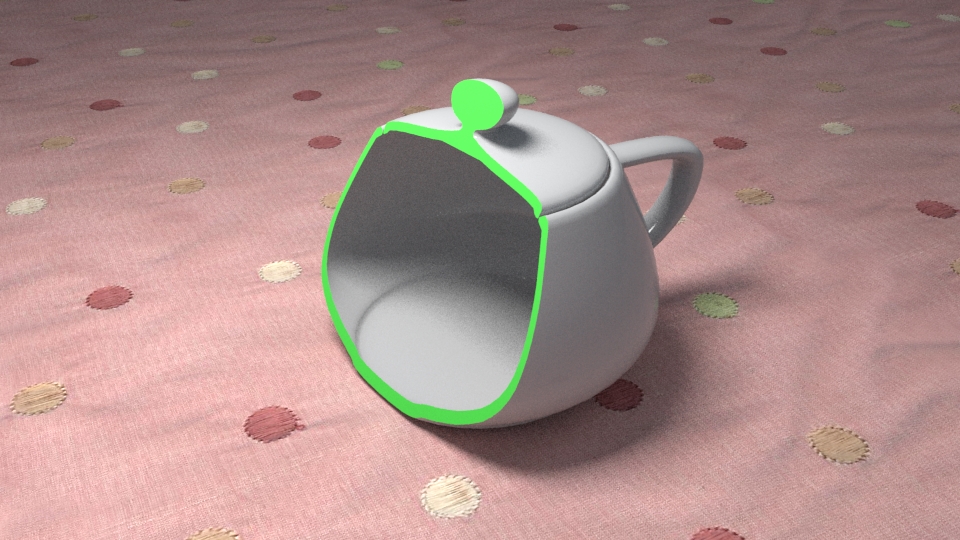
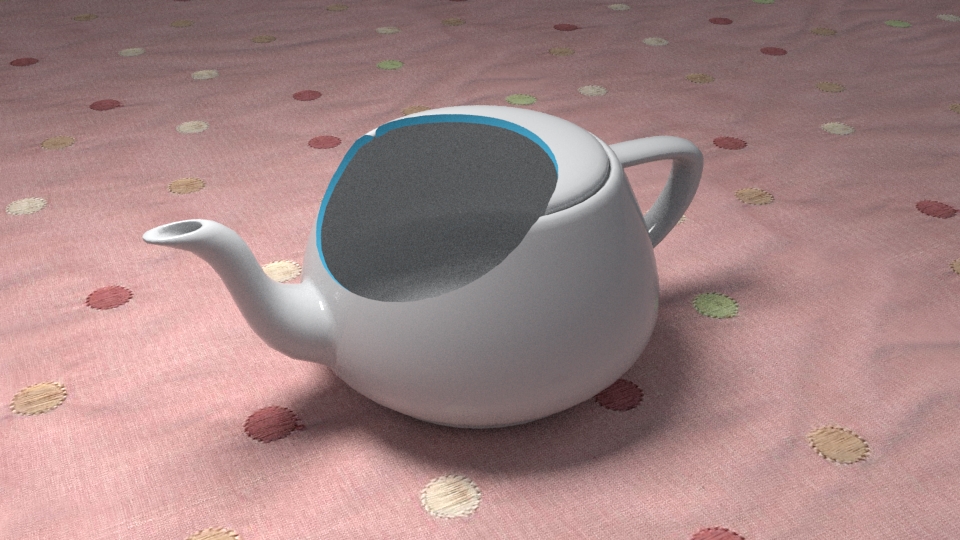
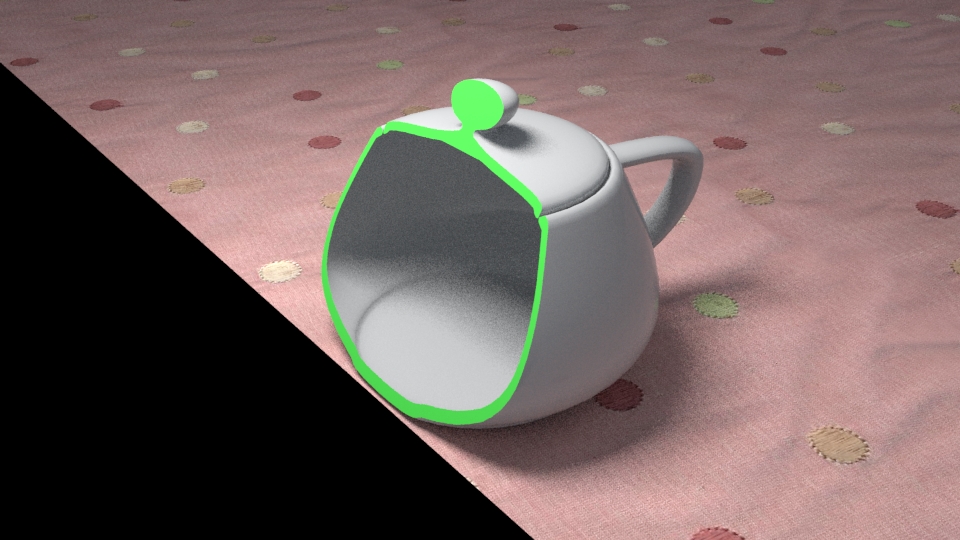
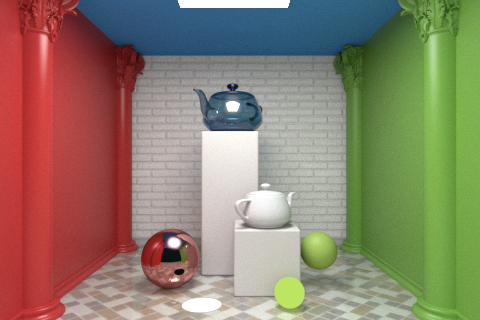
Introduction In this chapter, we'll talk about geometry clipping. VRayClipper is a geometric primitive that can be used to clip away parts of the scene with a simple plane. It is a render-time effect and does not modify the actual scene geometry in any way.
Parameters The plugin that we're interested in is called VRayClipper.
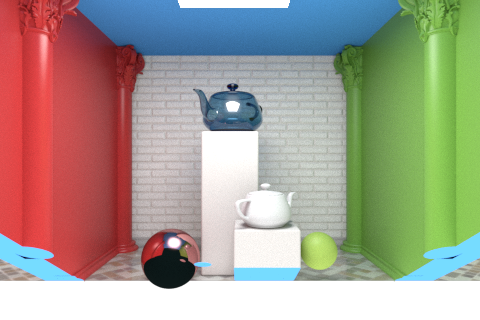
enabled – turns the clipper effect on and off. affect_light – if enabled, the clipper will affect area light sources as well. only_camera_rays – the clipper will affect objects as they are directly seen by the camera, but they will appear unchanged to reflection/refraction/GI rays. clip_lights – enables or disables the clipping of lights geometry (for example a mesh light ). use_obj_mtl – when enabled, the clipper will use the material of each clipped object to fill in the resulting holes. When this is off, the material applied to the clipper object itself will be used. set_material_id – when enabled, you can specify a face material ID for the clipper object. You can then use this ID inside a Multi/Sub-object material to specify a different filler material for different objects. material_id – the face material ID for the clipped surfaces when Set material ID is enabled. invert_inside - determines how to use the mesh when Mesh mode is enabled:0 - Intersection - clips away anything that is outside the specified mesh; only render objects and parts of objects inside the specified mesh; 1 - Subtraction - clips away anything inside the specified mesh; only render objects and parts of objects outside of the specified mesh. exclusion_nodes – an include/exclude list that allows you to select which scene objects will be clipped. exclusion_mode - false to include the nodes listed, true to exclude the nodes listed. clip_mesh - Mesh plugin to use as a clipping mesh instead of the simple plane Example The following scenes are rendered by using this scene bundle.
Clipper Exclude Clipper Mesh Clipper Clipper Plane Python <code data-v-c2b1f83f=""><span data-v-c2b1f83f="" class="line"># Compatibility with Python 2.7.</span><span data-v-c2b1f83f="" class="line">from __future__ import print_function</span><span data-v-c2b1f83f="" class="line"></span><span data-v-c2b1f83f="" class="line"># The directory containing the vray shared object should be</span><span data-v-c2b1f83f="" class="line"># present in the PYTHONPATH environment variable.</span><span data-v-c2b1f83f="" class="line"># Try to import the vray module from VRAY_SDK/python, if it is not in PYTHONPATH</span><span data-v-c2b1f83f="" class="line">import sys, os</span><span data-v-c2b1f83f="" class="line">VRAY_SDK = os.environ.get('VRAY_SDK')</span><span data-v-c2b1f83f="" class="line">if VRAY_SDK:</span><span data-v-c2b1f83f="" class="line"> sys.path.append(os.path.join(VRAY_SDK, 'python'))</span><span data-v-c2b1f83f="" class="line">import vray</span><span data-v-c2b1f83f="" class="line"></span><span data-v-c2b1f83f="" class="line">SCENE_PATH = os.path.join(os.environ.get('VRAY_SDK'), 'scenes')</span><span data-v-c2b1f83f="" class="line"># Change process working directory to SCENE_PATH in order to be able to load relative scene resources.</span><span data-v-c2b1f83f="" class="line">os.chdir(SCENE_PATH)</span><span data-v-c2b1f83f="" class="line"></span><span data-v-c2b1f83f="" class="line"># Create an instance of VRayRenderer with default options. The renderer is automatically closed after the `with` block.</span><span data-v-c2b1f83f="" class="line">with vray.VRayRenderer() as renderer:</span><span data-v-c2b1f83f="" class="line"> # Register a simple log callback. Always useful for debugging.</span><span data-v-c2b1f83f="" class="line"> def dumpMsg(renderer, message, level, instant):</span><span data-v-c2b1f83f="" class="line"> if level == vray.LOGLEVEL_ERROR:</span><span data-v-c2b1f83f="" class="line"> print("[ERROR]", message)</span><span data-v-c2b1f83f="" class="line"> elif level == vray.LOGLEVEL_WARNING:</span><span data-v-c2b1f83f="" class="line"> print("[Warning]", message)</span><span data-v-c2b1f83f="" class="line"> elif level == vray.LOGLEVEL_INFO:</span><span data-v-c2b1f83f="" class="line"> print("[info]", message)</span><span data-v-c2b1f83f="" class="line"> # Uncomment for testing, but you might want to ignore these in real code</span><span data-v-c2b1f83f="" class="line"> #else: print("[debug]", message)</span><span data-v-c2b1f83f="" class="line"> renderer.setOnLogMessage(dumpMsg)</span><span data-v-c2b1f83f="" class="line"></span><span data-v-c2b1f83f="" class="line"> # Load scene from a file.</span><span data-v-c2b1f83f="" class="line"> renderer.load(os.path.join(SCENE_PATH, 'cornell_new.vrscene'))</span><span data-v-c2b1f83f="" class="line"> # Create a VRayClipper plugin</span><span data-v-c2b1f83f="" class="line"> clipper = renderer.classes.VRayClipper()</span><span data-v-c2b1f83f="" class="line"> # Don't assign a node to get mesh from; clip against a plane instead</span><span data-v-c2b1f83f="" class="line"> # Enable the clipper</span><span data-v-c2b1f83f="" class="line"> clipper.enabled = True</span><span data-v-c2b1f83f="" class="line"> # List of exclusion nodes</span><span data-v-c2b1f83f="" class="line"> exclusionNodes = [ </span><span data-v-c2b1f83f="" class="line"> renderer.plugins['Sphere0Shape1@node'],</span><span data-v-c2b1f83f="" class="line"> renderer.plugins['Sphere0Shape4@node']</span><span data-v-c2b1f83f="" class="line"> ]</span><span data-v-c2b1f83f="" class="line"> clipper.exclusion_nodes = exclusionNodes</span><span data-v-c2b1f83f="" class="line"> # Exclude the nodes from the list; all other nodes will be clipped</span><span data-v-c2b1f83f="" class="line"> clipper.exclusion_mode = True</span><span data-v-c2b1f83f="" class="line"> # Perform subtraction</span><span data-v-c2b1f83f="" class="line"> clipper.invert_inside = 1</span><span data-v-c2b1f83f="" class="line"> # Attach the blue material</span><span data-v-c2b1f83f="" class="line"> clipper.material = renderer.plugins['Blue_Mtl@mtlsingle']</span><span data-v-c2b1f83f="" class="line"> # Assign a transform to the clipper plane</span><span data-v-c2b1f83f="" class="line"> clipper.transform = vray.Transform(vray.Matrix(vray.Vector(1, 0, 0), vray.Vector(0, 0.5, 0.87), vray.Vector(0, -0.87, 0.5)), vray.Vector(0, 20, 0))</span><span data-v-c2b1f83f="" class="line"></span><span data-v-c2b1f83f="" class="line"> # Start rendering.</span><span data-v-c2b1f83f="" class="line"> renderer.startSync()</span><span data-v-c2b1f83f="" class="line"> # Wait for rendering to end.</span><span data-v-c2b1f83f="" class="line"> renderer.waitForRenderEnd()</span></code>
C++ <code data-v-c2b1f83f=""><span data-v-c2b1f83f="" class="line">#define VRAY_RUNTIME_LOAD_PRIMARY</span><span data-v-c2b1f83f="" class="line">#include "vraysdk.hpp"</span><span data-v-c2b1f83f="" class="line">#include "vrayplugins.hpp"</span><span data-v-c2b1f83f="" class="line">#include "utils.h"</span><span data-v-c2b1f83f="" class="line"></span><span data-v-c2b1f83f="" class="line">using namespace VRay;</span><span data-v-c2b1f83f="" class="line">using namespace VRay::Plugins;</span><span data-v-c2b1f83f="" class="line">using namespace std;</span><span data-v-c2b1f83f="" class="line"></span><span data-v-c2b1f83f="" class="line">const char *BASE_PATH = getenv("VRAY_SDK");</span><span data-v-c2b1f83f="" class="line">string SCENE_PATH = (BASE_PATH ? string(BASE_PATH) : string(".")) + PATH_DELIMITER + "scenes";</span><span data-v-c2b1f83f="" class="line"></span><span data-v-c2b1f83f="" class="line">int main() {</span><span data-v-c2b1f83f="" class="line"> // Change process working directory to SCENE_PATH in order to be able to load relative scene resources.</span><span data-v-c2b1f83f="" class="line"> changeCurrentDir(SCENE_PATH.c_str());</span><span data-v-c2b1f83f="" class="line"> // Load V-Ray SDK library.</span><span data-v-c2b1f83f="" class="line"> VRayInit init(NULL, true);</span><span data-v-c2b1f83f="" class="line"> // Create an instance of VRayRenderer with default options.</span><span data-v-c2b1f83f="" class="line"> // The renderer is automatically closed at the end of the current scope.</span><span data-v-c2b1f83f="" class="line"> VRayRenderer renderer;</span><span data-v-c2b1f83f="" class="line"> // It's recommended to always have a console log</span><span data-v-c2b1f83f="" class="line"> renderer.setOnLogMessage(logMessage);</span><span data-v-c2b1f83f="" class="line"> // Load scene from a file.</span><span data-v-c2b1f83f="" class="line"> renderer.load("cornell_new.vrscene");</span><span data-v-c2b1f83f="" class="line"></span><span data-v-c2b1f83f="" class="line"> // Create a VRayClipper plugin</span><span data-v-c2b1f83f="" class="line"> VRayClipper clipper = renderer.newPlugin<VRayClipper>();</span><span data-v-c2b1f83f="" class="line"> // Don't assign a node to get mesh from; clip against a plane instead</span><span data-v-c2b1f83f="" class="line"> // Enable the clipper</span><span data-v-c2b1f83f="" class="line"> clipper.set_enabled(true);</span><span data-v-c2b1f83f="" class="line"> // List of exclusion nodes</span><span data-v-c2b1f83f="" class="line"> ValueList exclusionNodes;</span><span data-v-c2b1f83f="" class="line"> exclusionNodes = {</span><span data-v-c2b1f83f="" class="line"> Value(renderer.getPlugin("Sphere0Shape1@node")),</span><span data-v-c2b1f83f="" class="line"> Value(renderer.getPlugin("Sphere0Shape4@node"))</span><span data-v-c2b1f83f="" class="line"> };</span><span data-v-c2b1f83f="" class="line"> clipper.set_exclusion_nodes(exclusionNodes);</span><span data-v-c2b1f83f="" class="line"> // Exclude the nodes from the list; all other nodes will be clipped</span><span data-v-c2b1f83f="" class="line"> clipper.set_exclusion_mode(true);</span><span data-v-c2b1f83f="" class="line"> // Perform subtraction</span><span data-v-c2b1f83f="" class="line"> clipper.set_invert_inside(1);</span><span data-v-c2b1f83f="" class="line"> // Attach the blue material</span><span data-v-c2b1f83f="" class="line"> clipper.set_material(renderer.getPlugin("Blue_Mtl@mtlsingle"));</span><span data-v-c2b1f83f="" class="line"> // Assign a transform to the clipper plane</span><span data-v-c2b1f83f="" class="line"> clipper.set_transform(Transform(Matrix(Vector(1, 0, 0), Vector(0, 0.5, 0.87), Vector(0, -0.87, 0.5)), Vector(0, 20, 0)));</span><span data-v-c2b1f83f="" class="line"></span><span data-v-c2b1f83f="" class="line"> // Start rendering.</span><span data-v-c2b1f83f="" class="line"> renderer.startSync();</span><span data-v-c2b1f83f="" class="line"> // Wait for rendering to end.</span><span data-v-c2b1f83f="" class="line"> renderer.waitForRenderEnd();</span><span data-v-c2b1f83f="" class="line"></span><span data-v-c2b1f83f="" class="line"> return 0;</span><span data-v-c2b1f83f="" class="line">}</span></code>
C#.NET <code data-v-c2b1f83f=""><span data-v-c2b1f83f="" class="line">using System;</span><span data-v-c2b1f83f="" class="line">using System.IO;</span><span data-v-c2b1f83f="" class="line">using System.Collections.Generic;</span><span data-v-c2b1f83f="" class="line">using VRay;</span><span data-v-c2b1f83f="" class="line">using VRay.Plugins;</span><span data-v-c2b1f83f="" class="line"></span><span data-v-c2b1f83f="" class="line">namespace _clipperPlane</span><span data-v-c2b1f83f="" class="line">{</span><span data-v-c2b1f83f="" class="line"> class Program</span><span data-v-c2b1f83f="" class="line"> {</span><span data-v-c2b1f83f="" class="line"> static void Main(string[] args)</span><span data-v-c2b1f83f="" class="line"> {</span><span data-v-c2b1f83f="" class="line"> string SCENE_PATH = Path.Combine(Environment.GetEnvironmentVariable("VRAY_SDK"), "scenes");</span><span data-v-c2b1f83f="" class="line"></span><span data-v-c2b1f83f="" class="line"> // Change process working directory to SCENE_PATH in order to be able to load relative scene resources.</span><span data-v-c2b1f83f="" class="line"> Directory.SetCurrentDirectory(SCENE_PATH);</span><span data-v-c2b1f83f="" class="line"></span><span data-v-c2b1f83f="" class="line"> // Create an instance of VRayRenderer with default options. The renderer is automatically closed after the `using` block.</span><span data-v-c2b1f83f="" class="line"> using (VRayRenderer renderer = new VRayRenderer())</span><span data-v-c2b1f83f="" class="line"> {</span><span data-v-c2b1f83f="" class="line"> // Add a listener for any type of log message.</span><span data-v-c2b1f83f="" class="line"> renderer.LogMessage += new EventHandler<MessageEventArgs>((source, e) =></span><span data-v-c2b1f83f="" class="line"> {</span><span data-v-c2b1f83f="" class="line"> // You can remove the if for testing, but you might want to ignore Debug in real code</span><span data-v-c2b1f83f="" class="line"> if (e.LogLevel != LogLevelType.Debug)</span><span data-v-c2b1f83f="" class="line"> {</span><span data-v-c2b1f83f="" class="line"> Console.WriteLine(String.Format("[{0}] {1}", e.LogLevel.ToString(), e.Message));</span><span data-v-c2b1f83f="" class="line"> }</span><span data-v-c2b1f83f="" class="line"> });</span><span data-v-c2b1f83f="" class="line"> // Load scene from a file.</span><span data-v-c2b1f83f="" class="line"> renderer.Load("cornell_new.vrscene");</span><span data-v-c2b1f83f="" class="line"></span><span data-v-c2b1f83f="" class="line"> // Create a VRayClipper plugin</span><span data-v-c2b1f83f="" class="line"> VRayClipper clipper = renderer.NewPlugin<VRayClipper>();</span><span data-v-c2b1f83f="" class="line"> // Don't assign a node to get mesh from; clip against a plane instead</span><span data-v-c2b1f83f="" class="line"> // Enable the clipper</span><span data-v-c2b1f83f="" class="line"> clipper.Enabled = true;</span><span data-v-c2b1f83f="" class="line"> // List of exclusion nodes</span><span data-v-c2b1f83f="" class="line"> List<object> exclusionNodes = new List<object> {</span><span data-v-c2b1f83f="" class="line"> renderer.GetPlugin("Sphere0Shape1@node"),</span><span data-v-c2b1f83f="" class="line"> renderer.GetPlugin("Sphere0Shape4@node")</span><span data-v-c2b1f83f="" class="line"> };</span><span data-v-c2b1f83f="" class="line"> clipper.ExclusionNodes = exclusionNodes;</span><span data-v-c2b1f83f="" class="line"> // Exclude the nodes from the list; all other nodes will be clipped</span><span data-v-c2b1f83f="" class="line"> clipper.ExclusionMode = true;</span><span data-v-c2b1f83f="" class="line"> // Perform subtraction</span><span data-v-c2b1f83f="" class="line"> clipper.InvertInside = 1;</span><span data-v-c2b1f83f="" class="line"> // Attach the blue material</span><span data-v-c2b1f83f="" class="line"> clipper.Material = renderer.GetPlugin("Blue_Mtl@mtlsingle");</span><span data-v-c2b1f83f="" class="line"> // Assign a transform to the clipper plane</span><span data-v-c2b1f83f="" class="line"> clipper.Transform = new Transform(new Matrix(new Vector(1, 0, 0), new Vector(0, 0.5, 0.87), new Vector(0, -0.87, 0.5)), new Vector(0, 20, 0));</span><span data-v-c2b1f83f="" class="line"></span><span data-v-c2b1f83f="" class="line"> // Start rendering.</span><span data-v-c2b1f83f="" class="line"> renderer.StartSync();</span><span data-v-c2b1f83f="" class="line"> // Wait for rendering to end.</span><span data-v-c2b1f83f="" class="line"> renderer.WaitForRenderEnd();</span><span data-v-c2b1f83f="" class="line"> }</span><span data-v-c2b1f83f="" class="line"> }</span><span data-v-c2b1f83f="" class="line"> }</span><span data-v-c2b1f83f="" class="line">}</span></code>
Node.js <code data-v-c2b1f83f=""><span data-v-c2b1f83f="" class="line">var path = require('path');</span><span data-v-c2b1f83f="" class="line">var vray = require(path.join(process.env.VRAY_SDK, 'node', 'vray'));</span><span data-v-c2b1f83f="" class="line"></span><span data-v-c2b1f83f="" class="line">var SCENE_PATH = path.join(process.env.VRAY_SDK, 'scenes');</span><span data-v-c2b1f83f="" class="line">// Change process working directory to SCENE_PATH in order to be able to load relative scene resources.</span><span data-v-c2b1f83f="" class="line">process.chdir(SCENE_PATH);</span><span data-v-c2b1f83f="" class="line"></span><span data-v-c2b1f83f="" class="line">// Create an instance of VRayRenderer with default options.</span><span data-v-c2b1f83f="" class="line">var renderer = vray.VRayRenderer();</span><span data-v-c2b1f83f="" class="line">// It's recommended to always have a console log callback</span><span data-v-c2b1f83f="" class="line">renderer.on("logMessage", function(message, level, instant) {</span><span data-v-c2b1f83f="" class="line"> if (level == vray.LOGLEVEL_ERROR)</span><span data-v-c2b1f83f="" class="line"> console.log("[ERROR] ", message);</span><span data-v-c2b1f83f="" class="line"> else if (level == vray.LOGLEVEL_WARNING)</span><span data-v-c2b1f83f="" class="line"> console.log("[Warning] ", message);</span><span data-v-c2b1f83f="" class="line"> else if (level == vray.LOGLEVEL_INFO)</span><span data-v-c2b1f83f="" class="line"> console.log("[info] ", message);</span><span data-v-c2b1f83f="" class="line"> // Uncomment for testing, but you might want to ignore these in real code</span><span data-v-c2b1f83f="" class="line"> //else console.log("[debug] ", message);</span><span data-v-c2b1f83f="" class="line">});</span><span data-v-c2b1f83f="" class="line"></span><span data-v-c2b1f83f="" class="line">// Load scene from a file asynchronously.</span><span data-v-c2b1f83f="" class="line">renderer.load("cornell_new.vrscene", function(err) {</span><span data-v-c2b1f83f="" class="line"> if (err) throw err;</span><span data-v-c2b1f83f="" class="line"></span><span data-v-c2b1f83f="" class="line"> // Create a VRayClipper plugin</span><span data-v-c2b1f83f="" class="line"> var clipper = renderer.classes.VRayClipper();</span><span data-v-c2b1f83f="" class="line"> // Don't assign a node to get mesh from; clip against a plane instead</span><span data-v-c2b1f83f="" class="line"> // Enable the clipper</span><span data-v-c2b1f83f="" class="line"> clipper.enabled = true;</span><span data-v-c2b1f83f="" class="line"> // List of exclusion nodes</span><span data-v-c2b1f83f="" class="line"> var exclusionNodes = vray.List(</span><span data-v-c2b1f83f="" class="line"> renderer.plugins["Sphere0Shape1@node"],</span><span data-v-c2b1f83f="" class="line"> renderer.plugins["Sphere0Shape4@node"]</span><span data-v-c2b1f83f="" class="line"> );</span><span data-v-c2b1f83f="" class="line"> clipper.exclusion_nodes = exclusionNodes;</span><span data-v-c2b1f83f="" class="line"> // Exclude the nodes from the list; all other nodes will be clipped</span><span data-v-c2b1f83f="" class="line"> clipper.exclusion_mode = true;</span><span data-v-c2b1f83f="" class="line"> // Perform subtraction</span><span data-v-c2b1f83f="" class="line"> clipper.invert_inside = 1;</span><span data-v-c2b1f83f="" class="line"> // Attach the blue material</span><span data-v-c2b1f83f="" class="line"> clipper.material = renderer.plugins["Blue_Mtl@mtlsingle"];</span><span data-v-c2b1f83f="" class="line"> // Assign a transform to the clipper plane</span><span data-v-c2b1f83f="" class="line"> clipper.transform = vray.Transform(vray.Matrix(vray.Vector(1, 0, 0), vray.Vector(0, 0.5, 0.87), vray.Vector(0, -0.87, 0.5)), vray.Vector(0, 20, 0));</span><span data-v-c2b1f83f="" class="line"> </span><span data-v-c2b1f83f="" class="line"> // Start rendering.</span><span data-v-c2b1f83f="" class="line"> renderer.start(function(err) {</span><span data-v-c2b1f83f="" class="line"> if (err) throw err;</span><span data-v-c2b1f83f="" class="line"> // Wait for rendering to end.</span><span data-v-c2b1f83f="" class="line"> renderer.waitForRenderEnd(function() {</span><span data-v-c2b1f83f="" class="line"> renderer.close();</span><span data-v-c2b1f83f="" class="line"> });</span><span data-v-c2b1f83f="" class="line"> });</span><span data-v-c2b1f83f="" class="line">});</span></code>
Result Clipper Object Python <code data-v-c2b1f83f=""><span data-v-c2b1f83f="" class="line"># Compatibility with Python 2.7.</span><span data-v-c2b1f83f="" class="line">from __future__ import print_function</span><span data-v-c2b1f83f="" class="line"></span><span data-v-c2b1f83f="" class="line"># The directory containing the vray shared object should be</span><span data-v-c2b1f83f="" class="line"># present in the PYTHONPATH environment variable.</span><span data-v-c2b1f83f="" class="line"># Try to import the vray module from VRAY_SDK/python, if it is not in PYTHONPATH</span><span data-v-c2b1f83f="" class="line">import sys, os</span><span data-v-c2b1f83f="" class="line">VRAY_SDK = os.environ.get('VRAY_SDK')</span><span data-v-c2b1f83f="" class="line">if VRAY_SDK:</span><span data-v-c2b1f83f="" class="line"> sys.path.append(os.path.join(VRAY_SDK, 'python'))</span><span data-v-c2b1f83f="" class="line">import vray</span><span data-v-c2b1f83f="" class="line"></span><span data-v-c2b1f83f="" class="line"></span><span data-v-c2b1f83f="" class="line">SCENE_PATH = os.path.join(os.environ.get('VRAY_SDK'), 'scenes')</span><span data-v-c2b1f83f="" class="line"></span><span data-v-c2b1f83f="" class="line"># Change process working directory to SCENE_PATH in order</span><span data-v-c2b1f83f="" class="line"># to be able to load relative scene resources.</span><span data-v-c2b1f83f="" class="line">os.chdir(SCENE_PATH)</span><span data-v-c2b1f83f="" class="line"></span><span data-v-c2b1f83f="" class="line"># Create an instance of VRayRenderer with default options. The renderer is automatically closed after the `with` block.</span><span data-v-c2b1f83f="" class="line">with vray.VRayRenderer() as renderer:</span><span data-v-c2b1f83f="" class="line"> # Register a simple log callback. Always useful for debugging.</span><span data-v-c2b1f83f="" class="line"> def dumpMsg(renderer, message, level, instant):</span><span data-v-c2b1f83f="" class="line"> if level == vray.LOGLEVEL_ERROR:</span><span data-v-c2b1f83f="" class="line"> print("[ERROR]", message)</span><span data-v-c2b1f83f="" class="line"> elif level == vray.LOGLEVEL_WARNING:</span><span data-v-c2b1f83f="" class="line"> print("[Warning]", message)</span><span data-v-c2b1f83f="" class="line"> elif level == vray.LOGLEVEL_INFO:</span><span data-v-c2b1f83f="" class="line"> print("[info]", message)</span><span data-v-c2b1f83f="" class="line"> # Uncomment for testing, but you might want to ignore these in real code</span><span data-v-c2b1f83f="" class="line"> #else: print("[debug]", message)</span><span data-v-c2b1f83f="" class="line"> renderer.setOnLogMessage(dumpMsg)</span><span data-v-c2b1f83f="" class="line"></span><span data-v-c2b1f83f="" class="line"> # Load scene from a file.</span><span data-v-c2b1f83f="" class="line"> renderer.load(os.path.join(SCENE_PATH, 'cornell_new.vrscene'))</span><span data-v-c2b1f83f="" class="line"></span><span data-v-c2b1f83f="" class="line"> clipMesh = renderer.plugins['Sphere0Shape2@node']</span><span data-v-c2b1f83f="" class="line"> updatedTransform = clipMesh.transform</span><span data-v-c2b1f83f="" class="line"> # Modify the copy of the clipMesh transform.</span><span data-v-c2b1f83f="" class="line"> updatedTransform = updatedTransform.replaceOffset(updatedTransform.offset + vray.Vector(0, -20, 0))</span><span data-v-c2b1f83f="" class="line"> # Update the transform value in clipMesh (applying the changes above).</span><span data-v-c2b1f83f="" class="line"> clipMesh.transform = updatedTransform</span><span data-v-c2b1f83f="" class="line"></span><span data-v-c2b1f83f="" class="line"> # Create a VRayClipper plugin</span><span data-v-c2b1f83f="" class="line"> clipper = renderer.classes.VRayClipper()</span><span data-v-c2b1f83f="" class="line"> # Assign a node to get mesh from</span><span data-v-c2b1f83f="" class="line"> clipper.clip_mesh = clipMesh</span><span data-v-c2b1f83f="" class="line"> # Enable the clipper</span><span data-v-c2b1f83f="" class="line"> clipper.enabled = True</span><span data-v-c2b1f83f="" class="line"> # List of exclusion nodes</span><span data-v-c2b1f83f="" class="line"> exclusionNodes = [ </span><span data-v-c2b1f83f="" class="line"> renderer.plugins['FloorShape@node']</span><span data-v-c2b1f83f="" class="line"> ]</span><span data-v-c2b1f83f="" class="line"> clipper.exclusion_nodes = exclusionNodes</span><span data-v-c2b1f83f="" class="line"> # Include the nodes from the list</span><span data-v-c2b1f83f="" class="line"> clipper.exclusion_mode = False</span><span data-v-c2b1f83f="" class="line"> # Perform subtraction</span><span data-v-c2b1f83f="" class="line"> clipper.invert_inside = 1</span><span data-v-c2b1f83f="" class="line"> # Attach the blue material</span><span data-v-c2b1f83f="" class="line"> clipper.material = renderer.plugins['Blue_Mtl@mtlsingle']</span><span data-v-c2b1f83f="" class="line"></span><span data-v-c2b1f83f="" class="line"> # Start rendering.</span><span data-v-c2b1f83f="" class="line"> renderer.startSync()</span><span data-v-c2b1f83f="" class="line"> # Wait for rendering to end.</span><span data-v-c2b1f83f="" class="line"> renderer.waitForRenderEnd()</span></code>
C++ <code data-v-c2b1f83f=""><span data-v-c2b1f83f="" class="line">#define VRAY_RUNTIME_LOAD_PRIMARY</span><span data-v-c2b1f83f="" class="line">#include "vraysdk.hpp"</span><span data-v-c2b1f83f="" class="line">#include "vrayplugins.hpp"</span><span data-v-c2b1f83f="" class="line">#include "utils.h"</span><span data-v-c2b1f83f="" class="line"></span><span data-v-c2b1f83f="" class="line">using namespace VRay;</span><span data-v-c2b1f83f="" class="line">using namespace VRay::Plugins;</span><span data-v-c2b1f83f="" class="line">using namespace std;</span><span data-v-c2b1f83f="" class="line"></span><span data-v-c2b1f83f="" class="line">const char *BASE_PATH = getenv("VRAY_SDK");</span><span data-v-c2b1f83f="" class="line">string SCENE_PATH = (BASE_PATH ? string(BASE_PATH) : string(".")) + PATH_DELIMITER + "scenes";</span><span data-v-c2b1f83f="" class="line"></span><span data-v-c2b1f83f="" class="line">int main() {</span><span data-v-c2b1f83f="" class="line"> // Change process working directory to SCENE_PATH in order to be able to load relative scene resources.</span><span data-v-c2b1f83f="" class="line"> changeCurrentDir(SCENE_PATH.c_str());</span><span data-v-c2b1f83f="" class="line"> // Load V-Ray SDK library.</span><span data-v-c2b1f83f="" class="line"> VRayInit init(NULL, true);</span><span data-v-c2b1f83f="" class="line"> // Create an instance of VRayRenderer with default options.</span><span data-v-c2b1f83f="" class="line"> // The renderer is automatically closed at the end of the current scope.</span><span data-v-c2b1f83f="" class="line"> VRayRenderer renderer;</span><span data-v-c2b1f83f="" class="line"> // It's recommended to always have a console log</span><span data-v-c2b1f83f="" class="line"> renderer.setOnLogMessage(logMessage);</span><span data-v-c2b1f83f="" class="line"> // Load scene from a file.</span><span data-v-c2b1f83f="" class="line"> renderer.load("cornell_new.vrscene");</span><span data-v-c2b1f83f="" class="line"></span><span data-v-c2b1f83f="" class="line"> Node clipMesh = renderer.getPlugin<Node>("Sphere0Shape2@node");</span><span data-v-c2b1f83f="" class="line"> Transform updatedTransform = clipMesh.get_transform();</span><span data-v-c2b1f83f="" class="line"> // Modify the copy of the clipMesh transform.</span><span data-v-c2b1f83f="" class="line"> updatedTransform.offset += Vector(0, -20, 0);</span><span data-v-c2b1f83f="" class="line"> // Update the transform value in clipMesh (applying the changes above).</span><span data-v-c2b1f83f="" class="line"> clipMesh.set_transform(updatedTransform);</span><span data-v-c2b1f83f="" class="line"></span><span data-v-c2b1f83f="" class="line"> // Create a VRayClipper plugin</span><span data-v-c2b1f83f="" class="line"> VRayClipper clipper = renderer.newPlugin<VRayClipper>();</span><span data-v-c2b1f83f="" class="line"> // Assign a node to get mesh from</span><span data-v-c2b1f83f="" class="line"> clipper.set_clip_mesh(clipMesh);</span><span data-v-c2b1f83f="" class="line"> // Enable the clipper</span><span data-v-c2b1f83f="" class="line"> clipper.set_enabled(true);</span><span data-v-c2b1f83f="" class="line"> // List of exclusion nodes</span><span data-v-c2b1f83f="" class="line"> ValueList exclusionNodes;</span><span data-v-c2b1f83f="" class="line"> exclusionNodes = {</span><span data-v-c2b1f83f="" class="line"> Value(renderer.getPlugin("FloorShape@node"))</span><span data-v-c2b1f83f="" class="line"> };</span><span data-v-c2b1f83f="" class="line"> clipper.set_exclusion_nodes(exclusionNodes);</span><span data-v-c2b1f83f="" class="line"> // Include the nodes from the list</span><span data-v-c2b1f83f="" class="line"> clipper.set_exclusion_mode(false);</span><span data-v-c2b1f83f="" class="line"> // Perform subtraction</span><span data-v-c2b1f83f="" class="line"> clipper.set_invert_inside(1);</span><span data-v-c2b1f83f="" class="line"> // Attach the blue material</span><span data-v-c2b1f83f="" class="line"> clipper.set_material(renderer.getPlugin("Blue_Mtl@mtlsingle"));</span><span data-v-c2b1f83f="" class="line"></span><span data-v-c2b1f83f="" class="line"> // Start rendering.</span><span data-v-c2b1f83f="" class="line"> renderer.startSync();</span><span data-v-c2b1f83f="" class="line"> // Wait for rendering to end.</span><span data-v-c2b1f83f="" class="line"> renderer.waitForRenderEnd();</span><span data-v-c2b1f83f="" class="line"></span><span data-v-c2b1f83f="" class="line"> return 0;</span><span data-v-c2b1f83f="" class="line">}</span></code>
C#.NET <code data-v-c2b1f83f=""><span data-v-c2b1f83f="" class="line">using System;</span><span data-v-c2b1f83f="" class="line">using System.IO;</span><span data-v-c2b1f83f="" class="line">using System.Collections.Generic;</span><span data-v-c2b1f83f="" class="line">using VRay;</span><span data-v-c2b1f83f="" class="line">using VRay.Plugins;</span><span data-v-c2b1f83f="" class="line"></span><span data-v-c2b1f83f="" class="line">namespace _clipperMesh</span><span data-v-c2b1f83f="" class="line">{</span><span data-v-c2b1f83f="" class="line"> class Program</span><span data-v-c2b1f83f="" class="line"> {</span><span data-v-c2b1f83f="" class="line"> static void Main(string[] args)</span><span data-v-c2b1f83f="" class="line"> {</span><span data-v-c2b1f83f="" class="line"> string SCENE_PATH = Path.Combine(Environment.GetEnvironmentVariable("VRAY_SDK"), "scenes");</span><span data-v-c2b1f83f="" class="line"></span><span data-v-c2b1f83f="" class="line"> // Change process working directory to SCENE_PATH in order to be able to load relative scene resources.</span><span data-v-c2b1f83f="" class="line"> Directory.SetCurrentDirectory(SCENE_PATH);</span><span data-v-c2b1f83f="" class="line"></span><span data-v-c2b1f83f="" class="line"> // Create an instance of VRayRenderer with default options. The renderer is automatically closed after the `using` block.</span><span data-v-c2b1f83f="" class="line"> using (VRayRenderer renderer = new VRayRenderer())</span><span data-v-c2b1f83f="" class="line"> {</span><span data-v-c2b1f83f="" class="line"> // Add a listener for any type of log message.</span><span data-v-c2b1f83f="" class="line"> renderer.LogMessage += new EventHandler<MessageEventArgs>((source, e) =></span><span data-v-c2b1f83f="" class="line"> {</span><span data-v-c2b1f83f="" class="line"> // You can remove the if for testing, but you might want to ignore Debug in real code</span><span data-v-c2b1f83f="" class="line"> if (e.LogLevel != LogLevelType.Debug)</span><span data-v-c2b1f83f="" class="line"> {</span><span data-v-c2b1f83f="" class="line"> Console.WriteLine(String.Format("[{0}] {1}", e.LogLevel.ToString(), e.Message));</span><span data-v-c2b1f83f="" class="line"> }</span><span data-v-c2b1f83f="" class="line"> });</span><span data-v-c2b1f83f="" class="line"> // Load scene from a file.</span><span data-v-c2b1f83f="" class="line"> renderer.Load("cornell_new.vrscene");</span><span data-v-c2b1f83f="" class="line"></span><span data-v-c2b1f83f="" class="line"> Node clipMesh = renderer.GetPlugin<Node>("Sphere0Shape2@node");</span><span data-v-c2b1f83f="" class="line"> Transform updatedTransform = clipMesh.Transform;</span><span data-v-c2b1f83f="" class="line"> // Modify the copy of the clipMesh transform.</span><span data-v-c2b1f83f="" class="line"> updatedTransform = updatedTransform.ReplaceOffset(updatedTransform.Offset + new Vector(0, -20, 0));</span><span data-v-c2b1f83f="" class="line"> // Update the transform value in clipMesh (applying the changes above).</span><span data-v-c2b1f83f="" class="line"> clipMesh.Transform = updatedTransform;</span><span data-v-c2b1f83f="" class="line"></span><span data-v-c2b1f83f="" class="line"> // Create a VRayClipper plugin</span><span data-v-c2b1f83f="" class="line"> VRayClipper clipper = renderer.NewPlugin<VRayClipper>();</span><span data-v-c2b1f83f="" class="line"> // Assign a node to get mesh from</span><span data-v-c2b1f83f="" class="line"> clipper.ClipMesh = clipMesh;</span><span data-v-c2b1f83f="" class="line"> // Enable the clipper</span><span data-v-c2b1f83f="" class="line"> clipper.Enabled = true;</span><span data-v-c2b1f83f="" class="line"> // List of exclusion nodes</span><span data-v-c2b1f83f="" class="line"> List<object> exclusionNodes = new List<object> {</span><span data-v-c2b1f83f="" class="line"> renderer.GetPlugin("FloorShape@node")</span><span data-v-c2b1f83f="" class="line"> };</span><span data-v-c2b1f83f="" class="line"> clipper.ExclusionNodes = exclusionNodes;</span><span data-v-c2b1f83f="" class="line"> // Include the nodes from the list</span><span data-v-c2b1f83f="" class="line"> clipper.ExclusionMode = false;</span><span data-v-c2b1f83f="" class="line"> // Perform subtraction</span><span data-v-c2b1f83f="" class="line"> clipper.InvertInside = 1;</span><span data-v-c2b1f83f="" class="line"> // Attach the blue material</span><span data-v-c2b1f83f="" class="line"> clipper.Material = renderer.GetPlugin("Blue_Mtl@mtlsingle");</span><span data-v-c2b1f83f="" class="line"> </span><span data-v-c2b1f83f="" class="line"> // Start rendering.</span><span data-v-c2b1f83f="" class="line"> renderer.StartSync();</span><span data-v-c2b1f83f="" class="line"> // Wait for rendering to end.</span><span data-v-c2b1f83f="" class="line"> renderer.WaitForRenderEnd();</span><span data-v-c2b1f83f="" class="line"> }</span><span data-v-c2b1f83f="" class="line"> }</span><span data-v-c2b1f83f="" class="line"> }</span><span data-v-c2b1f83f="" class="line">}</span></code>
Node.js <code data-v-c2b1f83f=""><span data-v-c2b1f83f="" class="line">var path = require('path');</span><span data-v-c2b1f83f="" class="line">var vray = require(path.join(process.env.VRAY_SDK, 'node', 'vray'));</span><span data-v-c2b1f83f="" class="line"></span><span data-v-c2b1f83f="" class="line">var SCENE_PATH = path.join(process.env.VRAY_SDK, 'scenes');</span><span data-v-c2b1f83f="" class="line">// Change process working directory to SCENE_PATH in order to be able to load relative scene resources.</span><span data-v-c2b1f83f="" class="line">process.chdir(SCENE_PATH);</span><span data-v-c2b1f83f="" class="line"></span><span data-v-c2b1f83f="" class="line">// Create an instance of VRayRenderer with default options.</span><span data-v-c2b1f83f="" class="line">var renderer = vray.VRayRenderer();</span><span data-v-c2b1f83f="" class="line"></span><span data-v-c2b1f83f="" class="line">// It's recommended to always have a console log callback</span><span data-v-c2b1f83f="" class="line">renderer.on("logMessage", function(message, level, instant) {</span><span data-v-c2b1f83f="" class="line"> if (level == vray.LOGLEVEL_ERROR)</span><span data-v-c2b1f83f="" class="line"> console.log("[ERROR] ", message);</span><span data-v-c2b1f83f="" class="line"> else if (level == vray.LOGLEVEL_WARNING)</span><span data-v-c2b1f83f="" class="line"> console.log("[Warning] ", message);</span><span data-v-c2b1f83f="" class="line"> else if (level == vray.LOGLEVEL_INFO)</span><span data-v-c2b1f83f="" class="line"> console.log("[info] ", message);</span><span data-v-c2b1f83f="" class="line"> // Uncomment for testing, but you might want to ignore these in real code</span><span data-v-c2b1f83f="" class="line"> //else console.log("[debug] ", message);</span><span data-v-c2b1f83f="" class="line">});</span><span data-v-c2b1f83f="" class="line"></span><span data-v-c2b1f83f="" class="line">// Load scene from a file asynchronously.</span><span data-v-c2b1f83f="" class="line">renderer.load("cornell_new.vrscene", function(err) {</span><span data-v-c2b1f83f="" class="line"> if (err) throw err;</span><span data-v-c2b1f83f="" class="line"></span><span data-v-c2b1f83f="" class="line"> var clipMesh = renderer.plugins["Sphere0Shape2@node"];</span><span data-v-c2b1f83f="" class="line"> var updatedTransform = clipMesh.transform;</span><span data-v-c2b1f83f="" class="line"> // Modify the copy of the clipMesh transform.</span><span data-v-c2b1f83f="" class="line"> updatedTransform = updatedTransform.replaceOffset(updatedTransform.offset.add(vray.Vector(0, -20, 0)));</span><span data-v-c2b1f83f="" class="line"> // Update the transform value in clipMesh (applying the changes above).</span><span data-v-c2b1f83f="" class="line"> clipMesh.transform = updatedTransform;</span><span data-v-c2b1f83f="" class="line"></span><span data-v-c2b1f83f="" class="line"> // Create a VRayClipper plugin</span><span data-v-c2b1f83f="" class="line"> var clipper = renderer.classes.VRayClipper();</span><span data-v-c2b1f83f="" class="line"> // Assign a node to get mesh from</span><span data-v-c2b1f83f="" class="line"> clipper.clip_mesh = clipMesh;</span><span data-v-c2b1f83f="" class="line"> // Enable the clipper</span><span data-v-c2b1f83f="" class="line"> clipper.enabled = true;</span><span data-v-c2b1f83f="" class="line"> // List of exclusion nodes</span><span data-v-c2b1f83f="" class="line"> var exclusionNodes = vray.List(</span><span data-v-c2b1f83f="" class="line"> renderer.plugins["FloorShape@node"]</span><span data-v-c2b1f83f="" class="line"> );</span><span data-v-c2b1f83f="" class="line"> clipper.exclusion_nodes = exclusionNodes;</span><span data-v-c2b1f83f="" class="line"> // Include the nodes from the list</span><span data-v-c2b1f83f="" class="line"> clipper.exclusion_mode = false;</span><span data-v-c2b1f83f="" class="line"> // Perform subtraction</span><span data-v-c2b1f83f="" class="line"> clipper.invert_inside = 1;</span><span data-v-c2b1f83f="" class="line"> // Attach the blue material</span><span data-v-c2b1f83f="" class="line"> clipper.material = renderer.plugins["Blue_Mtl@mtlsingle"];</span><span data-v-c2b1f83f="" class="line"> </span><span data-v-c2b1f83f="" class="line"> // Start rendering.</span><span data-v-c2b1f83f="" class="line"> renderer.start(function(err) {</span><span data-v-c2b1f83f="" class="line"> if (err) throw err;</span><span data-v-c2b1f83f="" class="line"> // Wait for rendering to end.</span><span data-v-c2b1f83f="" class="line"> renderer.waitForRenderEnd(function() {</span><span data-v-c2b1f83f="" class="line"> renderer.close();</span><span data-v-c2b1f83f="" class="line"> });</span><span data-v-c2b1f83f="" class="line"> });</span><span data-v-c2b1f83f="" class="line">});</span></code>
Result Notes VRayClipper works best with "closed" objects. The results on open objects (without a corresponding back face) are not well defined. Currently, the VRayClipper may produce artifacts if there are overlapping triangles in the scene, regardless of whether they are part of the same object or not. Note that Set material ID must be used for Multi/Sub-object; it will not act like Mtl ID in MultiMatteElement.