V-Ray for Blender
Blend Mtl
This page provides information about the Blend Mtl in V-Ray for Blender.
Last updated 15 April 2026
This page provides information about the Blend Mtl in V-Ray for Blender.
Overview
V-Ray Blend Material can be used to layer several V-Ray-compatible materials in an efficient manner. It can be used to create complex materials like car paints, human skin (when Fast SSS2 material is used as a base material) etc.
You can use the Material Select render channel to split the different sub-materials of the Blend Material into different render elements.
V-Ray Blend Material takes a base material and applies other materials (coatings) on top of it. This works like a stack, where each coat material blends between its own shading and that of the materials below it in the stack.
UI Path: ||V-Ray Node Editor|| > Add > Material > V-Ray Blend Mtl

Input Sockets
This section lists the input sockets of the material. Some have corresponding properties, and some are only found on the node itself.

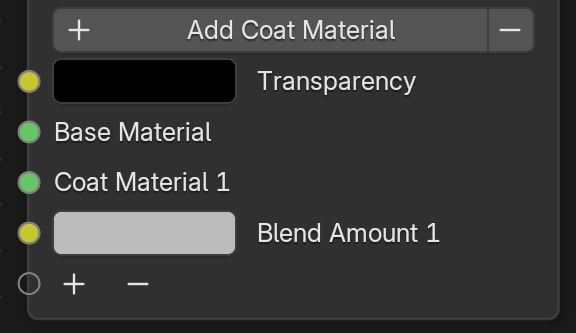
+ Add Coat Material/ - – Adds a new coat layer. Clicking on the button removes a material layer. Alternatively, you can use the + and - buttons at the bottom of the node inputs.
Transparency – Input socket for the Transparency property of the material.
Base Material – The base material over which other materials are layered. If this is not specified, the base material is assumed to be a perfectly transparent material.
Coat Material 1 – The layer on top of the base material, which is blended with it. All following coat layers are numbered accordingly (Coat Material 2, Coat Material 3, etc.).
Blend Amount 1 – Specifies how much of the final result is contributed by the corresponding coating material and the rest of the materials below it. If the Blend Amount is 1.0, the current material blocks the materials below it. If the Blend Amount is 0.0, the current material has no effect on the final result. This parameter can also be controlled by connecting a texture node.
Properties
Mode – Select how the V-Ray Blend Material behaves: like a multi-layered Additive material or as Energy Conserving. Selecting the Additive Mode would often result in a physically incorrect material (e.g., a material that reflects more light than falls on it). It is not recommended to use this option unless you know what you are doing.
Transparency – Specifies how transparent the Blend Material is. Black makes the material fully opaque, and white makes it fully transparent.
