V-Ray for Cinema 4D
Beauty RE
This page gives some basic details about the Beauty render preset and how it may be re-assembled in a composite using its component elements.
Last updated 19 September 2025
This page gives some basic details about the Beauty render preset and how it may be re-assembled in a composite using its component elements.
Overview
The Beauty Render (RGB) is V-Ray's pre-composited final render and is usually the primary export when rendering a scene. During rendering, it is created automatically as the RGB color render element in the V-Ray Frame Buffer. This render element is unique in that it is not added separately under the Render Elements tab. However, there is a Beauty preset available that includes all the needed render elements for compositing the Beauty.
This pass can be re-created manually in a composite by assembling the proper components together and fine-tuning the components. This process is commonly called Back to Beauty Compositing.
For specifics on how the Beauty pass is reconstructed, see Beauty RE#Back to Beauty Compositing.

Adding the Beauty Preset
All render elements are grouped into categories. You can add the whole Beauty category that contains all of the needed channels to composite the image back to Beauty.

Back to Beauty Compositing
The following is the base formula for reconstructing the Beauty pass. Some Render Elements can be excluded if the scene does not utilize them. Click the image to see the full-size version and zoom in to view all the render elements involved.
Lighting + Global Illumination + Reflection + Refraction + Specular + SSS + Self Ilumination + Caustics + Atmosphere + Background = RGB_Color (Beauty)
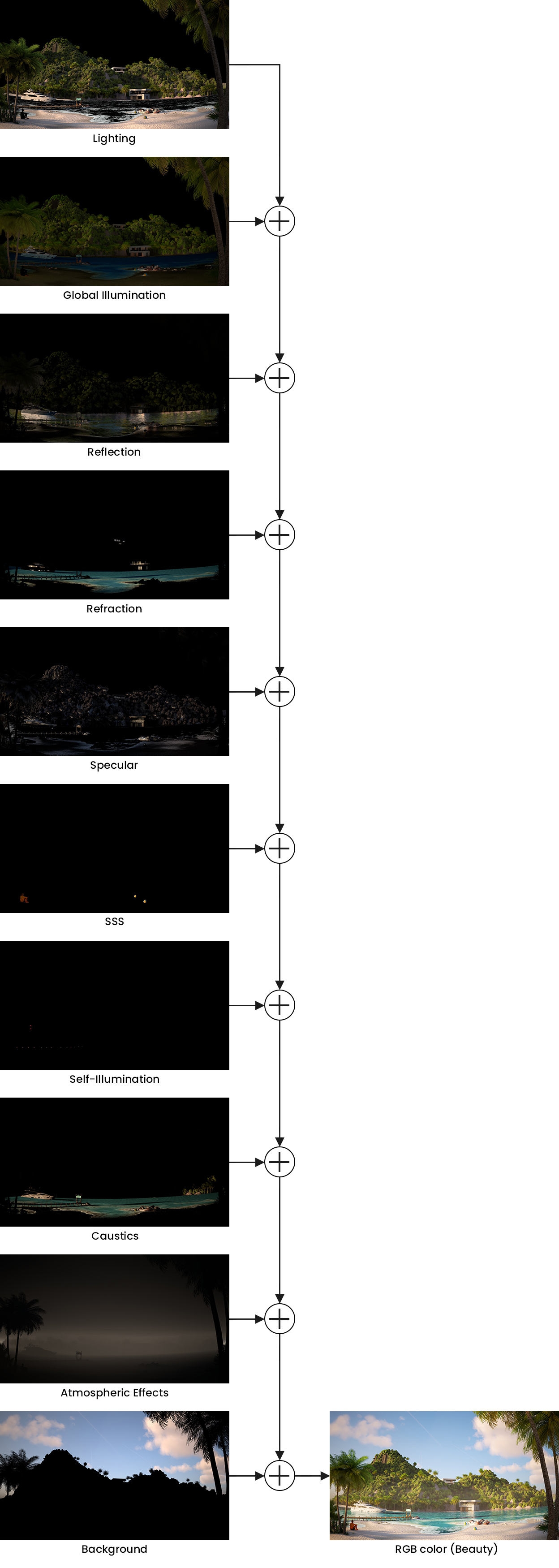
Click on the image to view it in full size.