V-Ray for Cinema 4D
Color Arithmetic Node
This page provides information about the Color Arithmetic node in V-Ray for Cinema 4D.
Last updated 19 September 2025
This page provides information about the Color Arithmetic node in V-Ray for Cinema 4D.
Overview
The Color Arithmetic node performs an arithmetic operation between two colors/textures.
For the example here, a Bitmap node is attached to Color A, and a User Color node with a value of orange is attached to Color B. The Mode is set to Sum, and this Output is connected to the Diffuse Color slot of the V-Ray Material node, which means that it combines both inputs to create the result.
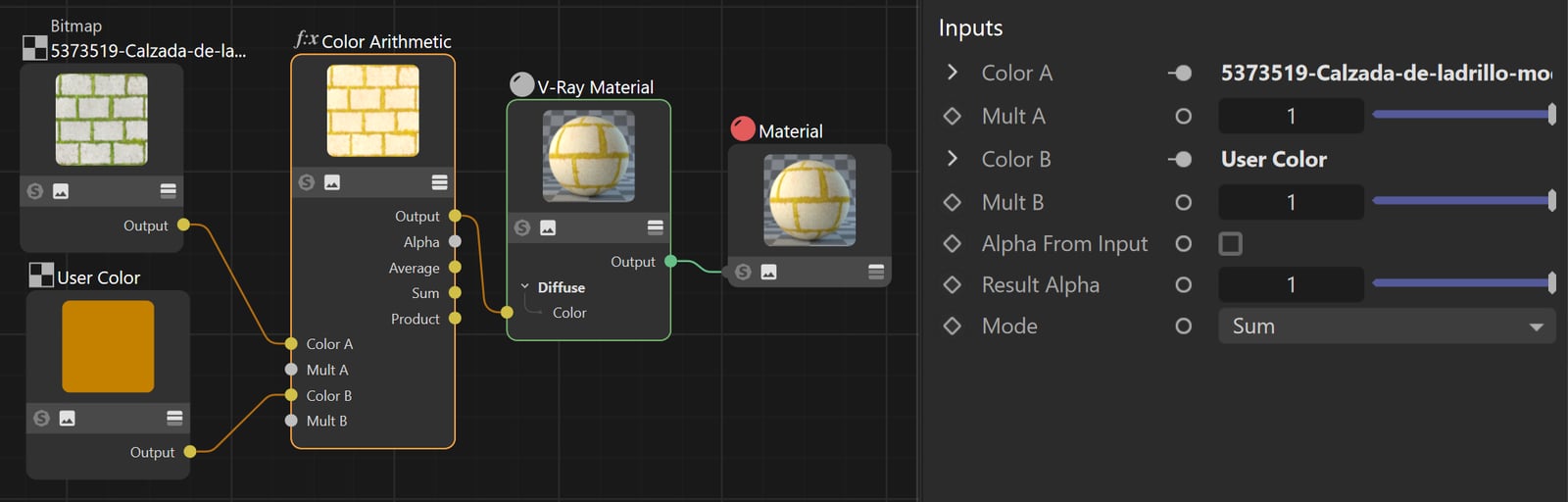
Inputs
Color A – Specifies the first color/texture.
Mult A – A multiplier for Color A.
Color B – Specifies the second color/texture.
Mult B – A multiplier for Color B.
Alpha from Input – When enabled, the alpha value is derived from the Color A shader. In case the Mode is set to Result B, the alpha is derived from the Color B shader.
Result Alpha – Determines a value that overrides the alpha value in the output.
Mode – Specifies the calculation method for the two colors/textures. The selected mode determines the data being output from the Output slot. Additional output slots include Average, Sum, and Product, which output the data produced by the respective mode. Alpha outputs the alpha value from the node.
Result A – Returns the value of A (color_a*mult_a)
Result B – Returns the value of B (color_b*mult_b)
Product – Performs a multiplication operation and returns the product (A*B).
Sum – Performs an addition operation and returns the sum (A+B).
Difference – Performs a subtraction operation and returns the difference (A-B).
Power – Performs an exponentiation operation and returns the power (A^B).
Division – Performs a division operation and returns the quotient (A/B).
Minimum – Performs a comparison and returns the minimum value.
Maximum – Performs a comparison and returns the maximum value.
Absolute Difference – Performs a subtraction operation and returns the difference as an absolute value (abs(A-B)).
Lower Intensity Color – Returns the value of whichever Color parameter has the lowest intensity.
Greater Intensity Color – Returns the value of whichever Color parameter has the greatest intensity.
Sin – Performs a sine function and returns the result (sin(A)).
Cos – Performs a cosine function and returns the result (cos(A)).
Abs – Returns the absolute value of the first argument (abs(color_a*mult_a)
Ceil – Performs a ceiling function that rounds up to the next integer that is equal to or greater than the largest argument - A or B (ceil(A)); (ceil(B)).
Exp – Performs an exponential function (ea+b).
Floor – Performs a floor function that rounds down to the next integer that is equal to or smaller than the smallest argument - A or B (floor(A)); (floor(B)).
Log – Performs a natural logarithmic function (ln(A)).
Log 10 – Performs a common logarithmic function (base 10) on the first argument (log(A)).
Sqrt – Performs a square root function (√A).
Fmod – Performs a division operation and returns the remainder (A%B).
Average – Returns the average of A and B (((color_a*mult_a)+(color_b*mult_b))/2)
Tan – Performs a tangent function and returns the result (tan(A.0)).
Asin – Performs an arcsine function and returns the result (asin(A).
Acos – Performs an arccosine function and returns the result (acos(A)).
Atan – Performs an arctangent function and returns the result (atan(A)).
Atan 2 – Performs an arctangent function with two arguments and returns the result (atan2(A,B)).
Bias Schlick – Performs a faster bias approximation, described by Christophe Schlick, based on the original definition by Kenneth Perlin.1
Gain Schlick – Performs a faster gain approximation, described by Christophe Schlick, based on the original definition by Kenneth Perlin.2
Bias Perlin – Implements the original bias definition by Kenneth Perlin.3
Gain Perlin – Implements the original gain definition by Kenneth Perlin.4

Bias and Gain Equations
The exact equations for the Christophe Schlick and Kenneth Perlin definitions are:
- <code data-v-c2b1f83f=""><span data-v-c2b1f83f="" class="line">bias_schlick(x, a) := x / ((1 / a - 2) * (1 - x) + 1)</span></code>
- <code data-v-c2b1f83f=""><span data-v-c2b1f83f="" class="line">gain_shclick(x, a) :=</span><span data-v-c2b1f83f="" class="line"> { bias_schlick(2 * x, a) / 2 , if a < 0.5 }</span><span data-v-c2b1f83f="" class="line"> { (bias_schlick(2 * x - 1, 1 - a) + 1) / 2 , if a >= 0.5 }</span></code>
- <code data-v-c2b1f83f=""><span data-v-c2b1f83f="" class="line">bias_perlin(x, a) := x ^ (ln(a) / ln(0.5))</span></code>
- <code data-v-c2b1f83f=""><span data-v-c2b1f83f="" class="line">gain_perlin(x, a) :=</span><span data-v-c2b1f83f="" class="line"> { bias_perlin(2 * x, 1 - a) / 2 , if a < 0.5 }</span><span data-v-c2b1f83f="" class="line"> { 1 - bias_perlin(2 - 2 * x, 1 - a) / 2 , if a >= 0.5 }</span></code>
References
[*] Kenneth Perlin and Eric M Hoffert. Hypertexture. SIGGRAPH, 1989.
[*] Christophe Schlick. Fast alternatives to Perlin’s bias and gain functions. Graphics Gems, 4, 1994