V-Ray for Rhino
Back to Beauty
This page provides information about the Back to Beauty Render Element in V-Ray for Rhino.
Last updated 18 May 2026
This page provides information about the Back to Beauty Render Element in V-Ray for Rhino.
Overview
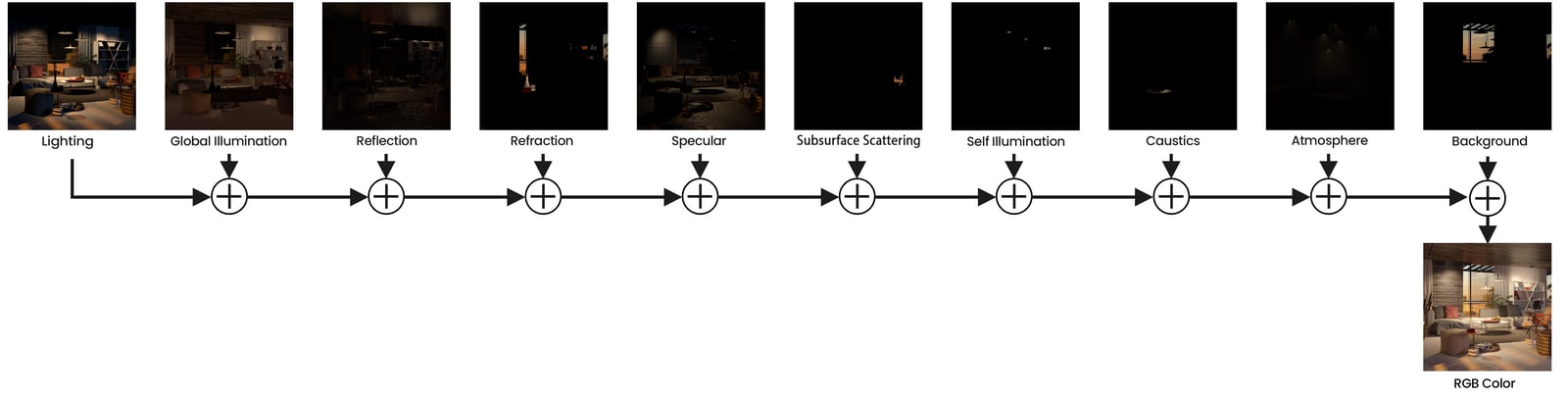
The V-Ray Back to Beauty Render Element expands as all beauty elements for the actual rendering. In the VFB, this render element creates a folder in Composite named Back To Beauty containing all elements with the appropriate blend modes. The elements that are used for the beauty rebuild are - Background, Lighting, Global Illumination, Reflection, Specular, Refraction, Self Illumination, Caustics, Subsurface Scattering and Atmosphere.
UI Paths
||V-Ray Asset Editor|| > Render Elements (right-click) > Back to Beauty
||V-Ray Asset Editor|| > Create Asset (left-click) > Render Elements > Back to Beauty
Parameters
Denoise – Specifies whether to denoise this render element.

Compositing
The following is the base formula for reconstructing the Beauty pass. Some Render Elements can be excluded if the scene does not utilize them.
(Click on the image to see it in full size)