I Lost My SketchUp Status Bar (PC)
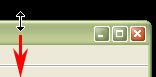
This can happen when your SketchUp window is larger than your monitor's screen. You can display the SketchUp status bar by clicking the "Maximize" button to maximize the SketchUp window (the "Maximize" button has an icon that looks like a computer screen and is just to the left of the "Close" button, the red button
Last updated 17 July 2026
This can happen when your SketchUp window is larger than your monitor's screen. You can display the SketchUp status bar by clicking the "Maximize" button to maximize the SketchUp window (the "Maximize" button has an icon that looks like a computer screen and is just to the left of the "Close" button, the red button with the white "x").

You can also manually resize the window so that it is smaller by dragging down the top bar, and then moving the entire window up.
Still need help?
Technical support from our New Zealand team is available to customers with a current Procadsys SketchUp Plus subscription: Pro Plus, Pro Scan Plus, Pro Civil Contractor Plus, Advanced Workflows Plus or Studio Plus. Self-help articles are public.
Contact SketchUp support