SketchUp Importer for Revit: model in SketchUp, document in Revit
The new SketchUp Importer for Revit brings SketchUp models into Revit as native walls, floors, roofs, doors and windows, so your team can model in SketchUp and only document in Revit.
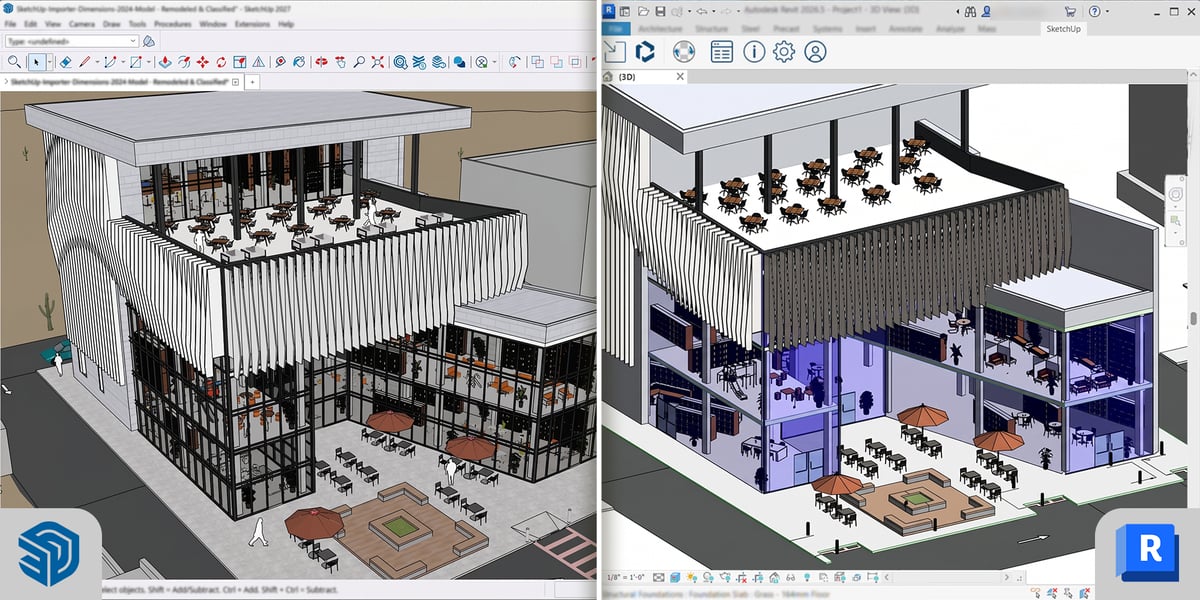
Trimble has released the SketchUp Importer for Revit. It is a Revit plugin that brings a SketchUp model into Revit as native, editable Revit elements, so nobody has to rebuild the design from scratch. It is included in SketchUp Pro Advanced Workflows and SketchUp Studio subscriptions.
For many firms this changes who needs a Revit seat. Your designers can do the modelling in SketchUp, and the people producing the documentation bring that model into Revit when it is ready.
What the importer does
Until now, getting a SketchUp model into Revit meant a link, an in-place component, an IFC export, or redrawing it. Trimble cites research by Dodge Data & Analytics estimating that up to 40 percent of design time in mid-to-late project phases goes on re-keying, remodelling and cleaning up geometry moved between design and documentation tools.
The importer reads the tags and classifications in your SketchUp model and maps them to Revit categories. According to SketchUp’s help centre and the SketchUp team’s launch post:
- Walls, floors, ceilings, roofs, curtain walls, doors and windows come in as native Revit elements that you can edit, tag, dimension and schedule.
- Doors and windows are hosted in their walls and cut the openings.
- Everything else keeps its exact shape as a loadable family or a mesh in the Revit category you choose. Meshes are not editable in Revit.
- Repeated components share one family, so the Revit file stays small.
- Component names become family names, SketchUp tags become Revit subcategories, and materials come through with their colour, transparency and textures.
Before you import, the Select Objects To Import dialog shows how each object will be built, and you can change its category or shape type. After the import, the SketchUp Panel in Revit gives you the Entity Info, Materials and Outliner trays, so you can rename components, change materials and control visibility.
You can import from your computer or from Trimble Connect, and you can bring 3D Warehouse components straight into Revit. SketchUp does not need to be installed on the Revit computer.
Why it matters for your software costs
Not everyone on a design team needs a full Revit seat. With the importer, designers can work in SketchUp from concept through design development. The Revit seats you already have then take the model into documentation without a rebuild.
The importer does not replace Revit. Whoever runs the import still needs an Autodesk Revit licence, and a SketchUp Pro Advanced Workflows or Studio subscription. If you are weighing up how many Revit seats your team really needs, call us and we will help you work out the right mix.
Who gets it and what you need
The SketchUp Importer for Revit is included in SketchUp Pro Advanced Workflows and SketchUp Studio subscriptions. It is not part of SketchUp Go or SketchUp Pro.
To install it you need:
- A Trimble ID with an active SketchUp Pro Advanced Workflows or Studio subscription.
- Autodesk Revit 2026 or 2027.
- Windows 11 and administrator rights. The importer is Windows only.
- Internet access.
On SketchUp Pro now? We can move your subscription to Pro Advanced Workflows or Studio.
Questions? Contact Professional CAD Systems
Free SketchUp 2027 webinar on 1 December
Trimble is running a free webinar, What’s New in SketchUp 2027, on Tuesday 1 December 2026 at 4:00pm NZ time. Martin Cox, a SketchUp Expert at Trimble, presents the 2027 updates and then answers questions live. If you cannot make it on the day, register anyway and we will send you the recording.
- When
- Where
- Online on Zoom, 4:00pm NZ time
- Cost
- Free
For everything else in this release, see SketchUp 2027 is here.
Sources: SketchUp and Revit and SketchUp to Revit in SketchUp’s help centre, the SketchUp team’s post SketchUp Importer for Revit is Live, and Trimble’s 10 November 2026 announcement. Image: Trimble SketchUp.