Chaos Vantage
ComplexFresnel
This page provides details about the ComplexFresnel texture in Chaos Vantage.
Last updated 1 September 2026
This page provides details about the ComplexFresnel texture in Chaos Vantage.
Overview
The ComplexFresnel texture can be used as a reflection color map in a material with the Fresnel option of the material turned off.
The regular materials can compute the Fresnel effect for dielectric materials like plastic based on the IOR of the material (n), while metals have a more complicated Fresnel reflective curve that depends also on the extinction coefficient (k): η = n + ik. The n and k determine the two characteristics of the Fresnel curve for a material: the reflectivity at normal incidence and how quickly it fades to white at gazing angles.
Settings
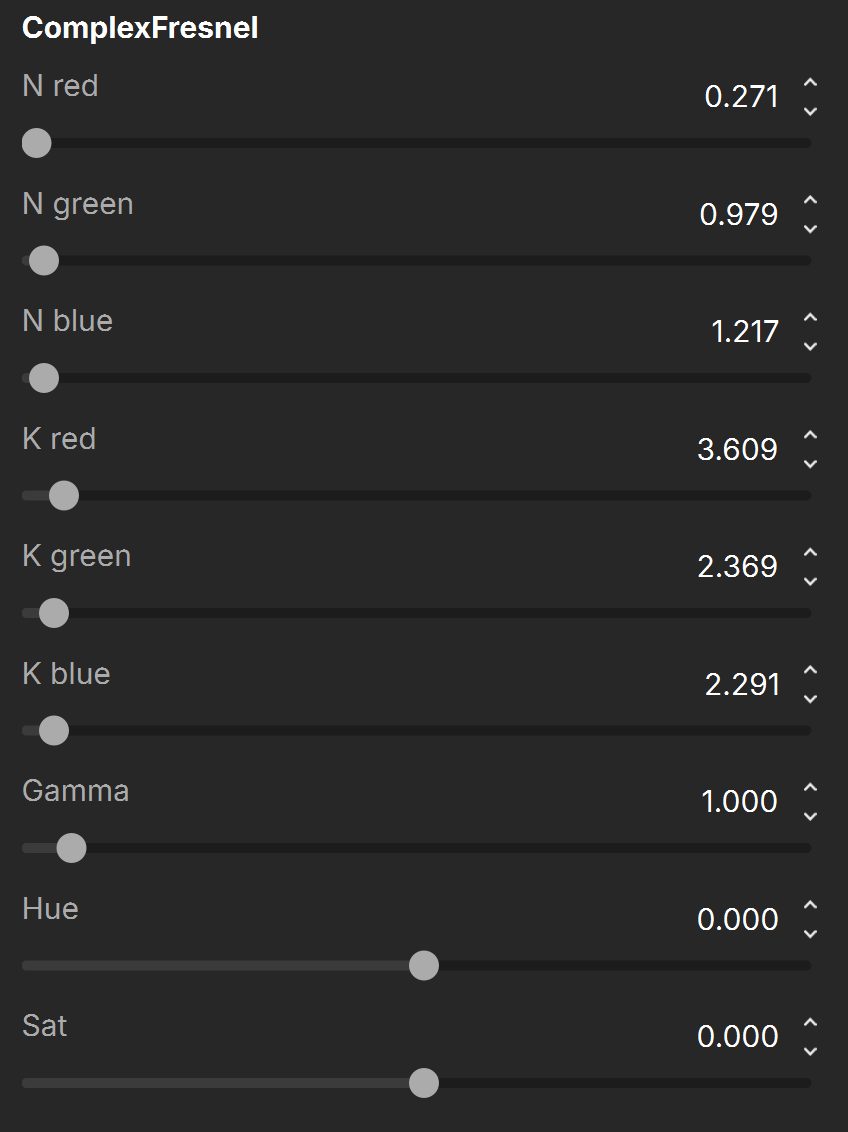
N red – Controls the n (IOR) values for the Red wavelengths.
N green – Controls the n (IOR) values for the Green wavelengths.
N blue – Controls the n (IOR) values for the Blue wavelengths.
K red – Controls the k (Extinction coefficient) values for the Red wavelengths.
K green – Controls the k (Extinction coefficient) values for the Green wavelengths.
K blue – Controls the k (Extinction coefficient) values for the Blue wavelengths.
Gamma – Controls the gamma correction value.
Hue – Changes the colors using a standard Hue spectrum.
Sat – Controls the intensity or purity of the colors. Lower values remove color, causing the color to tend toward grayscale, while higher values intensify the color.
For information about the parameters in the Common and Mapping Properties tab, see the Textures page.
Notes
- Chaos provides options for the creation of realistic metallic shaders through the VRayMtl's parameters. See the Metal Shaders and IOR article for more information.
- Chaos provides options to use Fresnel with OSL Shaders. See the Complex Fresnel shader article for more information.