Chaos Vantage
Shortcuts
This page provides information about the mouse and key shortcuts in Chaos Vantage.
Last updated 27 February 2026
This page provides information about the mouse and key shortcuts in Chaos Vantage.
Overview
Vantage provides a list of mouse and key shortcuts for easier navigation and commands execution. The navigation can be set to work as in 3ds Max, SketchUp or Maya. This can be set from the Navigation Preset dropdown.
The mouse and key shortcuts are divided in several groups:
Icon | Description |
|---|
Icon | Description |
|---|---|
General shortcuts | |
Navigation shortcuts | |
Camera shortcuts | |
Tools shortcuts | |
Selection shortcuts | |
Viewport filter shortcuts | |
Animation editor shortcuts | |
Virtual Reality shortcuts |
To see the full list of shortcut keys in Chaos Vantage, go to Edit > Mouse and Key Shortcuts.
To understand the shortcuts below, you should assume the following abbreviations:
Abbreviation | Control |
|---|
Abbreviation | Control |
|---|---|
LMB | Left Mouse Button |
RMB | Right Mouse Button |
MMB | Middle Mouse Button |
[3]/[S]/[M] | Shortcut depending on navigation preset: [3] - 3ds Max [S] - Sketchup [M] - Maya |

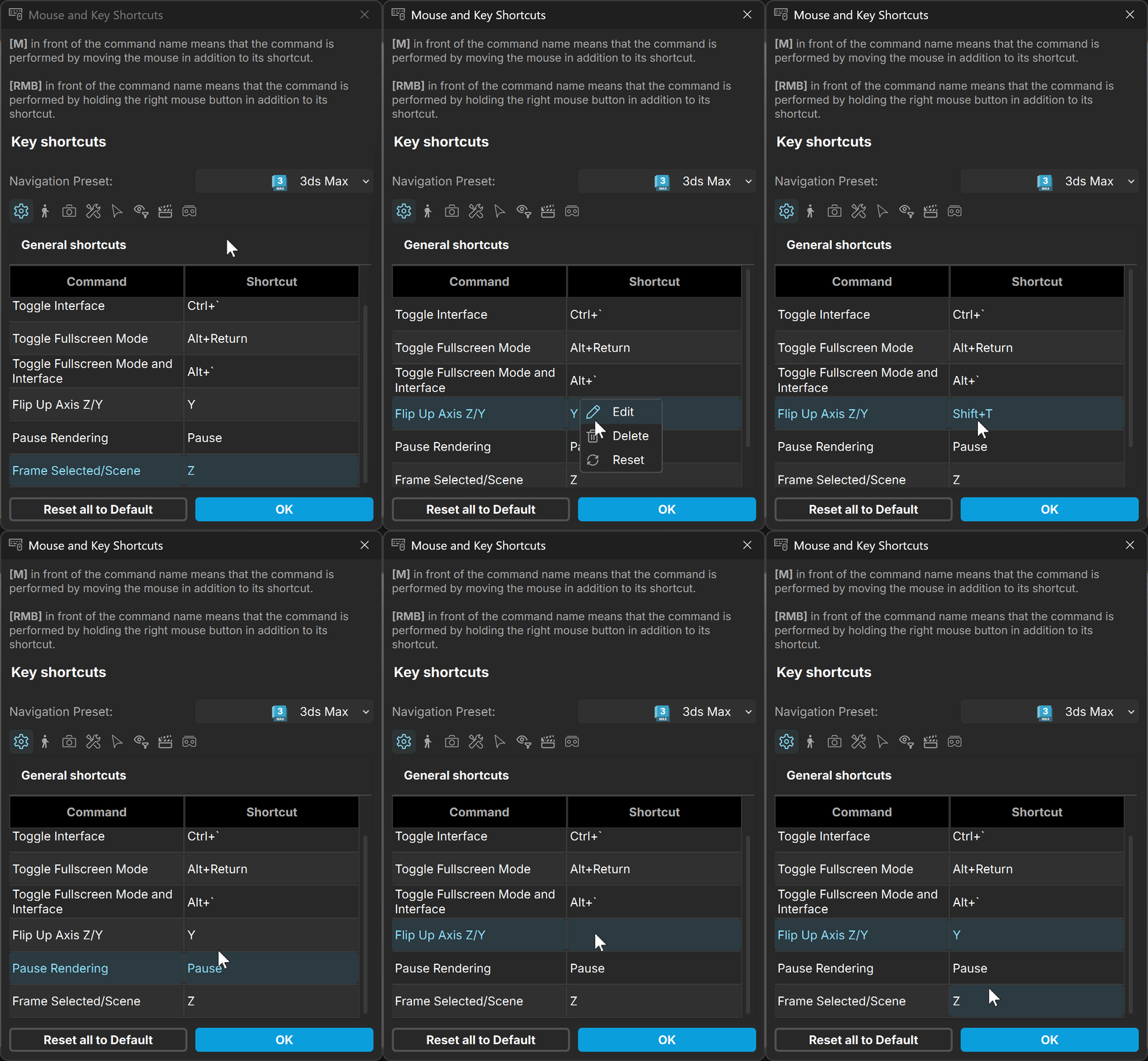
Shortcuts which are not greyed out can be edited. New keys or combination of keystrokes with modifiers can be assigned by using LMB click on the shortcut or RMB click > Edit. Additional options for shortcuts are Delete, which removes the shortcut and Reset, which restores it to default value.
General Shortcuts
Navigation Shortcuts
Command | Shortcut |
|---|
Command | Shortcut |
|---|---|
Toggle Interface | Ctrl+` |
Toggle Fullscreen Mode | Alt+Return |
Toggle Fullscreen Mode and Interface | Alt+` |
Flip Up Axis Z/Y | Y |
Pause Rendering | Pause |
Frame Selected/Scene | [3] Z |
Command | Shortcut |
|---|
Command | Shortcut |
|---|---|
Dolly Camera Sideways | [3] MMB |
Orbit Camera | [3] Alt+MMB |
Fine/Smooth Camera Zoom | [3] Ctrl+Alt+MMB [M] Alt+RMB |
Toggle First Person Mode | ` |
Toggle Camera Collision | C |
Camera Move Forward (when in First Person mode) | W |
Camera Move Backward (when in First Person mode) | S |
Camera Move Left (when in First Person mode) | A |
Camera Move Right (when in First Person mode) | D |
Camera Move Up (when in First Person mode) | E |
Camera Move Down (when in First Person mode) | Q |
Camera Move Faster (when in First Person mode) | Shift+ |
Increase/Decrease Move Speed (when in First Person mode) | Mouse wheel |
Camera Ignore Collisions (when in First Person mode) | Ctrl+ |
Camera Pan Up (when in First Person mode) | Up |
Camera Pan Down (when in First Person mode) | Down |
Camera Pan Left (when in First Person mode) | Left |
Camera Pan Right (when in First Person mode) | Right |
Camera Shortcuts
Command | Shortcut |
|---|
Command | Shortcut |
|---|---|
Change Focus Distance | Ctrl+Alt+LMB |
Change FOV | [3] Alt+RMB |
Roll Camera | Ctrl+MMB |
Toggle Camera Recording | Ctrl+Shift+R |
Undo Camera | Alt+Z |
Redo Camera | Alt+Shift+Z |
Level the Camera | X |
Save New Camera | Ctrl+K |
Overwrite Camera | Ctrl+Shift+K |
Switch to Home Camera | Home |
Switch to Next Camera | PgDown |
Switch to Previous Camera | PgUp |
Load Camera Slot | F1..F12 |
Tool Shortcuts
Command | Shortcut |
|---|
Command | Shortcut |
|---|---|
Clone Selection | Ctrl+D |
New Light | L |
Select | Q |
Group Select | Shift+Q |
Translate | W |
Rotate | E |
Scale | R |
Pick Focus | T |
Snap | S |
Undo | Ctrl+Z |
Redo | Ctrl+Shift+Z |
Copy Viewport to Clipboard | Ctrl+C |
High Quality Render Setup | Ctrl+R |
Always On Top | Ctrl+Alt+T |
Quick Save Snapshot | Ctrl+P |
Selection Shortcuts
Command | Shortcut |
|---|
Command | Shortcut |
|---|---|
Make Selection Invisible | V |
Make Selection Visible | Shift+V |
Select Parent | Ctrl+Up |
Save Selection | Ctrl+0..9 |
Restore Selection | 0..9 |
Animation Editor Shortcuts
Command | Shortcut |
|---|
Command | Shortcut |
|---|---|
Play/Pause Animation | Space |
Update animated objects | U |
Scroll through the timeline | Mouse wheel |
Zoom in/out of the timeline | Alt+Mouse wheel |
Viewport Filter Shortcuts
Command | Shortcut |
|---|
Command | Shortcut |
|---|---|
Toggle light gizmos | G |
Virtual Reality Shortcuts
Command | Shortcut |
|---|
Command | Shortcut |
|---|---|
Move Forward | [L] Thumbstick - UP |
Move Backward | [L] Thumbstick - DOWN |
Move Left | [L] Thumbstick - LEFT |
Move Right | [L] Thumbstick - RIGHT |
Move Up | [R] Thumbstick - UP |
Move Down | [R] Thumbstick - DOWN |
Rotate Left | [R] Thumbstick - LEFT |
Rotate Right | [R] Thumbstick - RIGHT |