Chaos Vantage
Wind
Тhis page provides information about the Wind rollout of Vantage's Environment tab.
Last updated 20 March 2026
Тhis page provides information about the Wind rollout of Vantage's Environment tab.
Overview
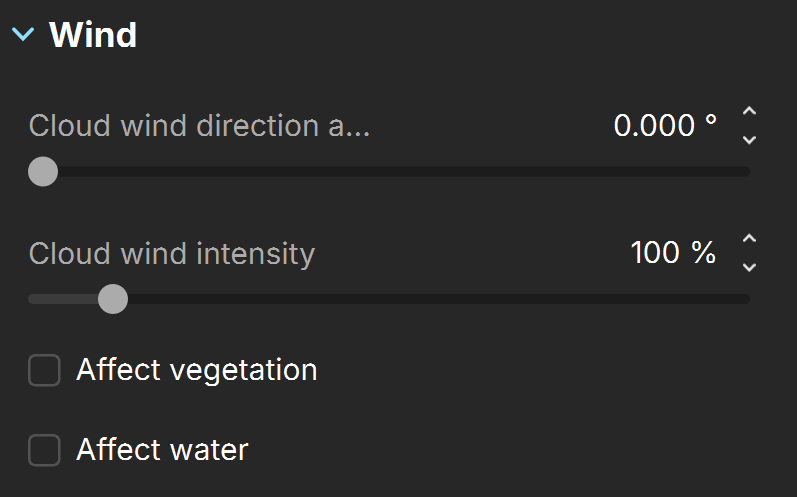
The Wind rollout provides settings for controlling the wind and movement of animated assets. The Wind rollout is located under the Environment tab in the right-hand side panel.

Settings
Cloud wind direction angle – Specifies the direction from which the wind originates. See the Cloud Wind Direction Angle example below.
Cloud wind intensity – Specifies the wind strength. See the Cloud Wind Intensity example below.
Affect vegetation – Enables animation in the viewport of compatible vegetation, like animated trees, to swing with the wind. Doesn’t affect the final render. It is recommended to use Affect vegetation with the DLSS or Vantage denoiser in interactive mode. See the example below. See the Affect Vegetation example below.
Vegetation wind intensity – Specifies the wind strength for animated vegetation. See the Vegetation Wind Intensity example below.
Affect water – Enables animation of water surface objects in the viewport. Doesn't affect the final render. See the Affect Water example below.
Examples
The following examples demonstrate the effect that individual Wind parameters have on the geometry. Click on any image to view it at a higher resolution.
Example: Cloud Wind Direction Angle
The Cloud wind direction angle specifies the angle from which the wind is blowing.
Cloud wind direction angle is 10°
Cloud wind direction angle is 100°
Example: Cloud Wind Intensity
The Cloud wind intensity specifies how fast the wind blows.
Cloud wind intensity = 0
Cloud wind intensity = 100
Example: Affect Vegetation
Enabling the Affect vegetation parameter animates the imported animated Cosmos asset.
Example: Affect Water
Enabling the Affect water parameter animates the water surface objects in the viewport.
Example: Vegetation Wind Intensity
The Vegetation wind intensity parameter speeds or slows down the animated assets' motion.
Vegetation wind intensity = 100
Vegetation wind intensity = 300