V-Ray for 3ds Max
Light Path Expressions
This page provides information about Light Path Expressions.
Last updated 8 May 2026
This page provides information about Light Path Expressions.
Overview
Light Path Expressions or LPEs are a very powerful and advanced tool for extracting specific lighting events from the scene to a separate channel. This allows for a very fine control of the image in compositing. For example, LPEs allow capturing only self-reflections, or the 1st bounce of GI, or the SSS that's only seen behind glass and similar for compositing control of only this aspect of the image.
The LPE syntax is based on regular expressions. Expressions describe a light path that starts from the camera and bounces around the scene until it reaches a light source.
The scene setup is similar to the Light Select workflow. As LPEs are a mode of the Light Select, the expression will capture contributions of the light that is added to the Light Select set. If the Light Select is empty, the expression will extract contributions from all scene lights. LPEs also allow extracting information from the environment, for example allow capturing the GI that comes from the environment only.
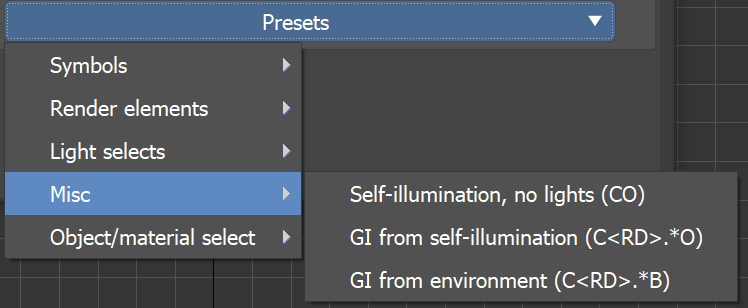
We’ve added a list of the basic symbols for constructing a Light Path expression.
Additionally, you can see what expression should get you the equivalent of some of the already available render elements (like Beauty, Lighting, GI, Light Select types etc.).
Finally, there's some Misc and masking LPE examples, e.g. to capture the GI coming from the environment or to get the GI coming from a given light bounced off of a given object marked by an extra attribute.

LPE Symbols
The LPE alphabet consists of the symbols representing a ray event/type and additional regular expression symbols (“.”, “+”, “*”, “<”, “>”, “[“, “]”, “|”, “?”, “^” and additional label strings).
A valid expression needs to start from the camera (C), capture ray spawn or scattering events and end at light (L), emissive object (O) or the environment (B).
Ray spawn events other than C can be combined with scattering types (e.g. <RD> - capture only diffuse reflection) to get a more specific ray event or they can be used directly (e.g. R - capture reflections of any scattering type. This is also equivalent to <R.>)
Ray termination events can also be combined with each other when you want to capture the contribution of a light together with emissive objects, e.g. C<RD>.*[LO] will capture the GI coming from lights or emissive objects.
Symbol | Description | Type | Final |
Symbol | Description | Type | Final |
Initial ray spawn event | |||
C | Camera ray | Initial ray spawn event | No |
Ray spawn events | |||
R | Reflection ray | Ray spawn event | No |
T | Transmission ray | Ray spawn event | No |
V | Volume ray | Ray spawn event | No |
Scattering types | |||
D | Diffuse scattering | Scattering type | No |
G | Glossy scattering | Scattering type | No |
S | Singular scattering | Scattering type | No |
s | Straight (no) scattering | Scattering type | No |
Ray termination events | |||
L | Light hit | Ray intersection event | Yes |
O | Emitting object hit | Ray intersection event | Yes |
B | Background hit | Ray intersection event | Yes |

Render Elements
Preset | Light path expression |
Preset | Light path expression |
Render elements | |
RGB | C.* |
Self-illumination | C[OL] |
Background | CB |
Lighting | C<RD>L |
Specular | C<R[GS]>L |
GI | C<RD>(.+L|.*[OB]) |
SSS | C<TD>.+L |
Reflection | C<R[GS]>.+L |
Refraction | C<T[GS]>.+L |
Atmosphere | CV.* |

Light Select
Preset | Light path expression |
Preset | Light path expression |
Light selects | |
Direct Illumination | CRL |
Direct Diffuse | C<RD>L |
Direct Specular | C<R[GS]>L |
Full | C.*L |
Indirect | CR.+L |
Indirect Diffuse | C<RD>.+L |
Indirect Specular | C<R[GS]>.+L |

Misc
Preset | Light path expression |
Preset | Light path expression |
Misc | |
Self-illumination, no lights | CO |
GI from self-illumination | C<RD>.*O |
GI from environment | C<RD>.*B |
Object/material select
Preset | Light path expression |
Preset | Light path expression |
Object/Material select | |
Indirect for the object label "obj1" | CR'obj1'.+L |
Indirect for all object labels but "obj1" and "obj2" | CR[^'obj1''obj2'].+L |
RGB for material "Material #01" | C.'mMaterial #01'.* |

