V-Ray for Blender
Grid
This page provides information about the Grid texture in V-Ray for Blender.
Last updated 14 April 2026
This page provides information about the Grid texture in V-Ray for Blender.
Overview
The V-Ray Grid texture generates a procedural grid texture.
UI Path: ||V-Ray Node Editor|| > Shader > Add > Textures > V-Ray Grid

Node Input Sockets
This section describes the input sockets of the node. Some sockets have dedicated parameters, which are further described below, and some sockets are just inputs.
Line Color – Allows a color node to be connected as the Line Color parameter.
Fill Color – Allows a color node to be connected as the Fill Color parameter.
U / V Width – Allows an integer-outputting node to be connected as the U/V Width parameters.
Mapping – Allows a UVW Mapping, or a UVW Randomizer node to be connected to determine the mapping of the ramp.
Output
Color Mult – Allows a color node to determine the multiplier of the ramp colors.
Color Offset – Allows a color node to determine the offset of the ramp colors.
Alpha Mult – Allows a float node to determine the multiplier for the alpha value.
Alpha Offset – Allows a float node to determine the offset of the alpha value.
No UVs Color – Allows a color node to serve as the fallback color.

Common
Compatibility With – Select the compatibility type of the exported map from 3ds Max or Maya.
Alpha From Intensity – Specifies where to take the alpha from.
Bitmap alpha – This is the default setting. With this option selected, V-Ray renders the material the same on both sides.
Color intensity/luminance – Renders the back side of polygons as invisible for the camera.
Force opaque – Renders the back side of polygons as invisible to all rays, except shadow rays.
Invert – Enable to invert the color of the texture.
Invert Alpha – Enable to invert the texture alpha. This option is active only when Invert is enabled.
Color Mult – Corrects the color of the texture by multiplying the RGB color values in the texture with the RGB color values specified here.
Color Offset – Corrects the color of the texture by adding the RGB color values specified here to the RGB color values of the texture.
Alpha Mult – Specifies a multiplier for the texture alpha.
Alpha Offset – Specifies an additional offset for the texture alpha.
No UVs Color – Specifies a default color used for polygons with no valid UVs. In case the map is not tiled, specifies a default color that is used outside the texture square. When a texture is selected, it overrides the color as long as the texture checkbox is enabled.

Mapped
Placement Type – Select how to place the texture.
Whole texture is valid – Uses the full valid portion of the texture.
Crop – Allows the user to specify a section of the texture using the parameters below.
Place – Allows the user to specify a section of the texture and how to place it using the parameters below.
U – U coordinate of the texture sector.
V – V coordinate of the texture sector.
W – W coordinate of the texture sector.
H – Specifies the height of the texture sector.
Jitter – Specifies a randomization value for the UV placement.
Tile U/ Tile V – Enable to choose between horizontal or vertical tiling.
UV Noise On – Enables UV noise.
Animate UV Noise – If enabled, the noise is animated. Use the UV noise phase to animate the noise.
UV Noise Amount – Specifies the UV noise amount.
UV Noise Levels – Specifies the UV noise iterations.
UV Noise Size – Specifies the UV noise size.

Properties
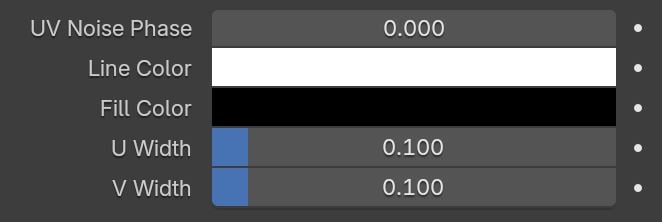
UV Noise Phase – Specifies the UV noise phase.
Line Color – Specifies the grid line's color or texture. When a texture is selected, it overrides the color as long as the texture checkbox is enabled.
Fill Color – Specifies the grid fill's color or texture. When a texture is selected, it overrides the color as long as the texture checkbox is enabled.
U Width – Controls the horizontal line width.
V Width – Controls the vertical line width.