V-Ray for Blender
Mix
This page provides information about the Mix utility texture in V-Ray for Blender.
Last updated 14 April 2026
This page provides information about the Mix utility texture in V-Ray for Blender.
Overview
The V-Ray Mix utility texture mixes two colors or textures using a texture map or a solid color value.
UI Path: ||V-Ray Node Editor|| > Shader > Add > Texture Utilities > V-Ray Mix

Node Input Sockets
This section describes the input sockets of the node. The sockets have dedicated parameters, which are further described below.
Color 1 – Allows a color node to determine the first color.
Color 2 – Allows a color node to determine the second color.
Mix Map – Allows a color node to control the mix between the first and second colors.
Output
Color Mult – Allows a color node to serve as the Color Mult.
Color Offset – Allows a color node to serve as the Color Offset.
Alpha Mult – Allows a float node to serve as the Alpha Mult.
Alpha Offset – Allows a float node to serve as the Alpha Offset.
No UVs Color – Allows a color node to serve as the No UVs Color.

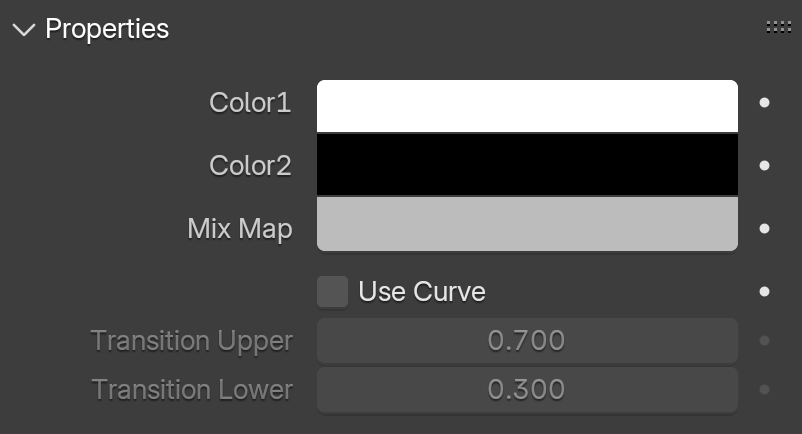
Properties
Color 1 – Specifies the first color.
Color 2 – Specifies the second color.
Mix Amount – Controls the strength of the mix.
Mix Map – Controls how Color 1 and Color 2 are mixed together.
Use Curve – When enabled, a curve is used to sharpen or smooth the mix between the two colors/textures. This parameter is useful in combination with a Mix Map.
Transition Upper/ Lower – When a curve is used to mix the two colors, the Transition parameters specify upper and lower float limits for the curve.
Output
Color Mult– Corrects the color of the texture by multiplying the RGB color values in the texture with the RGB color values specified here.
Color Offset – Corrects the color of the texture by adding the RGB color values specified here to the RGB color values of the texture.
Alpha Mult – Specifies a multiplier for the texture alpha.
Alpha Offset – Specifies an additional offset for the texture alpha.
No UVs Color – Specifies a default color used for polygons with no valid UVs. In case the map is not tiled, specifies a default color that is used outside the texture square. When a texture is selected, it overrides the color as long as the texture checkbox is enabled.
