V-Ray for Blender
Noise
This page provides information about the Noise texture in V-Ray for Blender.
Last updated 18 September 2025
This page provides information about the Noise texture in V-Ray for Blender.
Overview
The Noise node generates a procedural noise texture. It uses an implementation similar to Maya's. It uses two colors that can also have texture maps assigned to them.
UI Path: ||V-Ray Node Editor|| > Shader > Add > Textures > V-Ray Noise

Node Input Sockets
This section describes the input sockets of the node. Some sockets have dedicated parameters, which are further described below, and some sockets are just inputs.
Mapping – Allows a UVW Mapping or a UVW Randomizer node to be connected to determine the mapping of the ramp.
Color 1 (input socket) – Controls the first of the two colors used by the Noise procedural.
Color2 (input socket) – Controls the second of the two colors used by the Noise procedural.
Threshold (input socket) – Specifies a value added to the noise function. Note that values above 1.0 are clamped.
Scale (input socket) – Controls the scale for the noise UVW coordinates.
Origin (input socket)– Controls the translation for the noise UVW coordinates.
Implode (input socket) – Controls the amount of implode performed on the UVW coordinates.
Implode Cen (input socket) – Specifies the center of the implode effect.
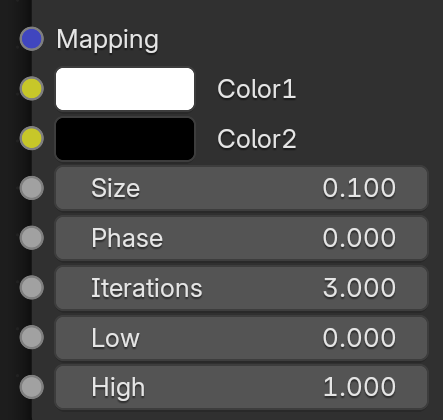
Properties
Type – Specifies the type of noise to be created through the Noise procedural.
Noise
Perlin
Inflected Perlin
Marble(with Perlin)
Color 1 – Controls the first of the two colors used by the Noise procedural.
Color2 – Controls the second of the two colors used by the Noise procedural.
Size – Controls the scale for the noise UVW coordinates.
Iterations – Specifies the UV noise iterations
Phase – Specifies the UV noise phase.

Noise Threshold
Low – Specifies the lowest possible value of the noise function. Values below this are clamped.
High – Specifies the highest possible value of the noise function. Values above this are clamped.
