V-Ray for Blender
Object Output
This page provides information about the Object Output node in the V-Ray Node Editor in Blender.
Last updated 18 September 2025
This page provides information about the Object Output node in the V-Ray Node Editor in Blender.
Overview
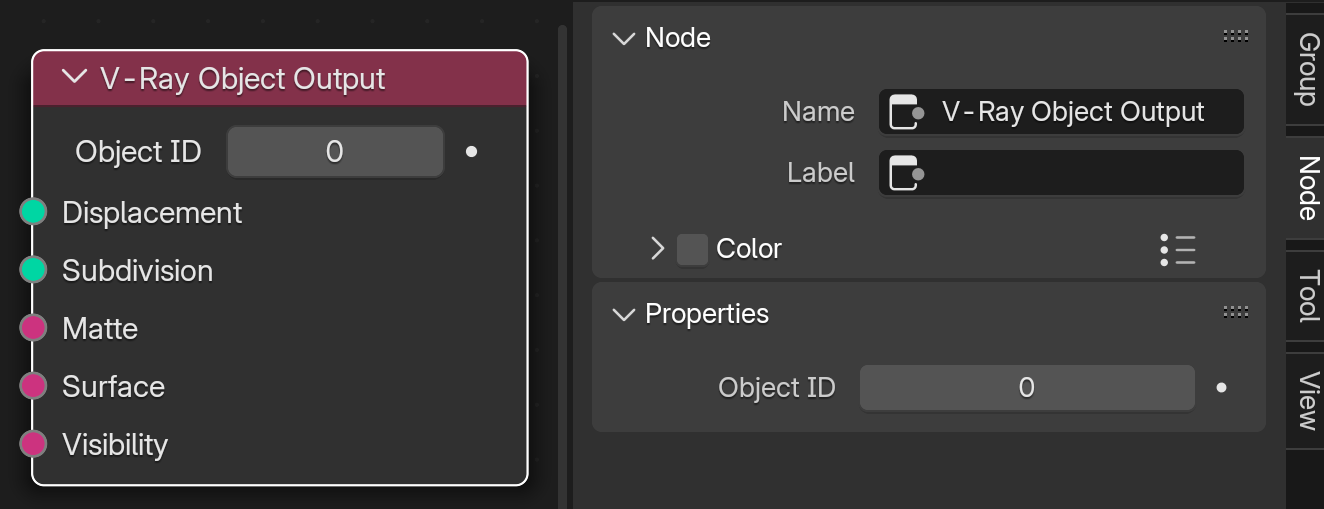
The Object Output node connects all nodes in the V-Ray Object Node Tree to the scene. Nodes not connected to the Material Output are not reflected in the scene. The nodes affect only the currently selected object. Geometry Nodes and Object Properties can be connected to this node.
UI Path: ||V-Ray Node Editor|| > Object > Add > Output > V-Ray Object Output
Node Input Sockets
Displacement – Connect a Displacement node to add displacement to the current object.
Subdivision – Connect a Subdivision node to add subdivision surface properties to the current object.
Matte – Connect a Matte Properties node to add matte properties to the current object.
Surface – Connect a Surface Properties node to edit the surface properties to the current object.
Visibility – Connect a Visibility Properties node to edit the visibility properties to the current object

Properties
This node's properties can be found in the Node menu of the right-side panel of the V-Ray Node Editor or on the node itself.
Object ID – Define an Object ID for the current geometry. The Object ID uniquely identifies the object. It can be referenced when using the Object ID Render Channel, the Multimatte Render Channel, and more.