V-Ray for Blender
Transform
This page provides information about the Transform node in V-Ray for Blender.
Last updated 18 September 2025
This page provides information about the Transform node in V-Ray for Blender.
Overview
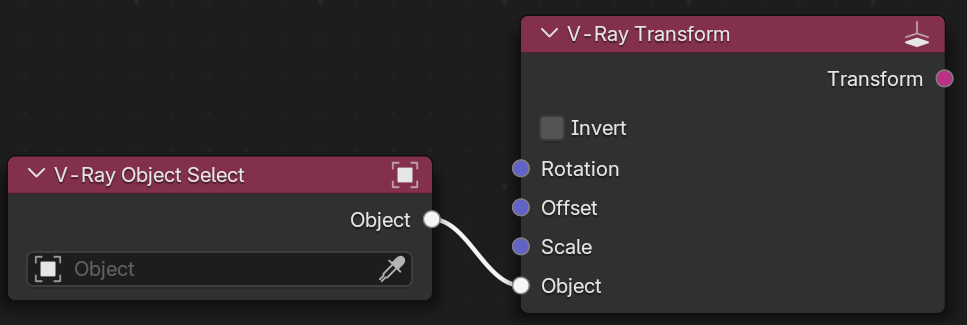
The Transform node adjusts an object's rotation, offset, and scale. The values set in this node only add to the transformations already applied to the object in its properties. In the picture, the output of the V-Ray Transform is connected to the 2d transform of the Displacement of an object.
UI Path: ||V-Ray Node Editor|| > Shader > Math > V-Ray Transform
UI Path: ||V-Ray Node Editor|| > Object > Math > V-Ray Transform
UI Path: ||V-Ray Node Editor|| > World > Math > V-Ray Transform

Node Input Sockets
Rotation – This slot allows you to connect a Vector node to determine the rotation values.
Offset – This slot allows you to connect a Vector node to determine the offset values.
Scale – This slot allows you to connect a Vector node to determine the scale values.
Object – Allows a Selector node to be connected. The Rotation, Offset, and Scale parameters are then derived from the connected object.
Properties
This node's properties can be found in the Node menu of the right-side panel of the V-Ray Node Editor or on the node itself.
Invert – When enabled, inverts the
Rotation – Controls the object rotation along the X, Y, and Z axes.
Offset – Controls the object offset along the X, Y, and Z axes.
Scale – Controls the object scale along the X, Y, and Z axes.
