V-Ray for Cinema 4D
Raw Lighting RE
This page provides information about the Raw Lighting Render Element in V-Ray for Cinema 4D.
Last updated 19 September 2025
This page provides information about the Raw Lighting Render Element in V-Ray for Cinema 4D.
Overview
The Raw Lighting Render Element stores the effects of direct lighting on scene objects with no diffuse components. It is useful for adjusting the brightness of direct lighting during compositing.
UI Path: ||V-Ray|| > Render Elements > Raw Lighting

How to add a render element to a scene
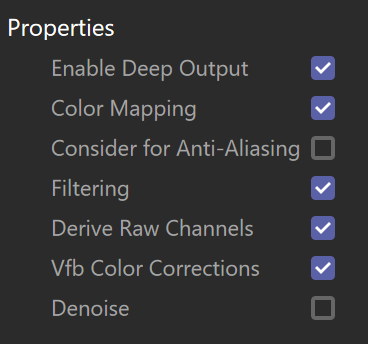
Properties
Enable Deep Output – Specifies whether to include this render element in deep images.
Color Mapping – Applies the color mapping options specified in the Color Mapping rollout of the V-Ray tab in the Render Settings window to this render element. This option is enabled by default.
Consider for Anti-Aliasing – When enabled, anti-aliasing is used where possible.
Filtering – Applies an image filter to this channel.
Derive Raw Channels – Generates data in the raw channels by combining the respective color and the filter color channels.
Vfb Color Corrections – Applies the post-render color adjustments made from the VFB.
Denoise – Enables the render element's denoising, provided the Denoiser render element is present.