V-Ray for Maya
Smoke Color
This page provides general information about the Smoke Color sub-section of the Rendering tab of the V-Ray Volumetric Grid.
Last updated 9 February 2026
This page provides general information about the Smoke Color sub-section of the Rendering tab of the V-Ray Volumetric Grid.
Overview
This roll-out controls the Diffuse color of the Volumetric Shader. The Smoke Color can be a uniform color, a mixture of colors dragged by the simulation (RGB), a function of any physical channel, or sampled from a texture. It is also affected by lights and shadows cast by objects in the scene.
Parameters
Based on | difSource – Specifies the source channel that will be used to determine the smoke color. By default, a uniform simple color set by the Constant Color option is used. This could also be a texture map, or read from the cache files - in that case the corresponding grid channel must be present in the cache files and remapped to the internal Volume Grid channels using the 3rd Party Channels Mapping dialog in the Input roll-out.
Disabled - the smoke color will not be rendered.
Temperature - the smoke color will be based on the values of the Temperature cache channel and can be remapped using the color gradient.
Smoke - the smoke color will be based on the values of the Smoke cache channel and can be remapped using the color gradient.
Speed - the smoke color will be based on the values of the Speed cache channel and can be remapped using the color gradient. See the Smoke Color by Speed example below.
Texture - the smoke color will be based on the values of a texture map plugged into the Texture slot.
Constant Color - the smoke color will be the same for the entire volume and will be taken from the Constant Color box.
RGB - the smoke will be based on the values of the RGB channel.
Fuel - the smoke will be based on the values of the Fuel channel and can be remapped using the color gradient.
Texture | difTexture – If Based on is set to Texture, this slot specifies which texture to use.
Modulate | difModulate – When Based on is not set to Texture, the color is multiplied by the texture in the Texture slot.
Reset to Defaults – Resets the settings to their default values.
Constant color | difSimpleColor – If Based on is set to Constant color, this color is used.
Scattering | difScattering – Controls how the light rays are scattered inside the volume.
Ray-traced (GI only) – Enables physically accurate scattering of light rays. This mode produces the most realistic results but it's the slowest to render. It requires V-Ray with enabled Global Illumination, otherwise, the rendered result would be the same as if the option is Disabled. The Master Multiplier does not affect the rendering in this mode.
Disabled – Disables scattering. The Master Multiplier value can be used to correct the brightness because without light scattering the volume would generally render darker.
Approximate – Uses an approximate formula which is faster than Ray-Traced scattering and produces good-looking results. Brighter areas of the volume would transfer light farther than dark areas. This option is not supported by the Volumetric Geometry render mode in the Rendering tab.
Approximate+Shadows – Same as Approximate, but also affects the strength of shadows over the scene geometry. Approximate+Shadows is not supported by the Volumetric Geometry render mode in the Rendering tab.

Phase Function | phase_function – Controls the direction in which the light will scatter inside the volume. Negative values correspond to backward scattering, which mimics a volume made up of solid particles and will produce denser and more detailed looks. Negative values are more suitable for smoke or dust effects. Positive values correspond to forward scattering, which mimics a volume made up of water droplets where light will scatter more. Positive values are suitable for highly scattering volumes such as clouds. The default value of 0 will scatter the light in all directions and create an even and diffuse look. See the Phase Function example below.
Note that values very close to 1.0 or -1.0 will produce very directional scattering that will be invisible from most angles, so such values are not recommended. When rendering with a Phase Function different than 0 and Volume Light Cache is enabled the rendered result will be brighter. The Phase function is ignored when the scattering is set to Approximate or Approximate+Shadows.
Optimize Anisotropic Scattering | anisotropic_scattering_optimization – When enabled it can greatly reduce the render times for highly scattering volumes such as clouds. Due to certain assumptions made for the optimizations, the optimized render result might produce different results compared to the exact brute-force anisotropic scattering. The option is ignored when the scattering is set to Approximate or Approximate+Shadows.
Scatter Depth | difScatterDepth – Specifies the maximum depth of the GI rays.
Volume Light Cache | difLightCache – Enables light caching for each voxel of the grid, which speeds up bucket rendering considerably when the voxel size of the grid is significantly larger than the rendering pixel. If the grid resolution is large enough compared to the rendering resolution, disabling this option speeds up rendering.
Light Cache Speedup | difLightCacheSR – [Valid only when Volume Light Cache is enabled] The higher this option is set, the faster the rendering will be, but the lower the quality of the volumetric Light Cache. You can increase this parameter and gain render speed as long as you don't start getting dark cubic grid artifacts on the smoke.
Own Light Scatter Mult | difOwnLightsBoost – Valid only when Scattering is set to Approximate or Approximate+Shadows. This multiplier determines how far the light travels through the volumetric, based on the distance from the emissive light itself.
External Scatter Mult | difExtLightsBoost – Valid only when Scattering is set to Approximate or Approximate+Shadows. This multiplier determines how far the light from all external light sources travels through the volumetric. Both Scatter Boost parameters don't alter the visual density of the smoke to the camera and only apply to the illumination.
Master Multiplier | difMult – A general multiplier for the diffuse color. It is ignored when the Scattering mode is set to Ray-traced (GI only).
Shadow Strength | difShadowStrength – A multiplier for the opacity of the shadow that the volumetric casts on other objects.
Color gradient – When the Based on option is set to a grid channel, this color gradient remaps grid simulation data to render smoke color. The sim data channel is laid out horizontally along the X axis in the color gradient.
This sim data has different ranges, depending on the solver it came from - Phoenix Smoke usually goes from 0-1; Fuel goes from 0-1; Temperature is in Kelvins, so it goes from 300-2000, or a few thousand; Speed is in Voxels/sec, so it depends on the grid size and resolution, but usually goes from 0 to several hundred. Data from other solvers often differs a lot from Phoenix ranges. The channel data range is highlighted in the gradient with a light-blue range which can change as you scroll the timeline as the temperature in a cache file rises, smoke dissipates, speed changes, etc., so keep in mind that the data range for one frame might not be representative for the entire cache sequence. You can also check the data ranges for the currently loaded cache file under the Input roll-out of the V-Ray Volume Grid.
Example: Phase Function with front lighting

Phase Function = -0.5

Phase Function = 0

Phase Function = 0.5

Phase Function = -0.5 (Backward Scattering)

Phase Function = 0 (Isotropic Scattering)

Phase Function = 0.5 (Forward Scattering)
The orange arrow represents a ray of light going through the volume and the possible scattering directions for the ray.
Example: Phase Function with back lighting

Phase Function = -0.5

Phase Function = 0
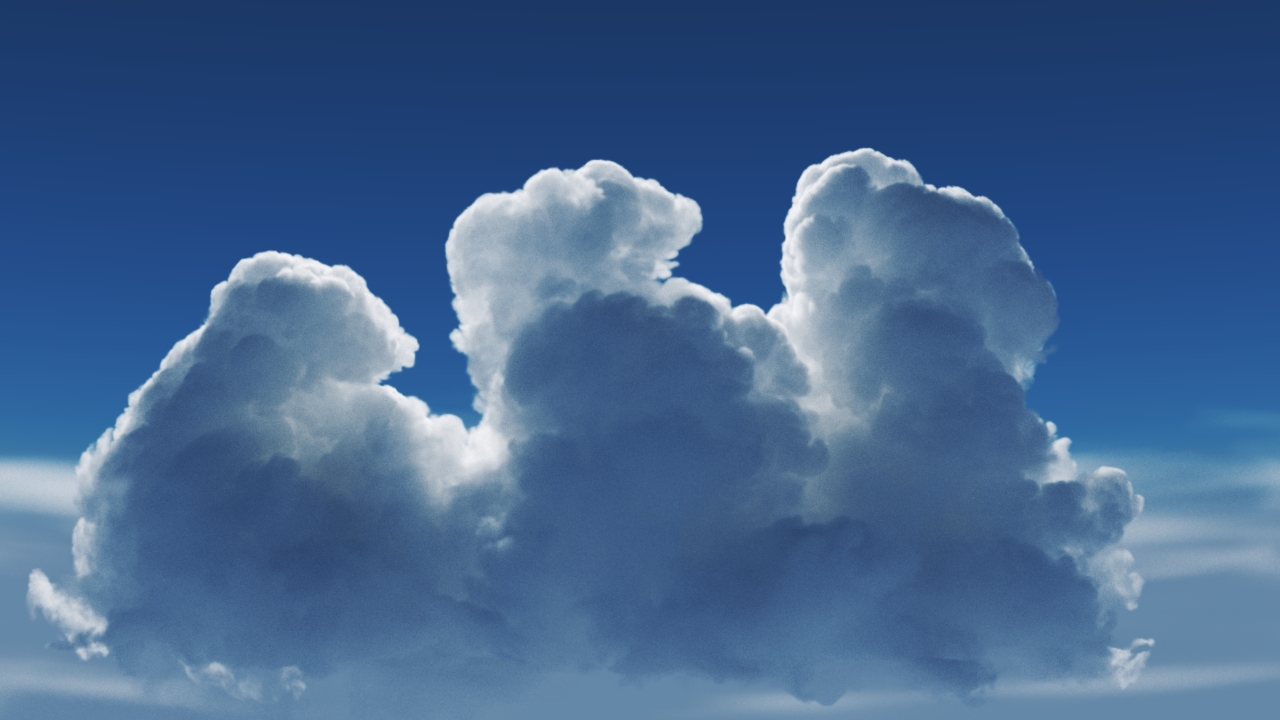
Phase Function = 0.5

Phase Function = -0.5 (Backward Scattering)

Phase Function = 0 (Isotropic Scattering)

Phase Function = 0.5 (Forward Scattering)
The orange arrow represents a ray of light going through the volume and the possible scattering directions for the ray.