V-Ray for Maya
Universal V-Ray Settings
This page provides information on V-Ray settings that work for most scenes.
Last updated 19 September 2025
This page provides information on V-Ray settings that work for most scenes.
Overview
Render quality is mainly controlled by the image sampler. There are a few different parameters - the Min and Max subdivs control how many samples are taken for each pixel, and the Noise Threshold controls how much noise is allowed in the image. The progressive image sampler has an extra option - the Max render time parameter that signals an end to rendering after a certain amount of time has passed. Each of these parameters acts as a stopping criterion for rendering, or in other words - whichever of the criteria is met first will signal V-Ray to stop rendering.
The concept of "universal" settings is to have a setup that works for almost all types of scenes with a single parameter that controls the image quality and render duration - the Noise Threshold.
The universal settings are the default since V-Ray Next, while with previous versions they were a recommendation.
There are cases where the default (universal) render settings may not give the desired result, in such instances the settings can be adjusted as needed. For more information, see the Render Settings Explained article.
Want to follow along but don’t have a license?
For the Progressive image sampler
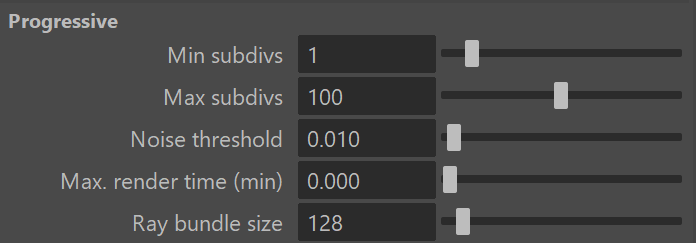
- The Max. render time (min) is set to 0, so that this parameter does not limit the render time. This means that rendering continues until any one of the other values is reached.
- The Max subdivs parameter is set to 100, a value that takes much longer to reach. This means that the Noise Threshold is reached first and determines the render time and quality.
- The Noise Threshold is set to 0.010, as that value produces clean renders and reasonable render times.
For the Bucket image sampler
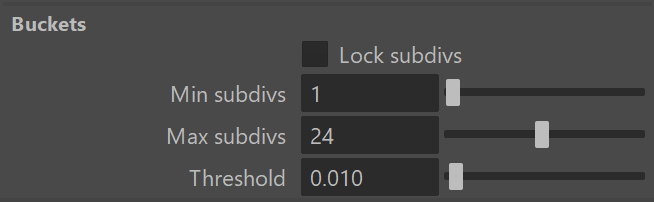
- The Max subdivs parameter is set to 24. Keep in mind that the actual number is 24 squared, which is 576. It will take the sampler a long time to reach this value. This means that rendering will stop when the Threshold is reached.
- The Threshold is set to 0.010, as that produces clean renders at a descent speed.