V-Ray for Rhino
Generic Coat
The Coat rollout is part of the Generic material's parameters.
Last updated 1 September 2026
The Coat rollout is part of the Generic material's parameters.
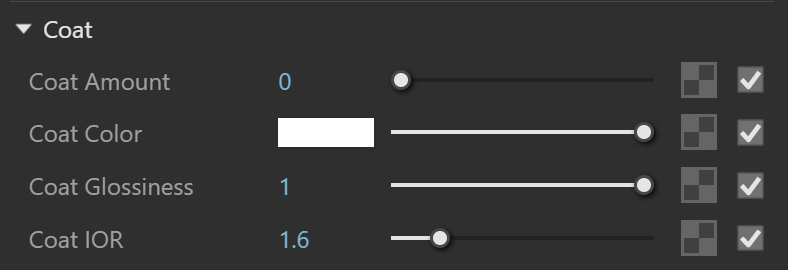
Coat
Coat Amount* – Specifies the blending weight of the coat layer. A value of 0 does not add a coat layer, while higher values blend the coat gradually. See the Coat off/on and the Coat Amount example below.
Coat Color – Determines the coat layer's color. A texture map can be used here.
Coat Glossiness* – Available when the Surface control option is set to Use Glossiness. Controls the sharpness of reflection. A value of 1.0 means perfect glass-like reflection; lower values produce blurry or glossy reflections. See the Coat Glossiness example below.
Coat IOR* – Specifies the Index of Refraction for the coat layer.
Example: Coat off/on
This example shows the effect of the Coat layer on the material. The Coat Amount in the first render is set to 0, the coat layer is off. In the second render, the Coat Amount is set to 1 and the coat layer is active.

Coat Amount
= 0

Coat Amount
= 1
Example: Coat Amount
This example shows how Coat Amount affects the look of the material. The base Reflection Glossiness is set to 0.76 and the Coat Glossiness is set to 1. The value of the Coat IOR is set to 2 and the Coat Color is the default white.

Coat Amount
= 0

Coat Amount
= 0.5

Coat Amount
= 1
Example: Coat Glossiness
This examples shows how Coat Glossiness controls the sharpness of the coat reflection. Here, the base Reflection Glossiness is set to 0.76 and the Coat Amount is set to 1. Coat IOR is 2 and the Coat Color is the default white.Notice how higher values produce glossier reflection and lower values make it look blurry.

Coat Glossiness
= 0

Coat Glossiness
= 0.75

Coat Glossiness
= 1
Coat Bump
Mode / Map – Allows the user to specify whether a bump map or a normal map effect is added to the base material.
Bump Map* – Requires a height map.
Normal Map – Requires an RGB map. If a Bitmap texture is slotted, its color space must be set to Rendering Space (Linear).
Local Space Bump – A height map should be used. Unlike the standard Bump mode, in this case the height is not measured in scene units. It is only determined by the raw texture values. Scaling objects will not affect the local space effect. This option has to be selected for the round edges effect (Edges texture used as bump).
Amount* – Multiplies the Bump / Normal effect.

Notes
* – When a Bitmap texture is mapped in this slot, its color space is automatically adjusted. Copy-pasting, replacing or wrapping a texture does not trigger this automatic adjustment. It is reserved solely when creating a Bitmap in the specified material slot.