Skip to content
07-848 2005

V-Ray for SketchUp, materials

Generic Diffuse

Set a Generic material's colour and diffuse roughness in V-Ray for SketchUp.

On this page
  1. Diffuse
  2. Example: Diffuse Roughness
  3. Notes

Use the Diffuse rollout in V-Ray for SketchUp to adjust a Generic material's diffuse settings.

Diffuse

Some options are available only in Advanced mode.

Colour sets the material's colour. For dielectric materials, this is the diffuse colour. For metals, this is the specular reflections colour.

Diffuse Roughness* controls the Diffuse BRDF Falloff. Use it to simulate rough or dusty surfaces, such as skin or the surface of the moon. This parameter affects only the diffuse portion of non-metallic materials. See the Roughness Parameter example below.

Diffuse panel with Color controls and Diffuse Roughness set to 0.

Example: Diffuse Roughness

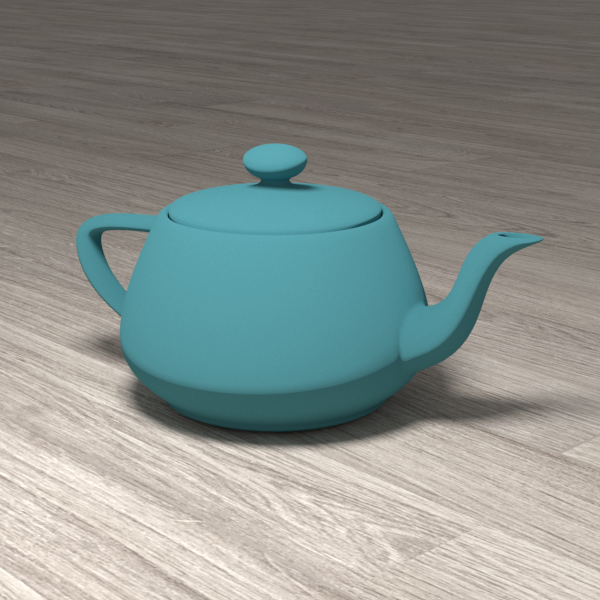
This example shows the effect of Diffuse Roughness. As Diffuse Roughness increases, materials look flatter and dustier.

Teal teapot on a wooden surface demonstrates how Diffuse Roughness affects material shading.

Diffuse Roughness

= 0.0 (regular diffuse material)

Teal teapot illustrates a regular diffuse material with Diffuse Roughness set to 0.0.

Diffuse Roughness

= 0.6

Teal teapot with Diffuse Roughness set to 0.6 shows flatter, dustier shading.

Diffuse Roughness

= 0.8

Notes

* The colour space adjusts automatically only when you create a Bitmap texture in this material slot. Copying and pasting, replacing or wrapping a texture does not trigger this adjustment.

Adapted from Chaos documentation: Generic Diffuse. © 2026 Chaos Software EOOD

Procadsys customer support

Still need help?

Licences, renewals and billing

Our New Zealand team looks after your V-Ray licences, renewals and invoices.

Monday to Friday, 9:00 am to 4:30 pm NZ time, excluding New Zealand public holidays.

Technical problems

Installation errors, crashes and other technical problems with V-Ray are handled by Chaos support.