Skip to content
07-848 2005

V-Ray for SketchUp, materials

Generic Self-Illumination

Control a Generic material's emission colour and intensity with Self-Illumination in V-Ray for SketchUp.

Use the Self-Illumination rollout in a Generic material's parameters to control its emission colour and intensity in V-Ray for SketchUp.

Self-Illumination

Colour controls the surface's emission colour.
Intensity controls the intensity of the Emissive Color.
Compensate EV adjusts the emission intensity to compensate for camera exposure when enabled. This keeps the emissive object's colour the same regardless of camera exposure.
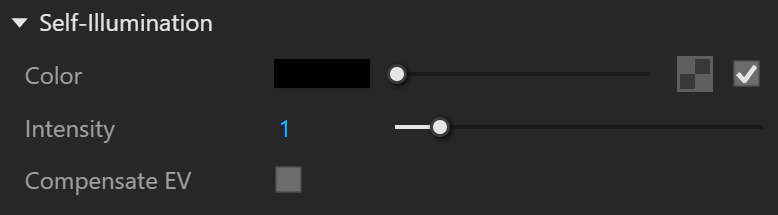
Self-Illumination panel showing Color set to black, Intensity at 1 and Compensate EV unticked.

Procadsys customer support

Still need help?

Licences, renewals and billing

Our New Zealand team looks after your V-Ray licences, renewals and invoices.

Monday to Friday, 9:00 am to 4:30 pm NZ time, excluding New Zealand public holidays.

Technical problems

Installation errors, crashes and other technical problems with V-Ray are handled by Chaos support.