V-Ray for Unreal
V-Ray Light Mesh Blueprint
This page provides information on the V-Ray Light Mesh Blueprint.
Last updated 25 February 2026
This page provides information on the V-Ray Light Mesh Blueprint.
Overview
The Mesh Light is a type of VRayLight that turns a static mesh object into a light source. It is useful for representing light sources that are not planar or spherical.
UI Paths
The VRayLightMeshBlueprint Actor is accessible through the Modes > V-Ray Assets > VRayLightMesh. Select the Blueprint and drag and drop it in the level.
||Modes Tab|| > V-Ray Assets > VRayLightMesh
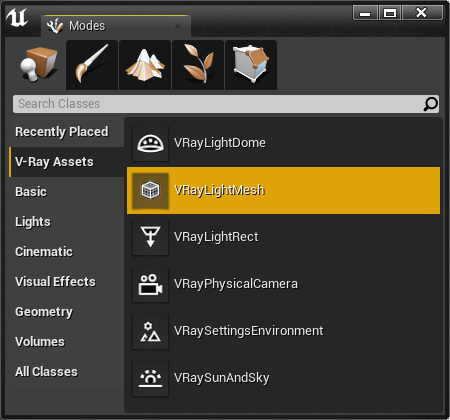
VRayLightMesh Settings
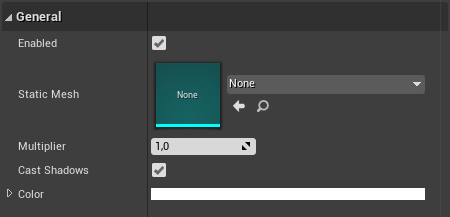
General
Enabled – When enabled (the default), the light contributes to the lighting in the level. Disabling it will stop the contribution of the light in the environment.
Static Mesh – Specifies the static mesh that will emit the light.
Multiplier – Specifies the intensity multiplier of the mesh light.
Cast Shadows – When enabled (the default), the light casts shadows. Turn this option off to disable shadow casting for the light.
Color – The color that the light emits.
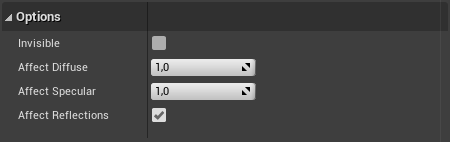
Options
Invisible – Controls whether the shape of the light source is visible in the rendered image. When this option is disabled, the light source is rendered in the color specified by the Color setting. This option only affects the visibility of the light when seen directly by the camera or through refractions.
Affect Diffuse – Determines whether the light will affect the diffuse portion of the materials. The value controls the light's contribution to the diffuse portion of the materials (No effect in viewport).
Affect Specular – Determines whether the light will affect the specular portion of the materials. The value controls the light's contribution to specular reflections (No effect in viewport).
Affect Reflections – Determines whether the light source will appear in reflections (No effect in viewport).