V-Ray for Unreal
V-Ray Sun and Sky Blueprint
This page provides details on using the V-Ray Sun and Sky Blueprint.
Last updated 25 February 2026
This page provides details on using the V-Ray Sun and Sky Blueprint.
Overview
A Sun light is a spherical light source placed at a specific location, which simulates the sun in the sky. Developed to work together, the V-Ray Sun and V-Ray Sky reproduce the real-life Sun and Sky environment of the Earth. Both are coded in a way that allows them to change their appearance depending on the Elevation and Azimuth of the Sun disk.

UI Paths
The VRaySunAndSky actor is accessible through the Modes > V-Ray Assets > VRaySunAndSky . Select the Blueprint and drag and drop it in the level.
||Modes Tab|| > V-Ray Assets > VRaySunAndSky

VRaySunAndSky Settings
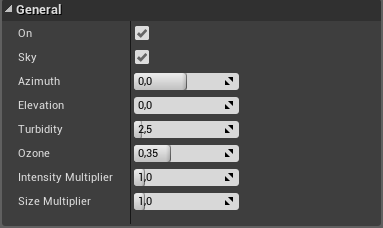
General
On – Toggles the sun on and off.
Sky – Toggles the Hosek sky.
Azimuth – Specifies the horizontal angle of the sun disk in degrees. Value ranges are from -180 to 180.
Elevation – Specifies the vertical angle of the sun disk in degrees. Value ranges are from 0 to 90.
Turbidity – Determines the amount of dust in the air and affects the color of the sun and sky. Smaller values produce a clear and blue sky and sun, while larger values make them yellow and orange.
Ozone – Affects the color of the sun light. Available in the range between 0.0 and 1.0. Smaller values make the sunlight more yellow, larger values make it blue.
Intensity Multiplier – Determines the intensity value when overwriting the sun settings.
Size Multiplier – Controls the visible size of the sun. This affects the appearance of the sun disc as seen by the camera and reflections, as well as the blurriness of the sun shadows.
Options
Set for Light Bake – Enable for V-Ray Bake. This sets the skylight and directional light mobility to static. When unchecked the skylight and the Directional light to movable.
Affect Diffuse – Determines whether the light will affect the diffuse portion of the materials. The value controls the light's contribution to the diffuse portion of the materials (No effect in viewport).
Affect Specular – Determines whether the light will affect the specular portion of the materials. The value controls the light's contribution to specular reflections (No effect in viewport).
Auto Update – Enables the automatic update of the sky based on the sun position.
