V-Ray for Unreal
VRayCarpaintUberMtl
This page provides an overview of the VRayCarpaintUberMtl and its parameters.
Last updated 25 February 2026
This page provides an overview of the VRayCarpaintUberMtl and its parameters.
Overview
VRayCarpaintUberMtl simulates metallic car paint. It is a complex material with two layers: a base layer and a clear coat layer. The material allows the adjustment of each of these layers separately.

UI Paths
You can create a VRayCarpaintUberMtl through the ||Content Browser|| > Add New > V-Ray > VRayCarpaintUberMtl or from ||Content Browser|| > Add New > V-Ray > VRay Material Instance > Parent Material > VRayCarpaintUberMtl .
||Content Browser|| > Add New > V-Ray > VRayCarpaintUberMtl

||Content Browser|| > Add New > V-Ray > VRay Material Instance > Parent Material > VRayCarpaintUberMtl


VRayCarpaintUberMtl Parameters
Specifies the properties of the base layer for the car paint.
- SolidColor – Specifies the diffuse color of the base layer.
- FlipFlop – Enables a flip-flop or chameleon effect for the base layer.
- PearlescentColor – Specifies the color at the Fresnel reflections. Note that this color also depends on the MetallicAmount parameter.
- PearlescentBIas – Controls the Fresnel amount of the PearlescentColor.
- MetallicAmount – Specifies the metallicness of the base layer.
- MetallicGossiness – Controls the sharpness of reflections. A value of 1.0 means perfect mirror-like reflection; lower values produce blurry, or glossy, reflections.

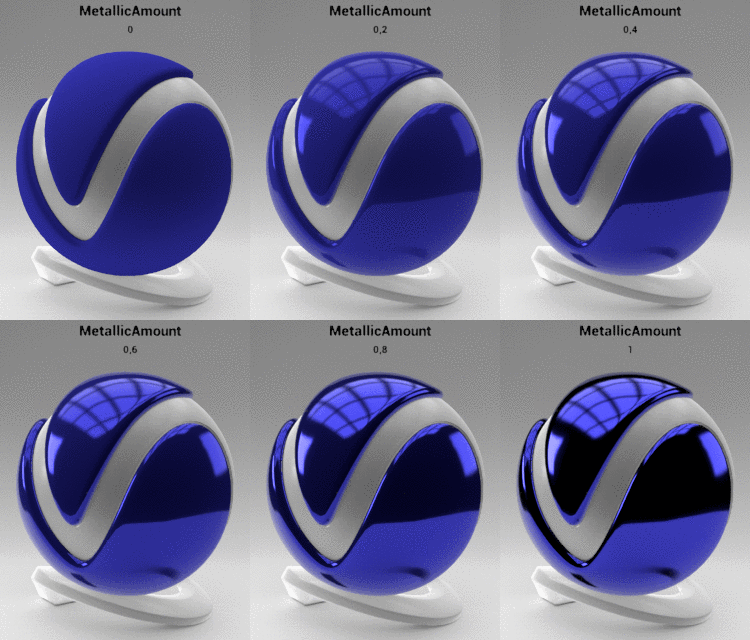
SolidColor=0.05,0.05,0.6; MetallicGlossines=1; CoatStrength=0

SolidColor=0.05,0.05,0.6; MetallicAmount=1; CoatStrength=0
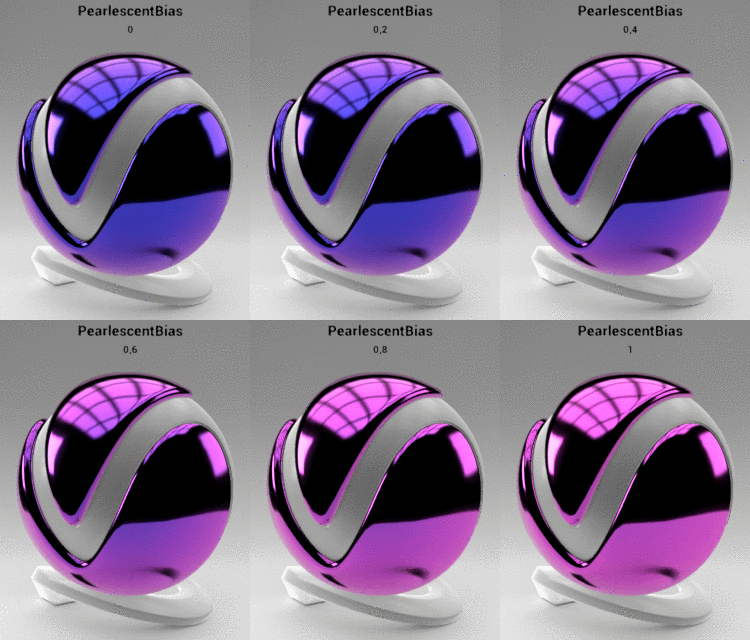
SolidColor=0.05,0.05,0.6; FlipFlop=On; PearlescentColor=0.9,0.7,0.1; MetallicGlossines=1; CoatStrength=0
Specifies the properties of the top coat layer of the car paint with additional reflection and bump properties.
- CoatStrength – Specifies the strength of the Clear Coat layer.
- CoatGlossiness – Controls the sharpness of reflections of the Clear Coat layer. A value of 1.0 means perfect mirror-like reflection; lower values produce blurry, or glossy, reflections.
- UseBumpTex – Enables the use of Texture for Bump of the Clear Coat layer.
- BumpTex – Specifies the Bump Texture for Clear Coat layer when UseBumpTex is enabled.
- BumpTexAmount – Specifies the bump amount of the Clear Coat layer.
- BumpTex_Channel – Specifies the UV channel index for the BumpTex of the Clear Coat layer.
- BumpTex_OffsetU – Specifies the horizontal offset of the BumpTex of the Clear Coat layer.
- BumpTex_OffsetV – Specifies the vertical offset of the BumpTex of the Clear Coat layer.
- BumpTex_TileU – Specifies the horizontal repetition of the BumpTex of the Clear Coat layer.
- BumpTex_TileV – Specifies the vertical repetition of the BumpTex of the Clear Coat layer.
- BumpTex_Triplanar – Enables triplanar mapping for the BumpTex of the Clear Coat layer.
- BumpTex_TriplanarBlend – Specifies the blend amount between the different Texture projections. Lower values produce sharper transitions between projections.
- BumpTex_TriplanarScale – Adjusts the scale of the BumpTex of the Clear Coat layer when BumpTex_Triplanar is enabled.


SolidColor=0.05,0.05,0.6; MetallicAmount=0; CoatGlossiness=1

SolidColor=0.05,0.05,0.6; MetallicAmount=0; CoatStrength=1