V-Ray for Unreal
VRaySettingsEnvironment
This page provides details on the Environment settings in V-Ray for Unreal.
Last updated 24 February 2026
This page provides details on the Environment settings in V-Ray for Unreal.
Overview
The VRaySettingsEnvironment blueprint is where you can specify a color and a texture map to be used for background in the viewport and also a color and a texture map to be used during GI and reflection/refraction calculations at render time.
UI Path
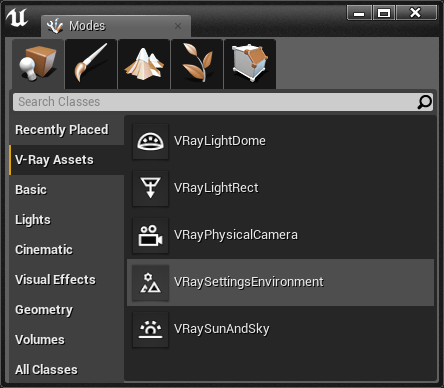
The VRaySettingsEnvironment Blueprint Actor is accessible through Modes > V-Ray Assets > VRaySettingsEnvironment. Select the Blueprint and drag and drop it in the level.
||Modes Tab|| > V-Ray Assets > VRaySettingsEnvironment
VRay Environment Settings
Override Background - Turns on and off the background override.
Background Color - Specifies the environment background color.
Background Texture - Lets you choose an environment background texture that will be visible in the viewport. Note that if present, the texture overrides the specified Background Color.
Override GI - Turns on and off the GI override (No effect in viewport).
GI Color - Specifies the environment (skylight) color (No effect in viewport).
GI Texture - Lets you choose a GI environment texture. Note that if present, the texture overrides the specified GI (No effect in viewport).
Override Reflection - Turns on and off the reflection override (No effect in viewport).
Reflection Color - Specifies the environment color for reflections (No effect in viewport).
Reflection Texture - Lets you choose an environment texture for reflections. Note that if present, the texture overrides the specified Reflection Color (No effect in viewport).
Override Refraction - Turns on and off the refraction override (No effect in viewport).
Refraction Color - Specifies the environment color for refractions (No effect in viewport).
Refraction Texture - Lets you choose an environment texture for refractions. Note that if present, the texture overrides the specified Refraction Color (No effect in viewport).

Misc
Preview Scale - Specifies the sorting priority of the SkySphere in the viewport. Values smaller than 1 will make the SkySphere render in front of other Actors that use Environment Spheres (e.g. VRayLightDome)
