V-Ray for Unreal
What's New
Example: Added Near Clip Plane functionality to VRayPhysicalCamera
Last updated 18 September 2025
Official Release
Date – January, 2022
New Features
Unreal Engine
- Support for Unreal Engine 4.27
Geometry
- Initial support for Skeletal Meshes

Render element
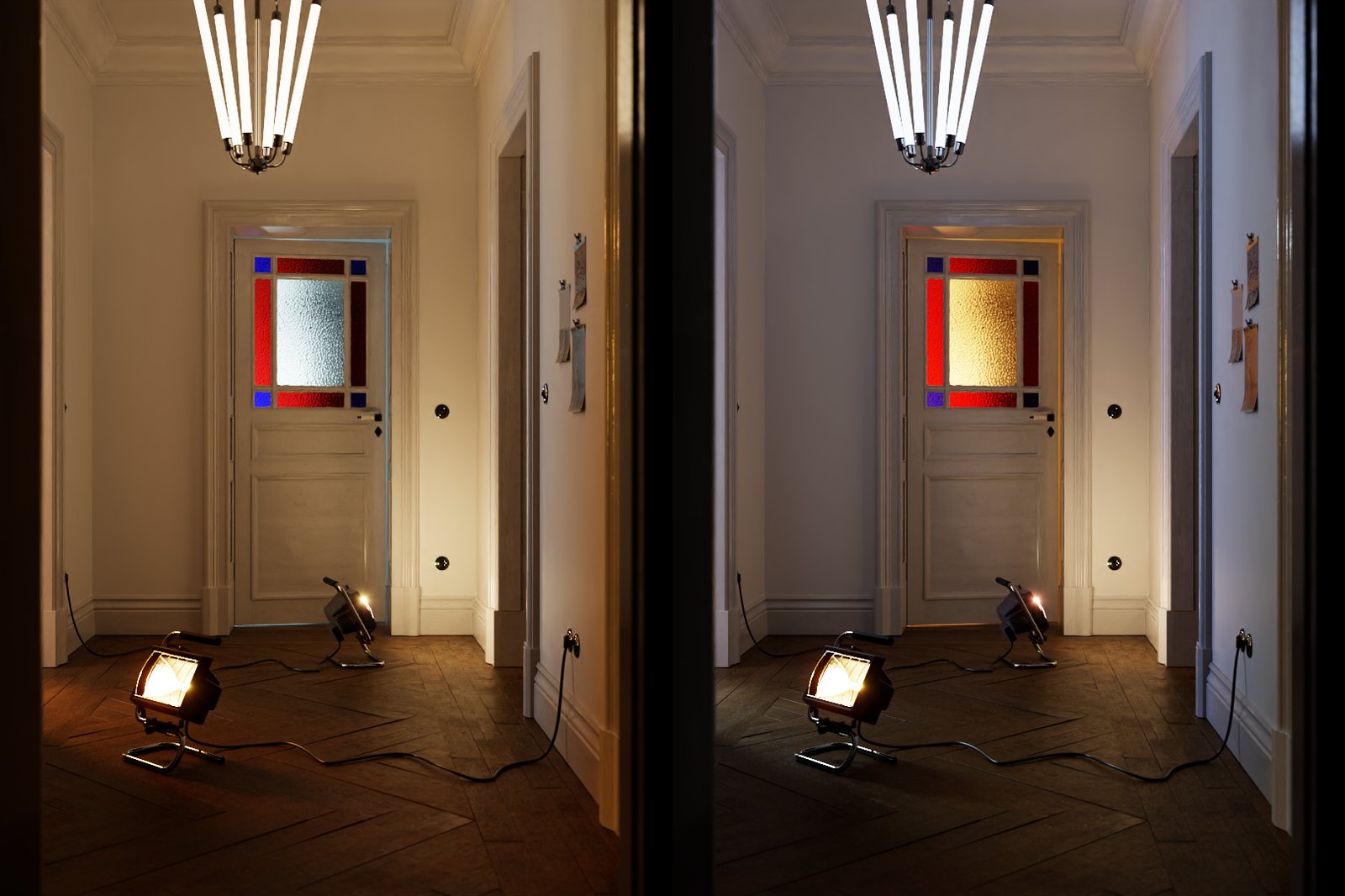
- Implemented Light Mix render element and LightMix Source in VFB
Modified Features
Performance
- Optimized Interactive rendering performance and responsiveness
Fixes
Installer
- Bug with auto detection the Unreal Engine's installation directory
Official Release
Date – August, 2021
New Features
V-Ray
- Updated V-Ray core to version 5.10.03
- Blue Noise Sampling
- Initial out-of-core support (only V-Ray proxy geometry)
- Improved Trace depth for reflection and refraction rays
New VFB
- New implementation of VFB with integrated Layers compositing

Denoiser
- Implemented Intel® Open Image Denoise

Geometry
- Support for geometry pivot offset
Materials
- Support for Coat layer in VRayMtl
Export .vrscene
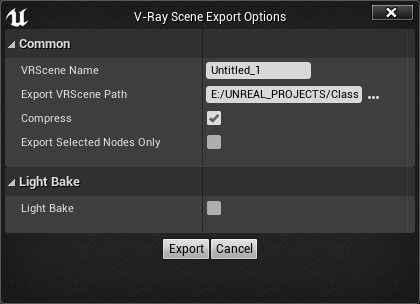
- Added export only selected nodes to .vrscene
Modified Features
V-Ray Bake
- Implemented Custom preset that takes settings from V-Ray Settings tab

Installer
- Updated Installer

License Server
- Updated Online License Server in installer to 5.5.4
Chaos Cloud
- Updated Chaos Cloud Client in installer to 1.13.0
Official Release
Date – March, 2021
New Features
Unreal Engine
- Support for Unreal Engine 4.26

Modified Features
License Server
- Updated Online License Server in installer to 5.5.3
Chaos Cloud
- Updated Chaos Cloud Client in installer to 1.1.0
Official Release
Date – October, 2020
Modified Features
Installer
- Improved installer initialization speed
.vrscene Import
- Grouping of objects in World Outliner based on type and layers in host DCC

.vrscene Export
- Improved exported .bat file when exporting light bake atlas .vrscenes
Bug Fixes
V-Ray Bake
- Light map EXRs modified in Photoshop import as black
- Process Atlases not extracting EXRs from a very long path
- Failed to export EXRs to a non-latin name path
.vrscene Import
- Crash on reimport of Light mesh in UE 4.25
.vrscene Export
- Port number doesn't export correctly in generated .bat file
Official Release
Date – June, 2020
New Features
Chaos Cloud
- Support for Chaos Cloud - Rendering and Light baking
UX
- Notification if the user is rendering in the viewport with disabled realtime option

Materials
- Added SideColor option representing Fresnel in VRayMtl
MAX Script
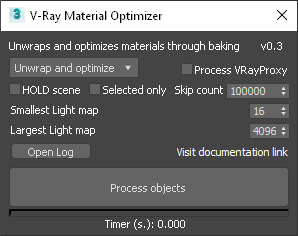
- V-Ray Material Optimizer MAX script for texture baking and material simplification
Modified Features
License Server
- Updated Online License Server in installer to 5.5.0
Bug Fixes
Materials
- Serialization mismatch crash in certain situations with AlphaComposite blend mode in VRayMtl
- Refraction input clamping colors above 1.0
Lights
- LightMesh not exporting correctly when set to "Invisiblе"
Installer
- Standalone Render Server installation fails to locate vray.exe
Official Release
Date – May, 2020
New Features
Unreal
- Support for Unreal Engine 4.25

V-Ray Bake
- Process Atlases - Extract light maps from single or multiple atlases saved in .exr files

- Export Light bake .vrscenes from the V-Ray Scene Export Options

Lights
- Support for V-Ray mesh lights

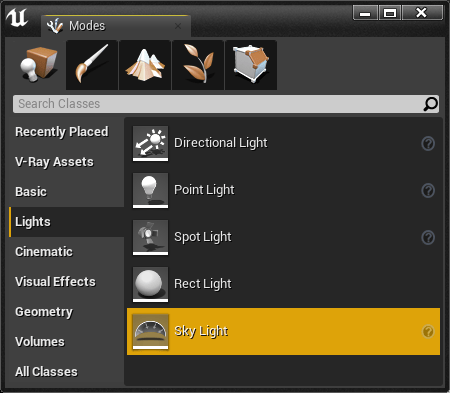
- Support for Unreal Sky light
Render Elements
- Support for Cryptomatte render element

Geometry
- Initial support for Unreal Landscape Actor:
- Landscape specific material expressions:LanscapeLayerBlend, LandscapeLayerCoords, LandscapeLayerSwitch, LandscapeLayerWeight, LanscapeVisibilityMask are not yet supported.

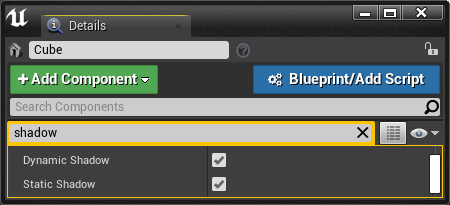
- Support for Static and Dynamic Shadow casting for Actors
Packaging
- V-Ray materials can now be packaged for mobile platforms
Modified Features
.vrscene Import
- Imported static meshes have assigned materials
Bug Fixes
V-Ray Bake
- Crash when aborting light bake
Geometry
- Error when hidden Brush geometry
Official Release
Date – January, 2020
New Features
Unreal
- Support for Unreal Engine 4.24

Geometry
- Support for Unreal Brushes geometry

UI
- Track Active Render View option to get the current render view aspect ratio being it either camera filmback settings or viewport in V-Ray Settings

Modified Features
V-Ray
- Improved speed on render and .vrscene export initialization
.vrscene Export
- Generates .bat file to be used in standalone rendering
VFB
- Improved speed when opening VFB
Bug Fixes
V-Ray
- VFB history and adjustments settings resets when closing
- Unreal material with Unlit shading model not generating GI
- Export failed for Cube Texture with Default compression settings
- Rendering expressions in different Normal spaces
- Crash when rendering substance materials
Official Release
Date – December, 2019
New Features
Texture
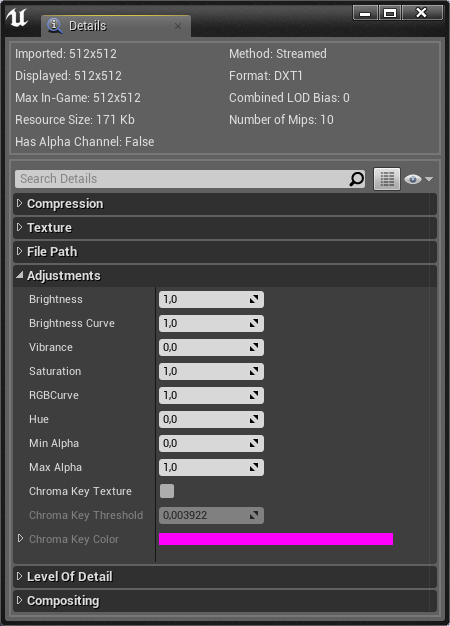
- Support for Color Corrections in Unreal texture asset editor
- Brightness
- Brightness Curve
- Vibrance
- Saturation
- RGBCurve
- Hue
UI
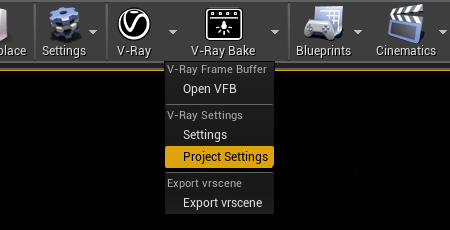
- Added shortcut from V-Ray drop-down menu to in Project settings
- OptiX render mode (Experimental) in V-Ray Settings tab

- Dedicated button and dialogue window to save .vrscene file

V-Bake
- Support for generating low-quality (mobile) lightmaps when lightbaking
Modified Features
V-Ray
- Improved speed when using Unreal materials in render and lightbake
UI
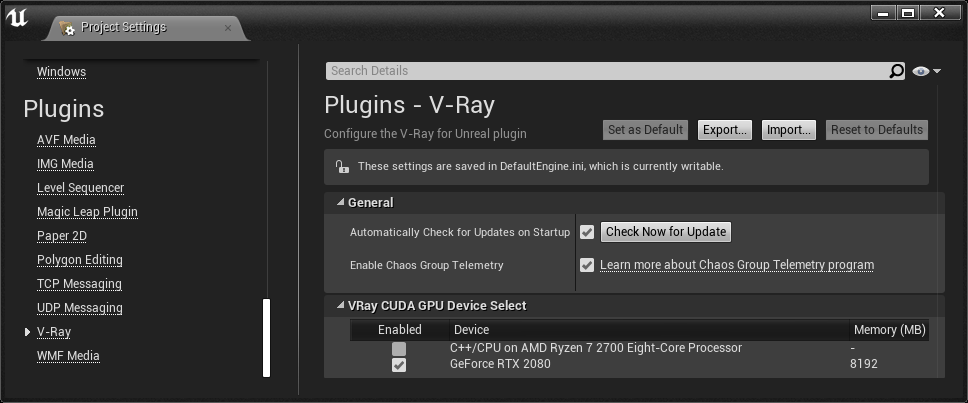
- Moved VRay CUDA GPU Device Selection to V-Ray category in Project Settings
.vrscene Import
- Better .vrscene import progress reporting and monitoring
Bug Fixes
.vrscene Import
- Crash when importing meshes without normal data
V-Ray
- Bugs with Normal map input producing incorrect shading
- "Affects World" property in Unreal lights not updating in IPR
- Bug with Dome light texture rotation in interactive does not update properly
- Crash when switching levels while rendering using VRayPhysicalCamera
- Bug "Use Custom Start Frame" option in Sequencer not exporting properly
- Exposure not exporting correctly in Sequencer animation when using "3d Max Compatible" in VRayPhysicalCamera
- Exception in CORE when network error occurs and bitmaps fail to load
- Directional light renders black with certain color values
- V-Ray material thumbnail preview mesh might randomly disappear
Official Release
Date – November, 2019
New Features
UI
- Added V-Ray Icons in Modes panel to V-Ray Assets

Camera
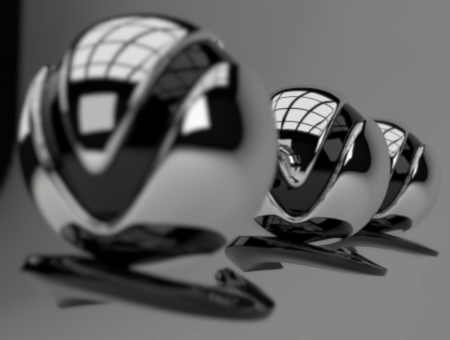
- Added Near Clip Plane functionality to VRayPhysicalCamera
Example: Added Near Clip Plane functionality to VRayPhysicalCamera
100

300
Modified Features
V-Ray
- Support for Unreal expressions – SetMaterialAttributes, GetMaterialAttributes
- Improved speed when using Unreal materials in render and lightbake

V-Ray Bake
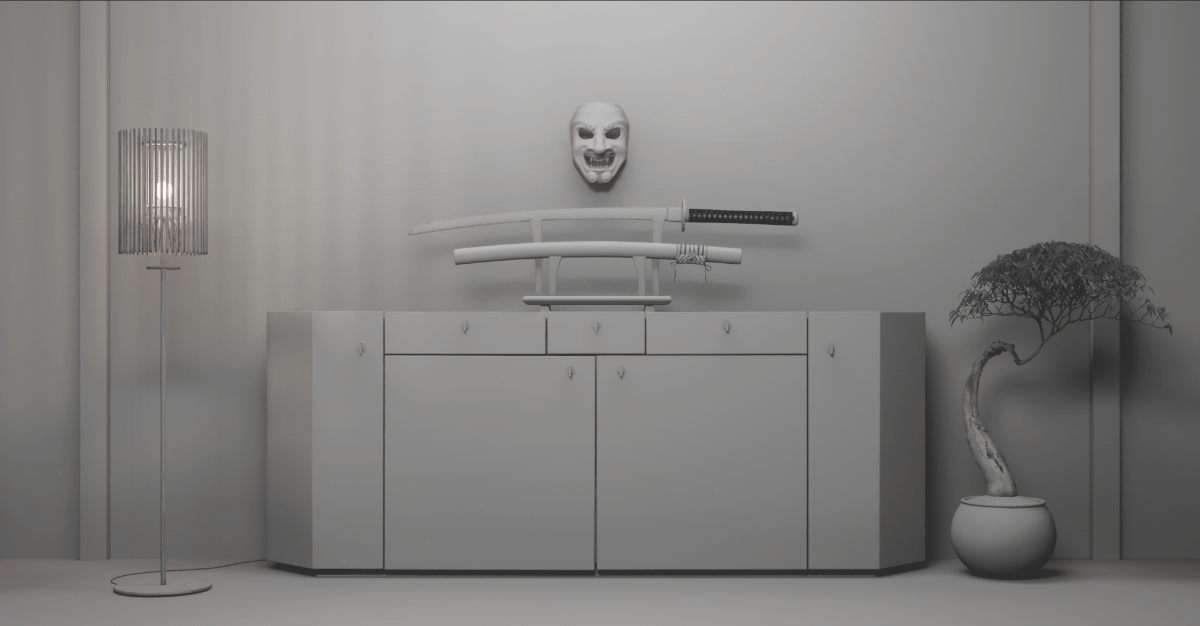
- Improved visual quality of shadows when lightbaking
BEFORE

CURRENT
Bug Fixes
V-Ray Bake
- Fixed crash when rebaking actors and loading lightmaps
Official Release
Date – October , 2019
New Features
V-Ray
- Support for Unreal Engine 4.23 (Recommended use after 4.23.1)
- Support for import automation of vrscene via python script
- Automatic saving of rendered still images in Unreal viewport when in non interactive mode
- In-product update notifier
Lights
- Support for Temperature parameter in native Unreal lights
UI
- Functionality to cancel vrscene import
Modified Features
UI
- Modified UI of V-Ray Scene Import Options dialog
- Animated render states for V-Ray Bake icon
V-Ray
- Support for Unreal expressions – RotateAboutAxis
Installer
- Updated Online License Server in installer to 5.2.3
V-Ray Bake
- Improved speed processing and storing of rendered lightmap atlases
Bug Fixes
V-Ray
- Missing VRay CUDA GPU Device Select from UI
- Actors with same ID Names not exporting correctly
- Incorrect render elements settings when rendering sequencer animation
- Crash when closing Unreal while rendering
- Crash when Render Element Light Select has listed lights that are hidden in the level
- V-Ray Settings are empty when Project Startup Map is set to None
Materials
- Missing Shader Balls preview in Content Browser for V-Ray Materials
Official Release
Date – August 29, 2019
New Features
V-Ray
- Moved to CORE version 4.20
- Render resolution and Lightmap Atlas resolution presets
- Lightmap baking progress bar
Geometry
- Support for Cast Shadows option for Static Mesh Actors
Textures
- Support for "Flip Green Channel" option in Normal textures
Modified Features
Import
- Improved the import of GeomMeshFile with identical vrmeshes
Installer
- Removed the check for running Epic Games launcher when installing the plugin
Materials
- Improved support for Unreal expressions - VertexColor, ObjectRadius, ObjectPositionWS
Bug Fixes
V-Ray
- Static Meshes with zero area UVs cause an Exception in CORE error when light baking
- Camera rotation bug when orbiting around mesh with ALT+Mouse
- Resolution capped to 11585
- Assertion crash with viewport rendering when using DX12
- Preparing scene progress goes above 100%
- Switching between level maps does not stop rendering or baking process
- Two Sided option not exporting correctly with VRayMtl, VRayCarpaintUberMtl, VRayPBRMtl
Official Release
Date – July 18, 2019
Bug Fixes
V-Ray
- V-Ray Light Bake memory leak
- Issue with support of multiple GPUs
- Issue with transparent native materials in Light bake
Official Release
Date – June 26, 2019
New Features
V-Ray
- Export/import functionality of lightmaps
Lights
- Rendering of DatasmithAreaLight
Camera
- Quadratic and Cubic distortion types to VRayPhysicalCamera
Modified Features
V-Ray
- Project path is new default directory for "Export VRScene Path" option
Lights
- Point Light Source radius working in IPR
Materials
- Improved support for Unreal expressions - TwoSidedSign, Time
Bug Fixes
V-Ray
- Static meshes with identical names in different folders do not render correctly
- Lights in Blueprints are exported at BP pivot point
- "Use Local Host" option not working in Light bake
- "Cannot send asset" error when in DR
- Incorrect Lightmaps is applied when some level actors are hidden
- CUDA Error 700 when "Export failed for the ... texture"
- CUDA error 700 when baking TwoSidedFoliage material
- "Error in last lightbake: File write error"
Release Notes for V-Ray Next for Unreal, update 1
Official Release
Date – May 28, 2019
New Features
V-Ray
- Support for Unreal Engine 4.22
- Toggle option for sky in VRaySunAndSky
- Option to remove local host from DR
- "Transfer Missing Assets" option in DR
- Progress report logging when computing long task
- Directional parameter in VRayLightRect
- Light options to V-Ray Lights - Affect Diffuse, Affect Specular, Affect Reflections
- Support for Specular Scale for Unreal lights
Modified Features
V-Ray
- Viewport rendering with Translucent shading model
- Speed and memory utilization when V-Ray Light Bake
- Support for Unreal shading models - Subsurface, Two Sided Foliage
- Support for Unreal expressions - Pixel Depth
- UI layout in V-Ray Settings and V-Ray Light Bake Settings
Bug Fixes
V-Ray
- Bug with lightmaps having offset
- Performance slow down during UV tree preparation in V-Ray Light Bake
- Crash in cooked games packaged in Shipping configuration
- Issues with metallic or highly reflective materials to appear black after V-Ray Light Bake
- Intensity mismatch between viewport and render when using Directional Light
Official Release
Date – March 13, 2019
New Features
V-Ray
- Viewport rendering functionality
- Support for Unreal tonemapper and post effects (in viewport rendering only)
- Dedicated V-Ray Bake settings
- Telemetry
Modified Features
V-Ray
- Dome Tex Resolution parameter in VRayLightDome blueprint
- Functionality for creating, deleting and hiding actors in the level while in IPR rendering
- Support for "Tangent Space Normal" checkbox option in Material
- Support for Unreal expressions: Arccosine, Arcsine, Arctangent, Arctangent2, Logarithm2, Tangent, World Position
Installer
- Updated Online License Server in installer to 5.2.2
Bug Fixes
V-Ray
- "Launch V-Ray Render Server (Unreal)".exe file path
- Issue with Sky texture not updating in IPR
- Issues when using Normal maps in Materials
Official Release
Date – February 01, 2019
New Features
V-Ray
- Support for rendering Unreal materials with V-Ray Hybrid rendering on both CPU and GPU
- Added the VRayMtl, VRayPBRMtl and VRayCarpaintMtl to the V-Ray Category in the Add New drop down menu in the Content Browser
Modified Features
V-Ray
- Support for Unreal Shading Models: Clear Coat
- Interactive update for native Unreal materials.
- Support for Unreal expressions: Bump Offset, CameraPositionWS, ConstantBiasScale, ReflectionVectorWS, Screen Position, SphereMask, TransformVector, VertexNormalWS, ViewProperty
- Error reporting for unsupported Unreal materials, expressions, blend modes and shading models
Installer
- Updated Online License Server in installer to 5.2.1
Bug Fixes
V-Ray
- Errors due to NVidia driver dependencies
- Crashes if unsupported expressions, blend modes and shading models are used
Official Release
Date – December 05, 2018
Modified Features
V-Ray
- Support for Unreal Engine 4.21
- Interactive update for native Unreal materials.
- Support for Unreal expressions - Ceil, Floor, FMod, Frac, If, Min, Round, Sign, Truncate expressions
Light Bake
- Improved speed of light bake
Bug Fixes
V-Ray
- V-Ray exporter in sequencer
- Export for custom start frame
- Export for sequencer camera cuts using multiple cameras
- Difference in color space in VFB and saved image
- VRay CUDA GPU Device Select not working with sequencer animation
Official Release
Date – November 15, 2018
Modified Features
V-Ray
- Responsiveness of UI during interactive render
Light Bake
- Improved speed of light bake
Installer
- Updated Online License Server in installer to 5.1.2
Teleport Blueprint
- Updated Teleport BP to get exposure from listed cameras
Bug Fixes
V-Ray
- V-Ray not loading in Unreal if no supported devices are set in device select
- Fallback to using CPU device if no supported devices are set in device select
- Render Server shortcut not pointing to correct file path
Light Bake
- Light bake not using devices set in V-Ray CUDA GPU Device Select
- CUDA error during light baking
Official Release
Date – November 08, 2018
New Features
V-Ray
- Log V-Ray messages in Unreal's Message Log
- Basic support for importing Displaced Static Meshes
- Output a list of the Static Meshes in the atlas currently baked
Modified Features
V-Ray
- Support for Unreal Materials - Masked, Translucent, Alpha Composite Blend Modes and Unlit Shading Model
Bug Fixes
Light Bake
- Crash when light baking Static Meshes with overlapping UVs
Beta release
Date – October 30, 2018
New Features
Light Bake
- Initial implementation of V-Ray Bake
Materials
- Initial support for Unreal native materials
Geometry
- Support for Foliage system
Render
- Initial support for Sequencer animation
Modified Features
Installer
- Request confirmation about version being uninstalled during installation process
UI
- Reworked UI
- Integrated GPU device select tool in V-Ray Settings
- Global Shadow Bias parameter
- Fallback material for use when rendering unsupported materials
- Quick settings quality presets slider
- Export VRScene path option
- Auto Exposure and Auto White Balance options
- Undersampling option
Camera
- Support for Depth of Field in VRayPhysicalCamera
Materials
- Improve parity for VRayMtl material
- Support for SeflIllumination material
- V-Ray Materials are now included in the packaging/cooking process
Lights
- Updated VRaySunAndSky sky model
- Support for Unreal Intensity Units in Lights
- Support for 4.20 RectLight
- Support for Light Source Angle in Directional Light
- Support for default intensity unit at import for Spotlight, Omni, Sphere Light, Rectangle Light
Geometry
- Improved support for VRay Proxy (vrmesh)
Render
- Update responsiveness and speed of IPR
- Support for interactive mesh material update
- Support for interactive material parameters update
- Stop renderer when noise threshold is reached in non-interactive session
Render Elements
- Added :
- NVidia AI Denoiser
- Background, GI, Lighting, Reflection, Refraction, Specular, Self Illumination, Sub Surface Scattering
- Diffuse Filter, Reflection Filter, Refraction Filter, Shadows, Atmosphere
- RenderID
- Normals, Bump Normals, Sampler Info, Velocity, ZDepth
- Light Select
- Sample Rate, Unclamped Color, Noise Level
VFB
- Dedicated button for opening the VFB
- Always on top VFB
VR
- V-Ray Teleport Blueprints separated in an additional plugin
Beta release
Date – April 05, 2018
New Features
vrscene Support
- Automatic convert of materials and lights into real-time equivalents for UE workflows
- Keeping original materials from the imported vrscene connected to their real-time versions and are using them for raytraced rendering
Camera
- Support for the VRayPhysicalCamera
- Support for the 3ds Max’s Physical Camera
- Initial implementation of exposure and color mapping
Materials
- Support for VRayMtl material (including partial VRay2SidedMtl)
- Initial implementation of a PBR material
- Initial implementation of an easy to use car paint material
- V-Ray materials are supported natively in UE and are working with Lightmass baking, Lights, Reflection probes, Post process materials, Blueprints
Lights
- Support for VRayLightDome, VRayLightRectangle, VRayLightSphere, VRayLightIES, UE Spot light, UE Point light, UE Direct light
- Initial implementation of the V-Ray Sun&Sky system
Render
- Initial implementation of interactive rendering
- V-Ray Hybrid rendering on both GPU and CPU
- Using the V-Ray Next GPU engine
Distributed Rendering
- Support for DR
Render Elements
- Support for the V-Ray Denoiser
Textures
- Support for VRayTriplanarTex
VFB
- Support for the VFB
- Render History window implemented
VR Mode
- Support for the VR mode in the Unreal Editor