Minimize Tag Usage
Many SketchUp models have unused components in them. When you delete them, their definition still remains in your model in case you want to use them later. If they are never used, SketchUp still keeps unused subcomponents, layers, and materials within the model.
Last updated 17 July 2026
Many SketchUp models have unused components in them. When you delete them, their definition still remains in your model in case you want to use them later. If they are never used, SketchUp still keeps unused subcomponents, layers, and materials within the model. Unless dealt with, it can cause your model to have unnecessary complexity, adding to the model’s file size, and affecting upload and download speeds.
To easily resolve these issues, open the Model Info window and navigate to Statistics. Clicking Purge Unused will purge any unreferenced components, tags, styles, and materials from the model.
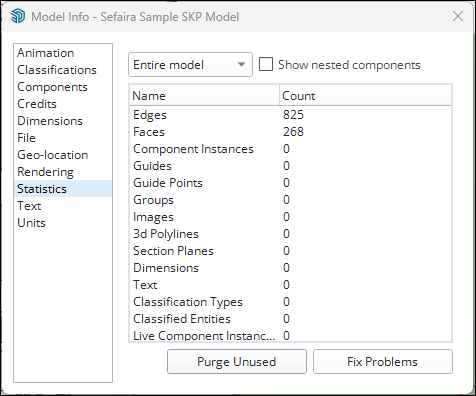
You can also delete components and materials individually, directly from their respective Panel. To make sure you get everything removed, we recommend you purge in the following order:
- Components and subcomponents
- Tags
- Materials
Still need help?
Technical support from our New Zealand team is available to customers with a current Procadsys SketchUp Plus subscription: Pro Plus, Pro Scan Plus, Pro Civil Contractor Plus, Advanced Workflows Plus or Studio Plus. Self-help articles are public.
Contact SketchUp support