If you are a manufacturer, retailer, service provider or institution, you can apply to register your organisation in 3D Warehouse. Approved organisations can:
- Publish official product catalogues.
- Prepare and refine content securely in private before publishing it.
- Add users to work together as a team.
- Use the 3D Warehouse API to connect to your existing product information management system and manage content.
Requirements
Before you apply, you must meet these requirements:
- Have an existing 3D Warehouse account linked to your Trimble ID.
- Have at least two pieces of content uploaded to your account.
- Have a designated administrator to manage your organisation's account settings and members.
- Have a company email address that uses your organisation's domain.
Registration process
A SketchUp team member reviews your application after you submit it. If your registration is approved, you receive an email about your new organisation account and how to use it.
Follow these steps to submit your organisation's application:
- In 3D Warehouse, click Register Organization (
 ) at the top-right of the page. The Register Your Organization dialog opens with information about registration and its requirements.
- Click Register Organization in the Register Your Organization dialog.
- Review the Terms of Service and click By Clicking Here, I Accept the Above Terms. The Application Details dialog opens.
- Enter your company website address and choose an organisation category.
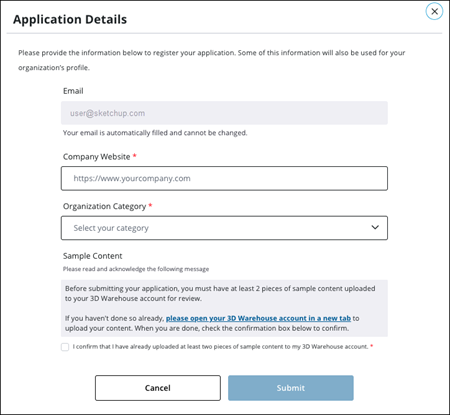
- Confirm that you have uploaded at least two pieces of sample content to your 3D Warehouse account.
- Click Submit.