Entity Palette
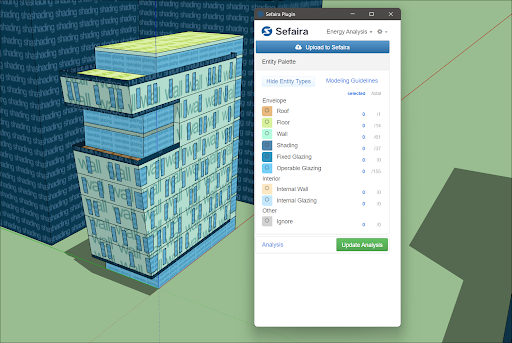
Entity PaletteSefaira attempts to assign the correct type to each entity in a model. If certain entities need to be ignored, or the entity needs to be changed manually, the Entity Palette can help with that. Clicking Show Entity Types color codes all entity types in a model allowing for easy identification.
Last updated 17 July 2026
Entity Palette
Sefaira attempts to assign the correct type to each entity in a model. If certain entities need to be ignored, or the entity needs to be changed manually, the Entity Palette can help with that. Clicking Show Entity Types color codes all entity types in a model allowing for easy identification. Selecting one or more entity types will show or hide certain parts of the model. Right click on an entity and go to Sefaira Plugin to tag the entity with a specific type, or clear existing tags.
Still need help?
Technical support from our New Zealand team is available to customers with a current Procadsys SketchUp Plus subscription: Pro Plus, Pro Scan Plus, Pro Civil Contractor Plus, Advanced Workflows Plus or Studio Plus. Self-help articles are public.
Contact SketchUp support