Managing Extensions
The Extension Manager in SketchUp and the My Extensions page in Extension Warehouse can help you manage, update, or uninstall the extensions you’ve chosen to use.To enable or disable extensions on the Home tab, use the toggle next to each listing.
Last updated 17 July 2026
The Extension Manager in SketchUp and the My Extensions page in Extension Warehouse can help you manage, update, or uninstall the extensions you’ve chosen to use.
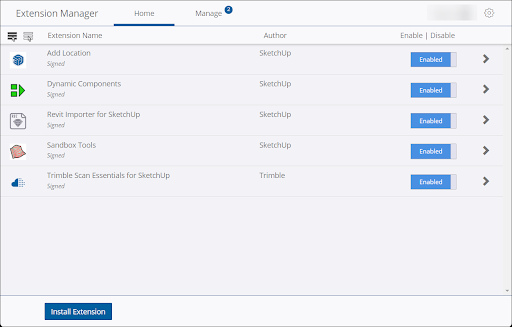
To enable or disable extensions on the Home tab, use the toggle next to each listing. You can also enable or disable all extensions using the Enable and Disable links at the top of the window.
On the Manage tab of Extension Manager you can:
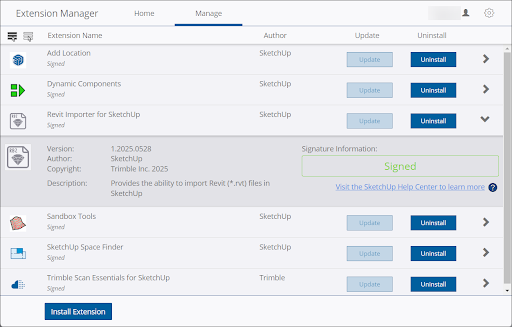
- Update Extensions – When a developer updates an extension you will receive a notification when opening a new or existing model in SketchUp to update it. You can click Update Now on that notification, or update each extension using the Update option under the Manage tab. To update all extensions, click Update at the top right of the page.
- Uninstall Extensions – You can always remove an extension by clicking Uninstall . To uninstall all extensions, click Uninstall at the top right of the page.
- Manage Trust and Signatures – To check the digital signatures on your extensions and view information about the developer, click the arrow on the right side of each entry. The entry will expand, revealing that information.
Still need help?
Technical support from our New Zealand team is available to customers with a current Procadsys SketchUp Plus subscription: Pro Plus, Pro Scan Plus, Pro Civil Contractor Plus, Advanced Workflows Plus or Studio Plus. Self-help articles are public.
Contact SketchUp support