Importing a Revit File
For SketchUp Studio subscribers using Microsoft Windows, our Revit Importer makes it easy to import your Revit project into a SketchUp model.
Last updated 17 July 2026
When you are ready to import a .rvt file into SketchUp using the Revit Importer, there are two things you need to know before you can start:
- The Revit Importer is only available as part of a SketchUp subscription. Pro Advanced Workflows and Studio subscriptions include access to the importer.
- Because Revit is only available on Windows, the Revit Importer is only available for SketchUp running on Windows.
To import a .rvt file into SketchUp:
- Click File > Import.
- In the file browser, choose Revit Files (*rvt) from the list of file types.
- Locate the file you want to import and click Import. The Revit Importer will open.
- In Select 3D View, a list appears of all 3D views saved in the file. Use the search box to filter the views by name and select the view you want to import.
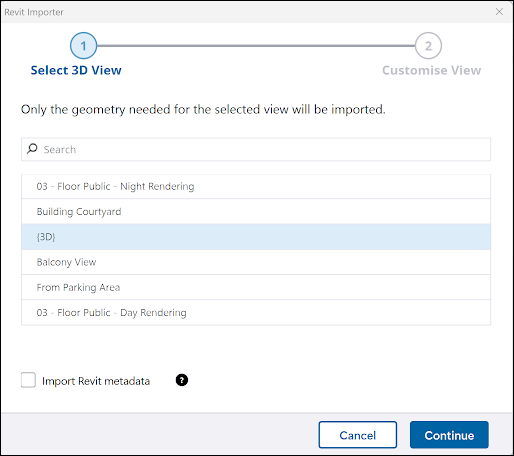
- Select Import Revit metadata to store Revit element parameters as SketchUp component attributes. For more information, see Importing Revit Metadata and Property Sets.
- Click Continue.
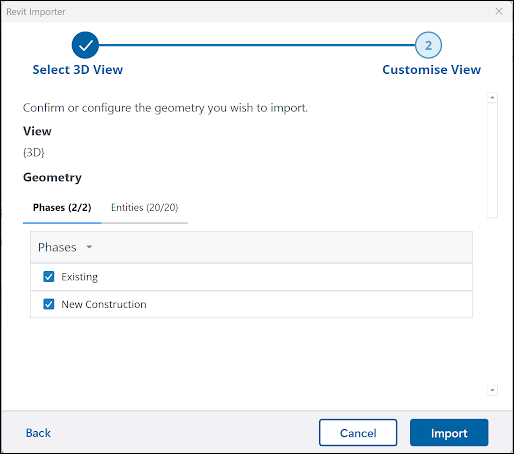
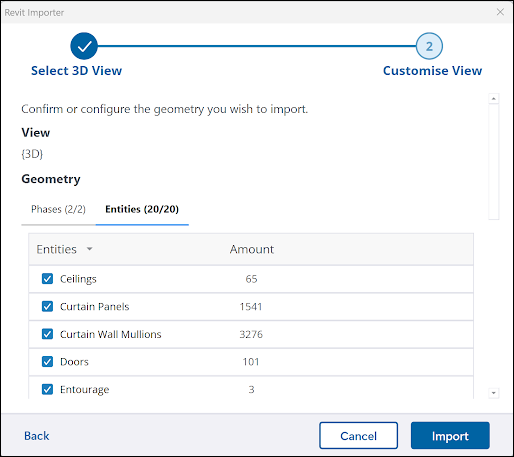
- In Customize View, you can further refine the imported data using the Phases and Entities tabs:
- Phases – Select each construction phase you want to include. Elements are then filtered based on the phase in which they were created. See Phases in Revit Importer for more information on how to set up phases in your Revit file before you import.
- Entities – Choose the specific Revit element categories for import. The Amount column provides a count of elements within each category.
- After customizing your view settings, click Import. The Revit Importer will import your file and an Import Results dialog will appear. Click Close to begin working on your imported file.
Still need help?
Technical support from our New Zealand team is available to customers with a current Procadsys SketchUp Plus subscription: Pro Plus, Pro Scan Plus, Pro Civil Contractor Plus, Advanced Workflows Plus or Studio Plus. Self-help articles are public.
Contact SketchUp support