Clearing Geolocation Data
Clearing Geolocation DataYou can clear geolocation data from your model at any time from either Add Location or Model Info.Clearing Data Using Add LocationTo clear data using Add Location:
Last updated 17 July 2026
Clearing Geolocation Data
You can clear geolocation data from your model at any time from either Add Location or Model Info.
Clearing Data Using Add Location
To clear data using Add Location:
- Open Add Location.
- Click the trash can icon.
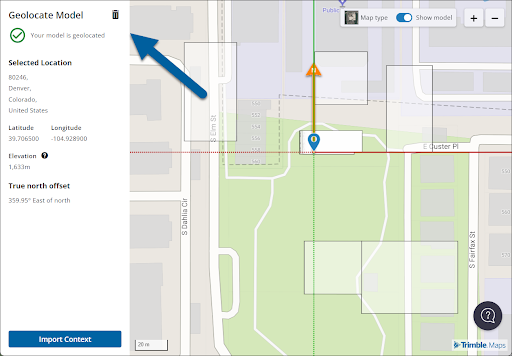
- In the confirmation window, you can choose to also reset the north offset or clear any imported context. Those options are enabled by default.
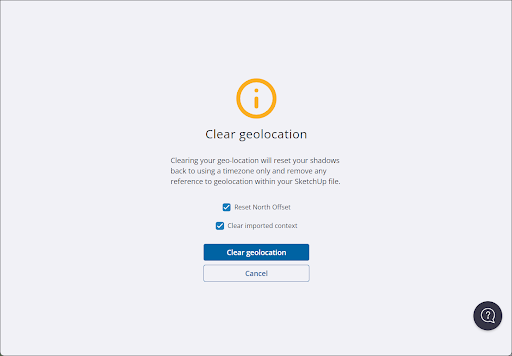
- Click Clear Geolocation to remove geolocation data from your model. To go back click Cancel.
Clearing Data in Model Info
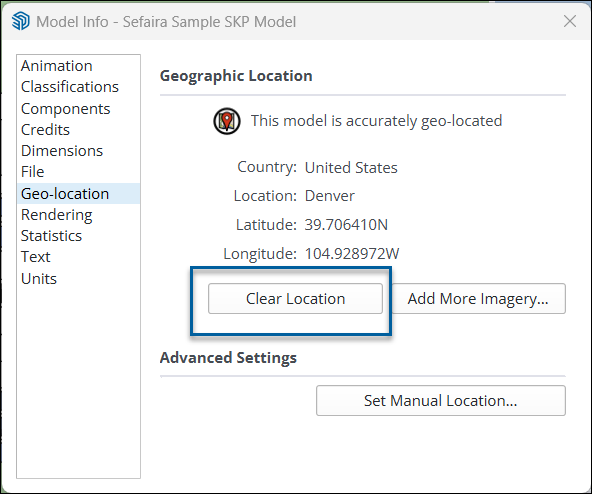
The Geo-location section of the Model Info panel is where you can see a model’s geolocation data. To clear all data, click Clear Location.
Still need help?
Technical support from our New Zealand team is available to customers with a current Procadsys SketchUp Plus subscription: Pro Plus, Pro Scan Plus, Pro Civil Contractor Plus, Advanced Workflows Plus or Studio Plus. Self-help articles are public.
Contact SketchUp support