Shadows Panel
SketchUp for iPad's Shadows () panel can help designate how parts of your model cast their shadows or even see how the sun would cast shadows on or around a geolocated model.
Last updated 17 July 2026
SketchUp for iPad's Shadows (  ) panel can help designate how parts of your model cast their shadows or even see how the sun would cast shadows on or around a geolocated model.
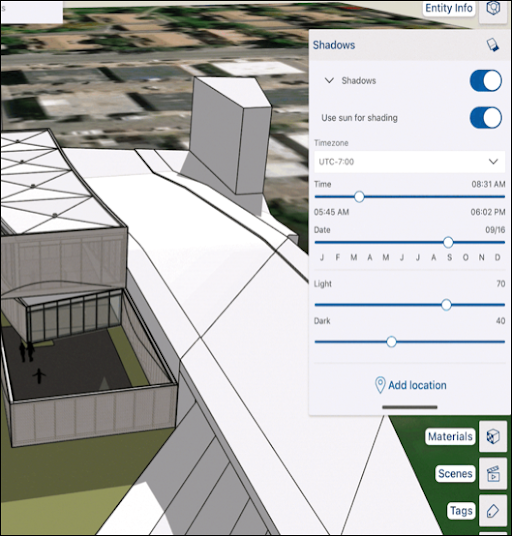
The Shadows panel helps you control shadows in your model using the following options:
- Shadows - Toggles used to turn shadows off or on, and adjust how they are cast:
- On Face - Cast shadows on other faces.
- On Ground - Cast shadows on the ground plane.
- From Edges - Controls whether edges that are not associated with a face cast a shadow
- Use sun for shading - When toggled on, SketchUp's simulated sun shades parts of your model even if shadows are toggled off.
- Timezone - A drop-down box allowing you to choose a specific time zone.
- Time/Date - Sliders allowing you to select a specific time or date.
- Light/Dark - Sliders controlling how light illuminated areas appear and how dark shaded or shadowed areas appear.
- Add location - Opens a tool to help you geolocate your model.
For more information on using shadows in your model, see Casting Real-World Shadows .
Still need help?
Technical support from our New Zealand team is available to customers with a current Procadsys SketchUp Plus subscription: Pro Plus, Pro Scan Plus, Pro Civil Contractor Plus, Advanced Workflows Plus or Studio Plus. Self-help articles are public.
Contact SketchUp support