Chaos Cosmos
Configuring the Asset Download Directory
By default, Cosmos assets are downloaded to a local directory:
Last updated 11 June 2026
Overview
By default, Cosmos assets are downloaded to a local directory:
- On Windows: C:\Users\[User]\Documents\Chaos Cosmos\
- On macOS: /Users/[User]/ChaosCosmos/
- On Linux: /home/[User]/.ChaosCosmos/Packages
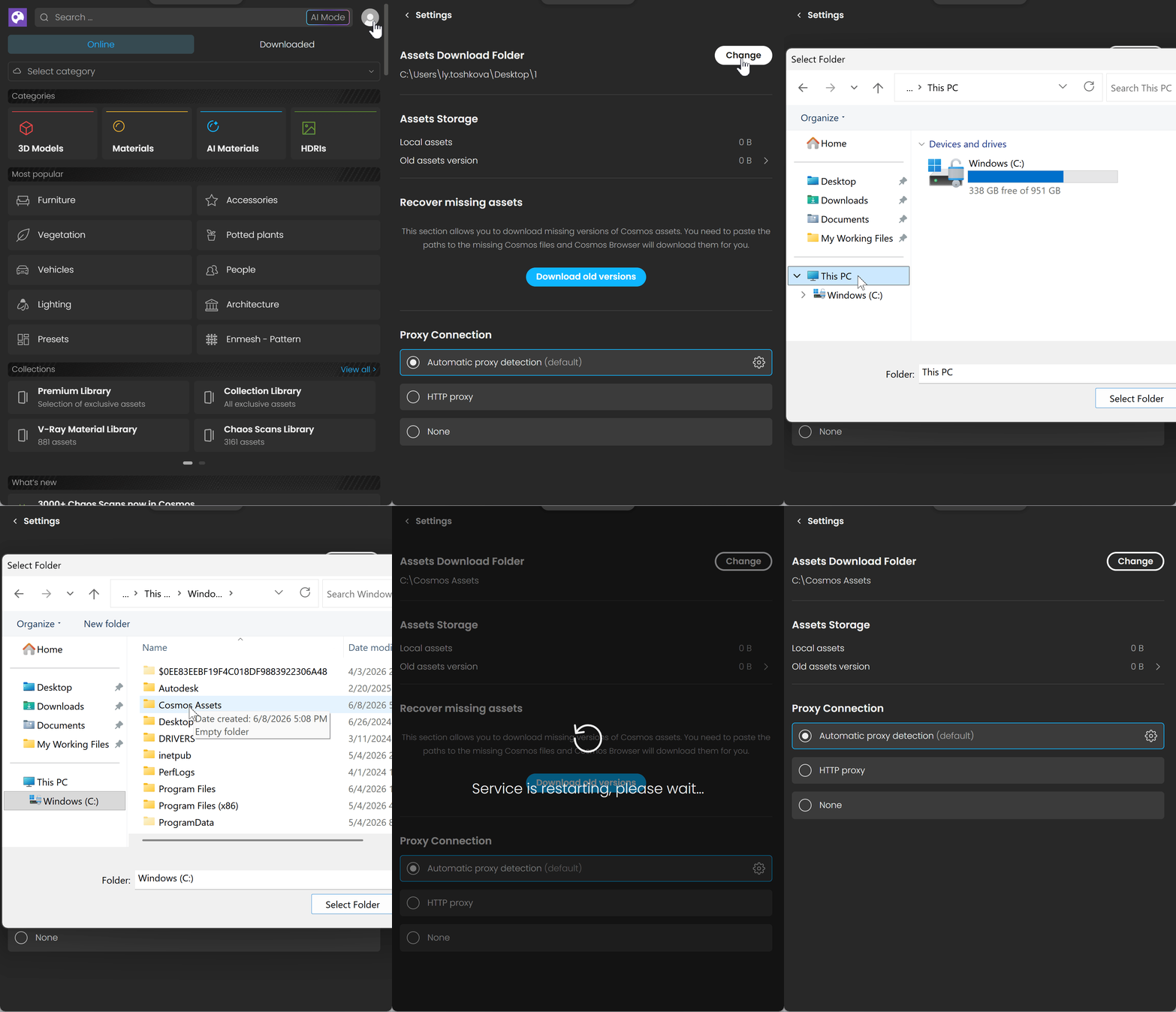
You can change this directory to a new local or network folder by updating the Cosmos Browser Settings.
Steps
- Start Cosmos Browser and go to menu ●●● > Settings.
- Press the button Change next to the Assets Download Folder.
- In the pop-up window, fill in or paste the new directory path.
- Press the Select Folder button.
Now the Cosmos Browser downloads are saved to the newly specified directory. Lock and Packages sub-folders appear in it.