Set up Corporate Sign In for Chaos so employees can sign in through your company's identity provider.
Overview
You can create a password-based account to sign in to the Chaos website. For enterprise customers with company-specific login requirements, Corporate Sign In provides an alternative on the Chaos login page.
Corporate Sign In connects your company's identity provider service (IDP) to the Chaos store. Your company's login page handles authentication. This lets you:
- Let employees sign in without creating separate Chaos store accounts or remembering extra passwords.
- Enforce authentication methods through your identity provider that the Chaos store may not support, such as certificate-based login or two-factor authentication.
- Sign in faster after a Chaos website session expires if you are still signed in to your corporate system.
- Give your company administrator more control over which employees can purchase and use Chaos products under your company domain. The Self-Service Portal provides further control 1.
Your company can also configure automatic user provisioning from its identity provider to Chaos. This keeps the following user details and account status in sync:
- Changes to users' names automatically update in Chaos.
- When an administrator deactivates a user in your identity provider, Chaos automatically deactivates the matching user.
Basics
Before configuring Corporate Sign In, review how authentication and user provisioning work.
OpenID Connect
OpenID Connect is an industry standard for delegating authentication. It builds on the OAuth2 protocol and uses an ID token to pass information about the authenticated user.
Chaos uses the following information from the ID token:
- Given Name is the user's first name.
- Family Name is the user's last name.
- Email is the user's work email address.
Depending on which fields are available, Chaos retrieves this information from "name", "given_name", "family_name", "email" or "upn" in the ID token.
SCIM
SCIM manages user provisioning from your company's identity provider to Chaos. OpenID Connect delegates authentication, but it does not notify Chaos when a user's status changes in your identity provider. SCIM handles those updates.
Chaos processes the following information during provisioning:
- Given Name is the user's first name.
- Family Name is the user's last name.
- Email is the user's work email address.
- Username is the user's unique identifier in your company's system.
- The username is used only to meet SCIM requirements.
- You cannot use this username to sign in to the Chaos website.
- External ID is an optional identifier for SCIM provisioning.
- Active records whether the user is active. This field is "false" when the user is deactivated in the source system.
Getting started
Using Corporate Sign In
If Corporate Sign In is enabled for your company, your employees can use this process to sign in to the Chaos website.
The Chaos login page has a Continue with corporate email button.

After selecting it, enter your email address when prompted.
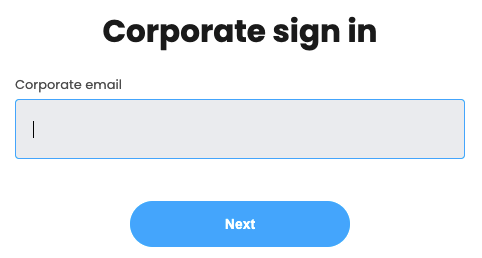
Chaos uses your email domain to identify your company's Corporate Sign In integration. It then redirects you to the relevant identity provider to sign in.
The following example shows the Azure login page.
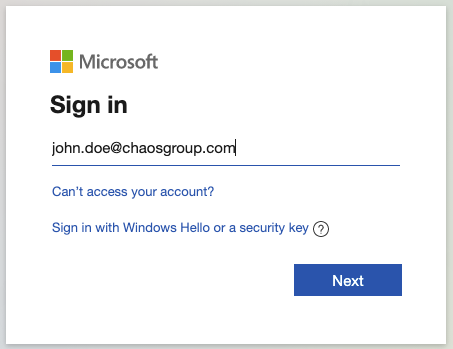
By default, the Chaos login form forwards your email address to your corporate identity provider's login page. If your identity provider does not use email addresses for login, this forwarding can be disabled. You can then use a username or another identifier on your identity provider's login page.
After you sign in on your company's login page, you return to the Chaos login page, which starts your session. You can then use the Chaos website as you would after signing in with a password.
Requesting Corporate Sign In
Before enabling Corporate Sign In for your company, read and agree to its terms of use, privacy statement and EULA.
Your administrator must open a support ticket with Chaos or contact your Chaos Key Account Manager to request Corporate Sign In for your company. Chaos then configures its system and exchanges the credentials needed for your company's system and Chaos to communicate securely. The configuration and credentials depend on your identity provider.
Configuring Corporate Sign In
After requesting Corporate Sign In, your administrator needs to configure your company's identity provider. Corporate Sign In is currently available to enterprise customers using these user management solutions:
Follow the documentation for your identity provider, as the integration differs slightly for each.
Limitations
Corporate Sign In has the following limitations.
Single domain support
Chaos uses the domain in your email address to choose the login process. See Using Corporate Sign In for details.
Chaos currently supports only one domain name per company. Users cannot sign in with an alternative domain. Chaos does not provision those users, except to store any metadata needed for SCIM to work correctly.
User deletion
Deleting a user in your identity provider also deletes them from Chaos's intermediate SCIM storage through SCIM. The actual Chaos user account is only disabled. Your company administrator must contact Chaos Support to request permanent deletion.
Email update
If user provisioning is enabled, changing a user's email address deactivates the Chaos account with the old address and creates an account with the new address. Your administrator must open a support ticket to request that any licences move to the new account. If your company uses the Self-Service Portal, your administrator can transfer the licences through its dashboard.
Single sign out
Signing out of Chaos does not sign you out of your corporate identity provider or other applications accessed through it.
Footnotes
1. The Self-Service Portal is enabled on request. To ask Procadsys about access, use Ask about support.