Learn what a License Manager can do in a Chaos Organization and how to assign or remove the role.
Overview
License Managers handle day-to-day licence and credit administration for the Admin. They can assign licences, invite and remove users, and manage Chaos Credits across the whole Organization. They cannot purchase products or access billing.
Use this role when different people buy and manage licences, or when one Admin cannot cover every team. An Organization has exactly one Admin and can have one or more License Managers.
Roles compared
License Managers have the same permissions as the Admin for managing licences, users and credits. Only the Admin can change roles, make purchases and manage billing.
Action | Admin | License Manager | User |
|---|
Action | Admin | License Manager | User |
|---|---|---|---|
Use assigned products | Yes | Yes | Yes |
Assign and revoke licences | Yes | Yes | No |
Invite and remove users | Yes | Yes | No |
Set credit access and limits for users | Yes | Yes | No |
Enable or disable Floating licence sharing | Yes | Yes | No |
View Users & Product assignments and the License Usage Report | Yes | Yes | No |
View Chaos Credits Management and the Credits Usage Report | Yes | Yes | No |
Change a User to a License Manager, or a License Manager back to a User | Yes | No | No |
Purchase products or credits, add seats and manage auto-renewal | Yes | No | No |
View invoices or manage billing details | Yes | No | No |
Make a user a License Manager
Only the Admin can assign the License Manager role, and the user must belong to the Organization. Invite a new user before changing their role. See Managing Users and Licenses for invitation steps.
- In My Chaos, go to Organization > Users & Product assignments.
- Find the user in the list. You can search by name or email.
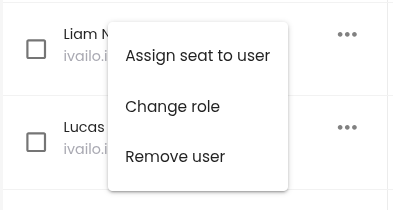
- Click the three-dot menu next to the user and select Change role.
- In the Change role dialog, select License manager. The user's current role is marked (Current role).
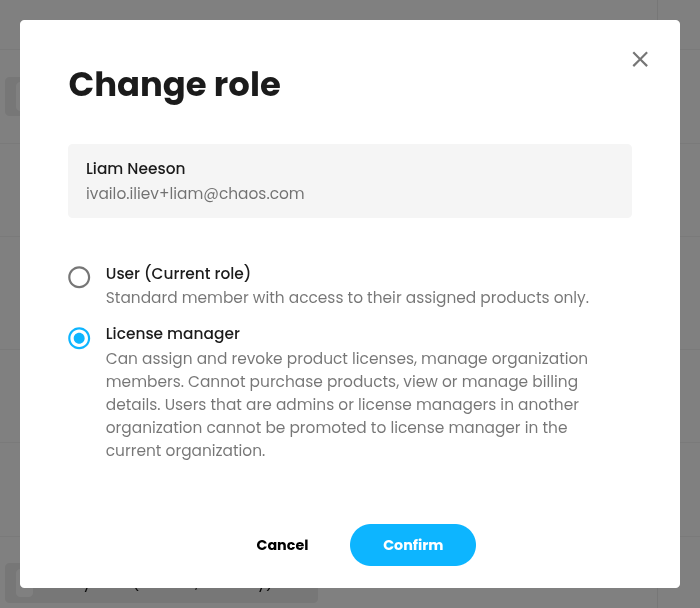
- Click Confirm.
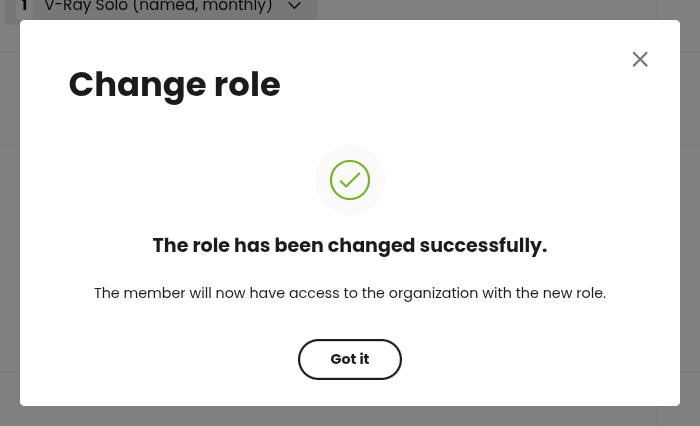
- When the confirmation appears, click Got it.
The change takes effect immediately. Licence manager appears next to the person's name in the user list. Their assigned products and rendering credit access stay the same.
License Manager eligibility
A user can be a License Manager in only one Organization at a time. You cannot assign the role to someone who is already an Admin or a License Manager in another Organization.
That user can still be a regular member of your Organization and use any licences you assign to them.
Remove the License Manager role
The Admin can remove the License Manager role at any time. The person stays in the Organization and keeps their assigned products.
- Go to Organization > Users & Product assignments.
- Click the three-dot menu next to the License Manager and select Change role.
- Select User, then click Confirm.
- Click Got it.
The person immediately loses access to licence, user and credit management. To remove them from the Organization entirely, select Remove user from the same menu.
Working as a License Manager
As a License Manager, you manage the Organization through the Organization menu in My Chaos, just as the Admin does.
- In Users & Product assignments, you can invite and remove users, assign and revoke licences with Assign products, and turn Floating licence sharing on or off.
- In Chaos Credits Management, you can set and remove credit limits for users and view the Credits Usage Report.
- In Usage reports, you can view the License Usage Report and the Credits Usage Report for the whole Organization.
License Managers cannot access purchasing or billing options. When your Organization needs more seats, products or credits, ask the Admin to arrange the purchase with Procadsys.
Common questions
How many License Managers can an Organization have? As many as you need. They all have the same permissions across the whole Organization.
Can a License Manager make other users License Managers? No. Only the Admin can change roles.
Can a License Manager buy more seats or credits? No. Only the Admin can make purchases, manage auto-renewal and access billing.
Why can't a new License Manager see my Organization's licences and credits? They are most likely already an Admin or a License Manager in another Organization. See License Manager Eligibility.
Can I limit a License Manager to one team or group of users? Not at the moment. License Manager permissions cover the whole Organization.