Chaos Vantage
Render Animation with Chaos Vantage from Maya
This page provides information about the Render Animation with Chaos Vantage tool in Maya.
Last updated 1 September 2026
This page provides information about the Render Animation with Chaos Vantage tool in Maya.
Overview
The Render Animation with Chaos Vantage tool helps you send and render your animated Maya scene to Chaos Vantage with a click of a button. For more information, see the Live-Link to Chaos Vantage page.
If initiating a Live-Link from a macOS or Linux machine, animation is not supported.
UI Path
To access the tool:
In Maya, right-click the Vantage icon and select Render Animation with Chaos Vantage.
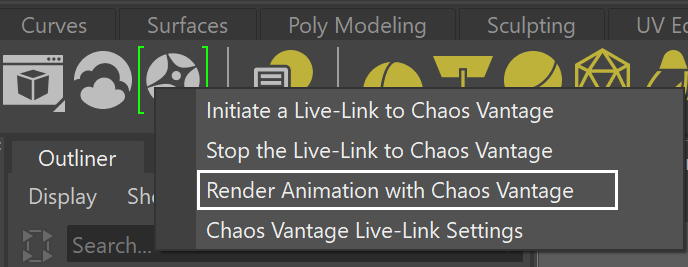
In Maya, go to V-Ray menu > Live-Link to Chaos Vantage > Render Animation with Chaos Vantage

Usage
For detailed instructions on setting up the Render Animation with Chaos Vantage tool, see the Live Link from Maya tutorial.
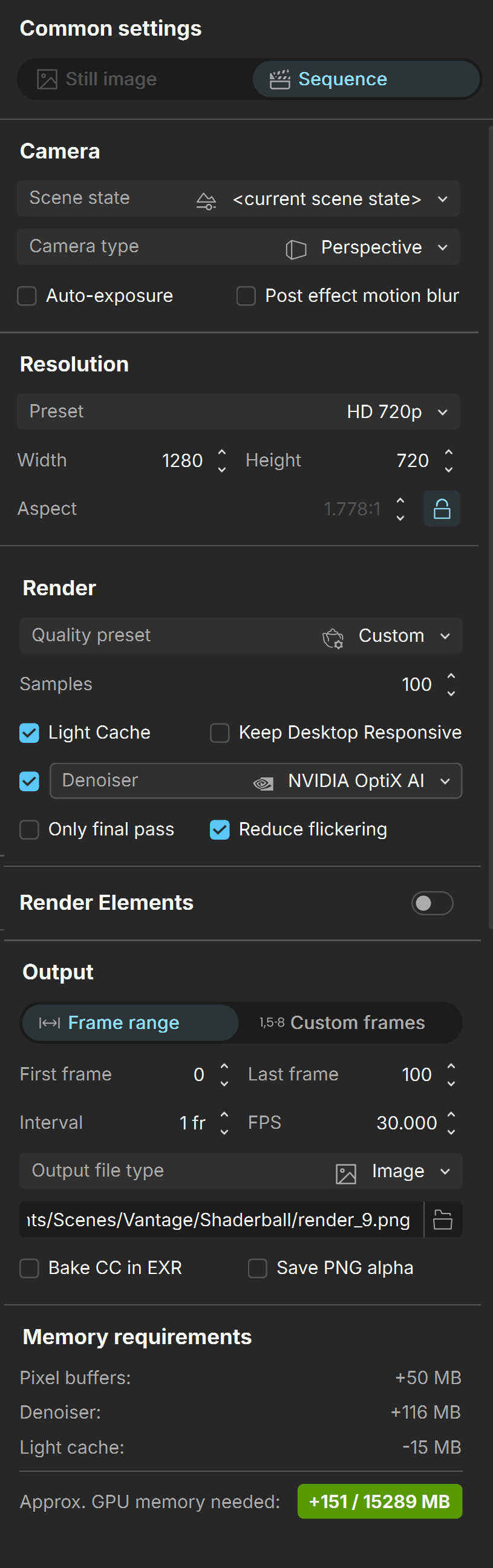
To use the tool, click the Render Animation with Chaos Vantage button. The Common settings dialog appears in Chaos Vantage, where you can set the sequence parameters to your liking.
For detailed information on each parameter from the Common settings dialog, see the Sequence section of the Rendering Mode page.
Click Start to begin rendering the animation. This also initializes a Live Link session between Maya and Chaos Vantage.
The tool automatically:
- Sends the scene to Chaos Vantage on 20703 port.
- Renders each frame from the specified range in the specified location.
To stop a Live Link session, click the Stop the Live-Link to Chaos Vantage button from ||V-Ray menu|| > Live-Link to Chaos Vantage > Stop the Live-Link to Chaos Vantage or from the dropdown menu available when you right-click on the Vantage icon in the V-Ray Toolbar.