Corona for Cinema 4D
Corona Select Shader
This article explains the settings and values for the Corona Normal shader in Cinema 4D.
Last updated 1 September 2026
This article explains the settings and values for the Corona Normal shader in Cinema 4D.
Overview
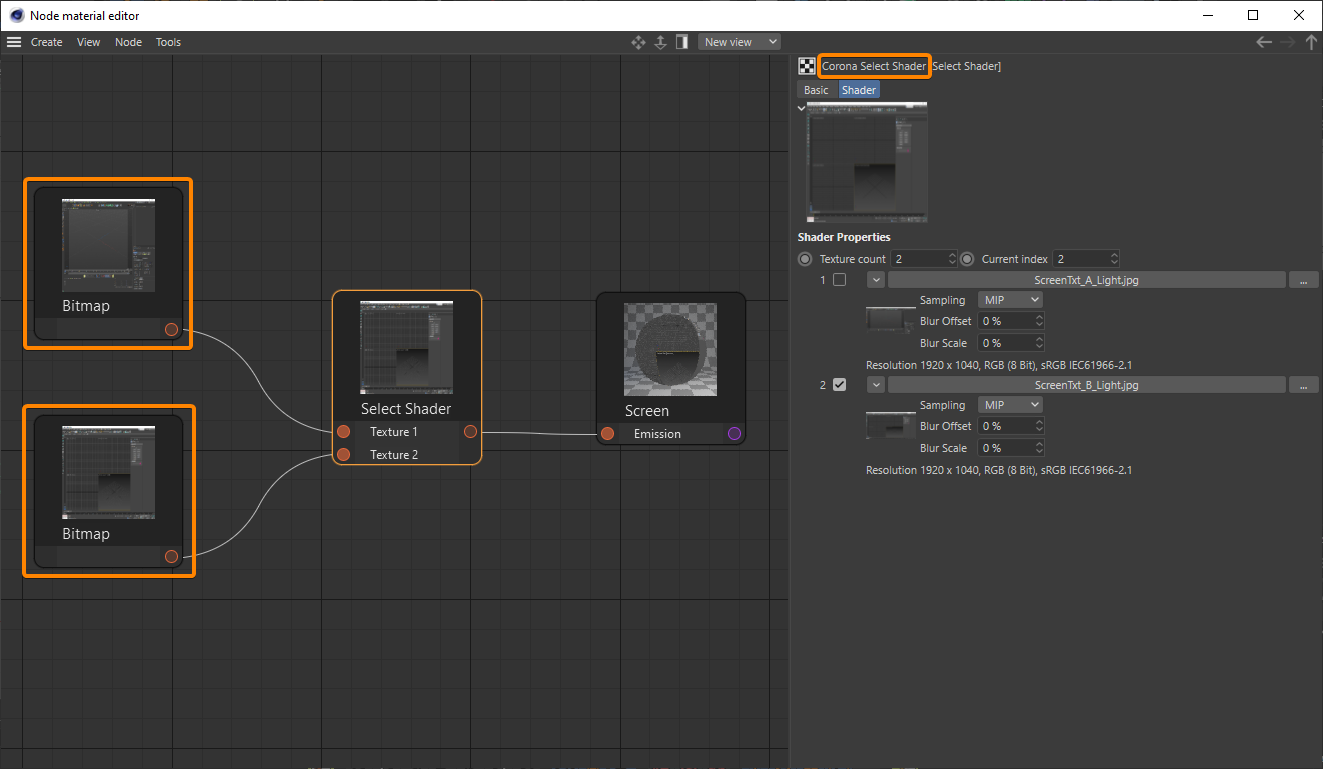
The Corona Select Shader is a shader that lets you use multiple texture maps or shaders into a single material and then choose which one of them to use in the actual rendering. To select a specific texture map, click the checkbox next to that item's number.
See also: Corona Select Material

Shader Properties
Texture count – This value specifies the number of texture maps or shaders that you wish to select between.
Current index – These are the different methods to calculate the Normal bump.
Batch load textures – This option allows loading multiple texture files at once. The number of texture maps loaded is the Texture count number as well. The textures are always loaded as Corona Bitmaps.
Active texture – The list shows all connected texture maps and allows selecting one of them.

Examples



Click here to see the material setup

Controlling Textures
In the following example, the Corona Select shader has been used to change the screen texture using a Corona Light Material with the "Emit light" option turned off.


Click here to see the material setup