V-Ray for 3ds Max
USD
This page provides information on support for the Universal Scene Description (USD) in V-Ray for 3ds Max.
Last updated 1 September 2026
This page provides information on support for the Universal Scene Description (USD) in V-Ray for 3ds Max.
Overview
USD or Universal Scene Description (.usd) is a framework and file format, developed by Pixar, that allows 3D scenes and assets to be transferred and edited on multiple applications. USD focuses on workflows that allow multiple users to collaborate on a project without conflict by using non-destructive editing, asset versions, and variations. For more information, visit Getting Started with USD.
Workflow
Import
USD or Universal Scene Description (.usd) is a framework and file format, developed by Pixar, that allows 3D scenes and assets to be transferred and edited on multiple applications. USD focuses on workflows that allow multiple users to collaborate on a project without conflict by using non-destructive editing, asset versions, and variations. For more information, visit Getting Started with USD.
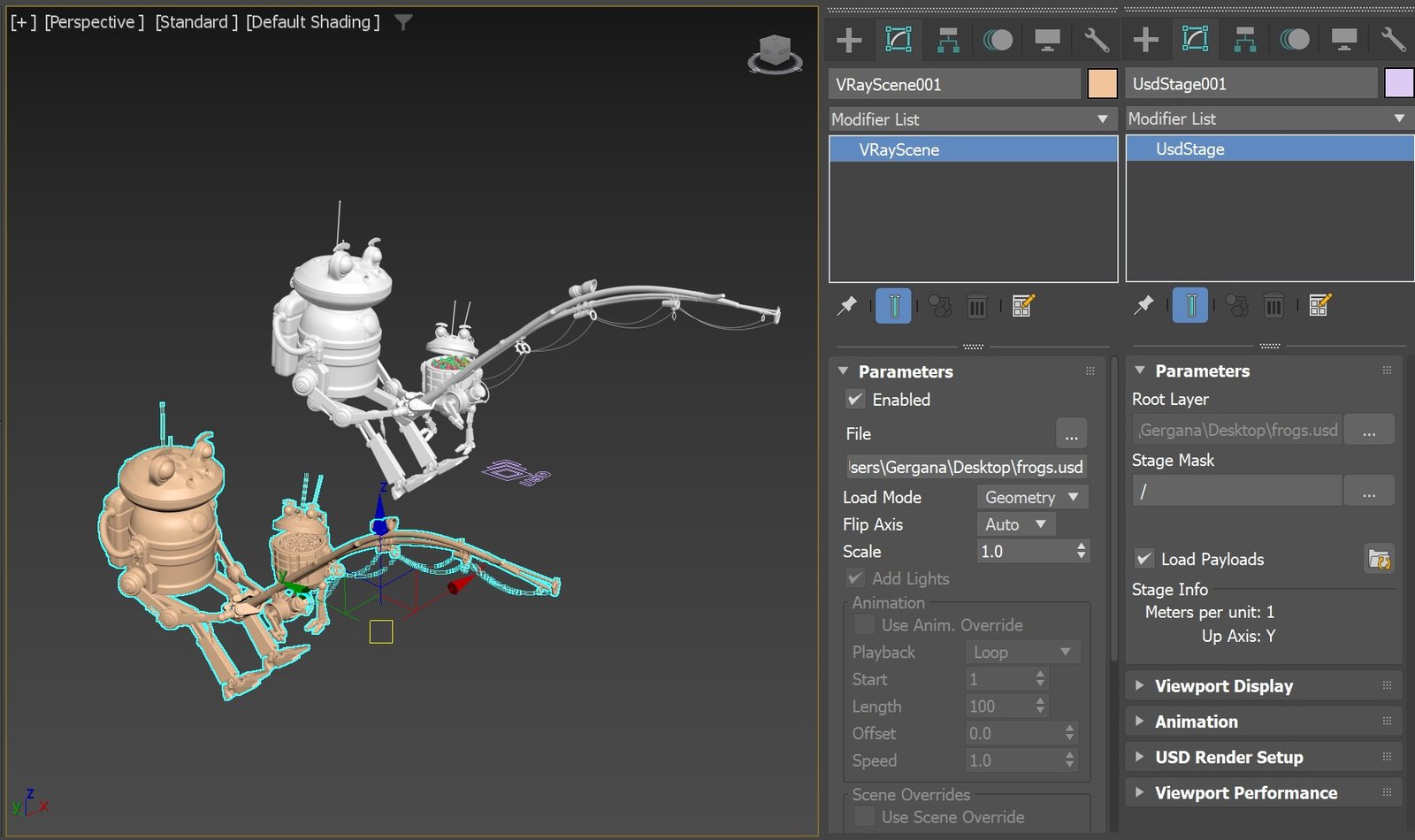
USD files can be loaded in 3ds Max and rendered with V-Ray with VRayScene object or USD stage object.
To load a USD file in a VRayScene object, go to Create tab > Geometry > VRay category > VRayScene.
To create a USD Stage node, use File > Reference > USD Stage or navigate to Create tab > Geometry > USD category > USD Stage node.
Export
Use MAX USD Exporter by navigating to File > Export> Export...(or File > Export> Export Selected...) and then choosing Universal Scene Description (.usd, .usda, .usdc, .usdz) from the available file formats in the drop-down menu. The specific file extension can also be appended manually to the file's name.
Click here to see how to export a USD file through the File menu.
If using V-Ray 6, update 1 and official beta USD for 3ds Max 0.3.0, set Materials export to V-Ray materials and enable Chaser: V-Ray when exporting USD files with V-Ray for 3ds Max.
Click here to see an image of the parameters.

If using V-Ray 6, update 1.1, or newer, select V-Ray as Plug-in Configuration.
Click here to see an image of the parameters.

Material Override
To override a USD material, enable the Assign USD Materials option. This assigns a Multi-Sub/Object material to the USD Stage node, where the submaterials can be replaced.
Note that the material override functionality is supported with V-Ray 6, update 2, and newer.
Supported USD Versions
USD | V-Ray | V-Ray | V-Ray | V-Ray 6.20.02 | V-Ray 6.20.06 | V-Ray | V-Ray | V-Ray | V-Ray | V-Ray | V-Ray | V-Ray | Max versions |
|---|
USD | V-Ray | V-Ray | V-Ray | V-Ray 6.20.02 | V-Ray 6.20.06 | V-Ray | V-Ray | V-Ray | V-Ray | V-Ray | V-Ray | V-Ray | Max versions |
|---|---|---|---|---|---|---|---|---|---|---|---|---|---|
0.3.0 | 2022-2023 | ||||||||||||
0.4.0 | 2022-2024 | ||||||||||||
0.5.0 | 2022-2024 | ||||||||||||
0.6.0 | 2022-2024 | ||||||||||||
0.7.0 | 2022-2025 | ||||||||||||
0.8.0 | 2022-2025 | ||||||||||||
0.9.0 | 2022-2025 | ||||||||||||
0.10.0 | 2022-2026 | ||||||||||||
0.11.0 | 2023-2026 | ||||||||||||
0.12.0 | 2023-2026 | ||||||||||||
0.13.0 | 2023-2026 | ||||||||||||
0.14.0 | 2024-2027 | ||||||||||||
0.15.0 | 2024-2027 | ||||||||||||
0.16.2 | 2024-2027 |
Supported Features
USD Rendering
The following features are supported when rendering USD files with V-Ray for 3ds Max:
- Static meshes
- Animated transforming meshes
- Animated deforming meshes
- Particles
- USD Preview Surface material
- V-Ray materials
- V-Ray textures
- V-Ray lights
- V-Ray Displacement
- Animation of shader and light parameters
- User-Defined object attributes with textures such as VRayUserScalar and VRayUserColor
- Material overrides functionality for USD Stage objects
- Native MaterialX materials through maxUSD
USD Exporting
The following features are supported when exporting USD files from 3ds Max with V-Ray:
- V-Ray shaders (materials and textures)
- Animation of shader parameters
- V-Ray lights
- Animation of VRayLight parameters
- V-Ray Displacement
- VRayInstancer
- VRayProxy
- V-Ray Physical Camera
- User-Defined object attributes with textures such as VRayUserScalar and VRayUserColor
- Native MaterialX materials through maxUSD
Temporary Limitations
The following features are still in development.
- Object properties, V-Ray properties, and Render settings are not exported to the USD file(for matte objects, use VRayWrapperMtl);
- Export to USD of Lights instancing via VRayInstancer is not supported;
- Direct illumination for VRayLightMtl is not exported;
- Only bitmap files (default values) are exported for VRayLights;
- Maps for Disc lights are not exported;
- VRayProxy exported in USD files can't be previewed in the viewport when loaded in a VRayScene object; it can only be previewed when loaded in a USD Stage Node;
- Exclude lists for VRayLights and textures. For example, VRayDistanceTex and VRayDirt are not exported to USD;