V-Ray for 3ds Max
VRayGaussianSplats
This page provides information about the VRayGaussianSplats render element.
Last updated 8 May 2026
This page provides information about the VRayGaussianSplats render element.
Overview
The VRayGaussianSplats render element isolates the VRayGaussiansGeom geometry in the scene. The depth information can be written in an additional VRayZDepth render element.
UI Path: || Render Setup window|| > Render Elements tab > Add button > VRayGaussianSplats


Parameters
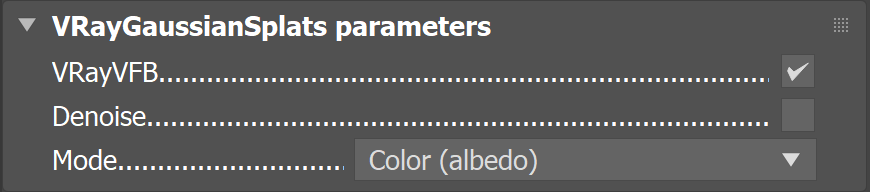
This render element is enabled through the Render Elements tab of the Render Setup window in 3ds Max and displays its parameters in a rollout at the bottom of the window:
VRayVFB – When enabled, the render element appears in the V-Ray Virtual Frame Buffer.
Denoise – Specifies whether to denoise this render element.
Mode
Color (albedo) – Uses unmodified color of the Gaussian splats (albedo).
Illumination – Uses a lit version of the splats if lighting is enabled.
Raw Illumination – Uses the raw lighting of the splats (lighting/albedo).
Common Uses
The VRayGaussianSplats render element is used to isolate the VRayGaussianGeom from the rest of the scene. Here, the render element isolates the pink flamingo gaussian splatting model from the rest of the scene objects.
When combined with a VRayZDepth render element, the depth-based blurring effect can be adjusted during post-processing.

Beauty Render

VRayGaussianSplats