V-Ray for Blender
User Attributes
This page provides information about the V-Ray User Attributes rollout of the Object Properties in Blender.
Last updated 12 June 2026
This page provides information about the V-Ray User Attributes rollout of the Object Properties in Blender.
Overview
User Attributes allow you to assign your custom properties and access them later using the User Color and User Scalar textures, to provide per-object values for shading attributes. They can also be used with the Bitmap to resolve the file directory on a per-object basis.
UI Path: (while selecting an object) ||Object tab|| > User Attributes
Properties
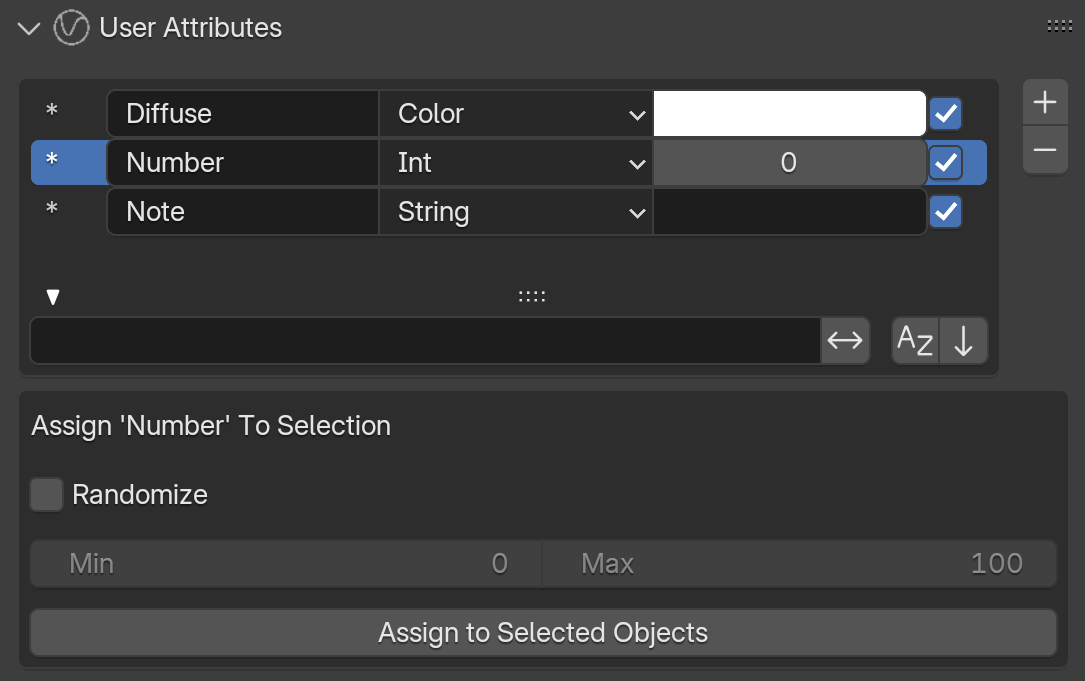
- You can use the + button to add attributes and the - button to remove a selected attribute.
- Assign a name to the attribute in the leftmost field (placeholder is MyAttr). This name is used to reference the specific user attribute.
- Select the attribute type from the dropdown menu.
- Set the attribute value in the rightmost field.
- You can disable the attribute from the checkbox.

When you select an attribute, an additional menu appears, which allows you to assign the selected attribute to any objects selected before the active object. When selecting multiple objects, the last object to be selected can have its User Attributes assigned to the entire selection using the Assign to Selected Objects button.
Float and Int attributes have two additional options - Randomize and Min, Max. When Randomize is enabled, a value within the Min and Max thresholds is assigned, at random, to each of the objects to which this attribute is assigned. If two cube geometries have the same randomized int attribute assigned, they will have different int values set for each of them.