V-Ray for Maya
VRayLightMeter
This page describes the V-Ray Light Meter and its use.
Last updated 2 July 2026
This page describes the V-Ray Light Meter and its use.
Overview
The VRayLightMeter node evaluates how a scene is illuminated at a given time during the day or how it is affected by different light sources. The information can be displayed in the viewport or saved to a CSV file.
UI Paths


Dimensions
Width – The width of the VRayLighteter.
Length – The length of the VRayLightMeter.
Width segs – The resolution of the VRayLightMeter in the x direction.
Length segs – The resolution of the VRayLightMeter in the z direction.

Preview
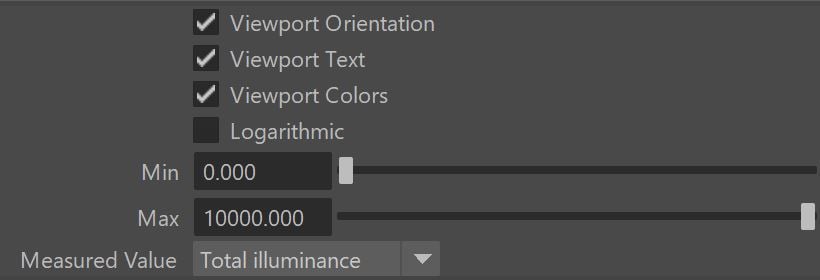
The settings in this group control the way the illumination information is represented in the view port.
Viewport Orientation – Enables or disables the preview of the direction from which the light is coming.
Viewport Text – Enables or disables the preview of the actual values of the illumination for each point.
Viewport Colors – When enabled the VRayLightMeter displays a gradient to illustrate the variation in the illumination.
Logarithmic – Changes the illumination scale to Logarithmic for the purposes of displaying it in the viewport. This is useful when there is a great variation in the illumination.
Min – Specifies the minimum illumination displayed in the viewport in lux.
Max – Specifies the maximum illumination displayed in the viewport in lux.
Measured values – Specifies which part of the illumination in the scene will be measured:
Total illuminance – The total illuminance will be measured - this includes direct light, GI, and light coming from the environment.
Direct illuminance – Calculates only the illumination from direct lighting.
Indirect illuminance – Calculates only the effect of the indirect illumination.
Actions
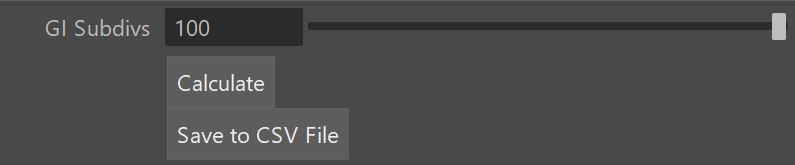
GI Subdivs – Number of GI subdivs used for calculating the measured values.
Calculate – Hitting this button calculates the measured values at the grid points of the light meter helper.
Save to CSV file – This button allows you to save the result in a .csv file.
Example: VRayLightMeter
The following example shows how VrayLightMeter measures the illuminance from two lights.
VRayLightRect – Default settings with Intensity multiplier of 90
VRayLightSphere: Default settings
VRayLightMeter:
Witdth = 24
Lenght = 24
Witdth = 8
Lenght = 8
Viewport Orientation: ON
Viewport Text: ON
Viewport Colors: ON
Min = 0
Max = 1000
Measured Value: Total Illuminance

MEL Script Methods
The following methods of the VRayLightMeter node are accessible from the Script Editor.
VRayLightMeter Method | Description |
|---|
VRayLightMeter Method | Description |
|---|---|
vrayLightMeterCalculate("VrayLightMeterShapeX"); | Calculates the values along the light meter grid. |
vrayLightMeterSaveToCSV("VrayLightMeterShapeX", "path/filename.csv"); | Saves the values from the grid into the specified text file, in CSV (comma separated values) format. |
vray getLightmeterMaxValue <NODE NAME - STRING> [direct|gi|total] | Returns the maximum value of a lightmeter (for Direct/GI/Total light). |
vray getLightmeterAverageValue <NODE NAME - STRING> [direct|gi|total] | Returns the average value of a VRayLightMeter node. |
Notes
- The VRayLightMeter node is based on the texture baking and render elements functionality of the V-Ray renderer.
- The VRayLightMeter node uses brute force GI with user selected GI Subdivs and 100 Bounces to calculate the measured values.