V-Ray for Maya
VRayNormalMap
This page provides information on VRayNormalMap texture.
Last updated 5 December 2025
This page provides information on VRayNormalMap texture.
Overview
The VRayNormalMap is similar to the VRayMtl Bump and Normal Mapping rollout, but it works on any V-Ray compatible geometry, including V-Ray proxies, displaced objects, etc. It offers additional flexibility compared to VRayMtl's native bump and normal mapping, such as flipping and swapping channels, rotating the normal map, and more.
For detailed information on bump and normal mapping, refer to the Bump and Normal Mapping in V-Ray article.
UI Path: ||Hypershade|| > Create panel > VRay section > 2D Textures > VRay Normal Map


Parameters
Map Type - defines the type of map and how its parameters are interpreted. See the Bump and Normal Mapping in V-Ray article to see detailed explanation on each map type and its typical usage.
Bump Map - Uses a bump map to determine the bump effect applied.
Normal map in tangent space - Uses a tangent normal map to determine the bump effect applied.
Normal map in object space - Uses an object space normal map to determine the bump effect applied.
Normal map in screen space - Uses a screen space normal map to determine the bump effect applied.
Normal map in world space - Uses a world space normal map to determine the bump effect applied.
Explicit normal - Uses a world space normal map as the bump normal without conversion, regardless whether the input is a color or vector texture.
Map - Allows the user to select a texture for the bump or normal map. Leaving this unconnected turns off bump/normal mapping.
Normal Map Mult - Multiplies the bump effect of the map. This option is available when the Map Type is different than Bump Map.
Normal Map Rotation - Determines the rotation of the Normal map in tangent space. This option is available when the Map Type is different than Bump Map.
Additional Bump – An additional texture for bump mapping applied on top of the Normal map. This option is available when the Map Type is different than Bump Map.
Additional Bump Mult – Increase or decrease the effect of the Additional Bump map. This option is available when the Map Type is different than Bump Map.
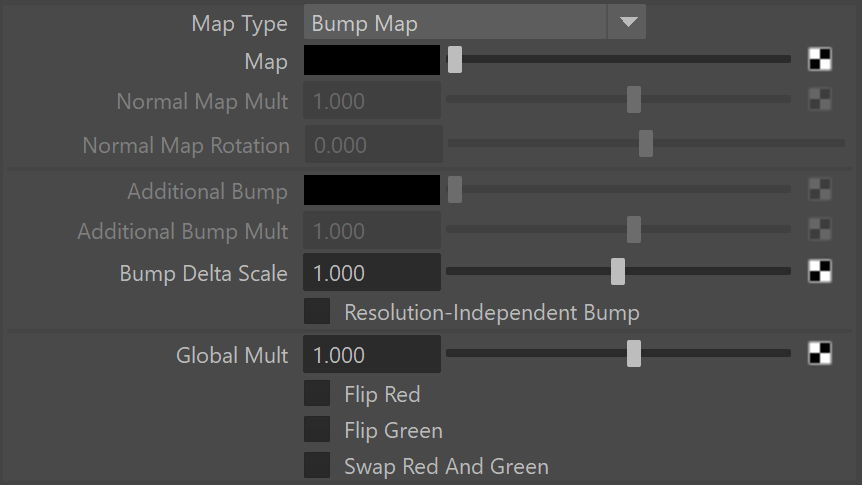
Bump Delta Scale – This parameter can be decreased to sharpen the bump and increased to blur it. Available only when Map Type is set to Bump Map.
Resolution-Independent Bump – Ensures consistency of the bump effect regardless of the camera’s distance or rendering resolution. The texture’s details don’t vary when zooming in or out on the object. Note that when using a File texture, you must set the Filter type to Off.
Global Mult – A global multiplier for the bump amount that takes effect over both bump and normal map(s).
Flip Red - When enabled, flips the red channel of the Normal map. This is needed for maps produced by some software packages.
Flip Green - When enabled, flips the green channel of the map. This is needed for maps produced by some software packages.
Swap Red And Green - Swaps the red and green channels of the map. Some software packages assume that the green G component of the Normal map is the "up" direction along the surface normal. This corrects that.