V-Ray for Maya
VRayUVWRandomizer
The VRayUVWRandomizer allows applying random offset, rotation, and scale to textures. It is used by connecting it to the uvCoord attribute of a texture node.
Last updated 1 September 2026
Overview
The VRayUVWRandomizer allows applying random offset, rotation, and scale to textures. It is used by connecting it to the uvCoord attribute of a texture node.
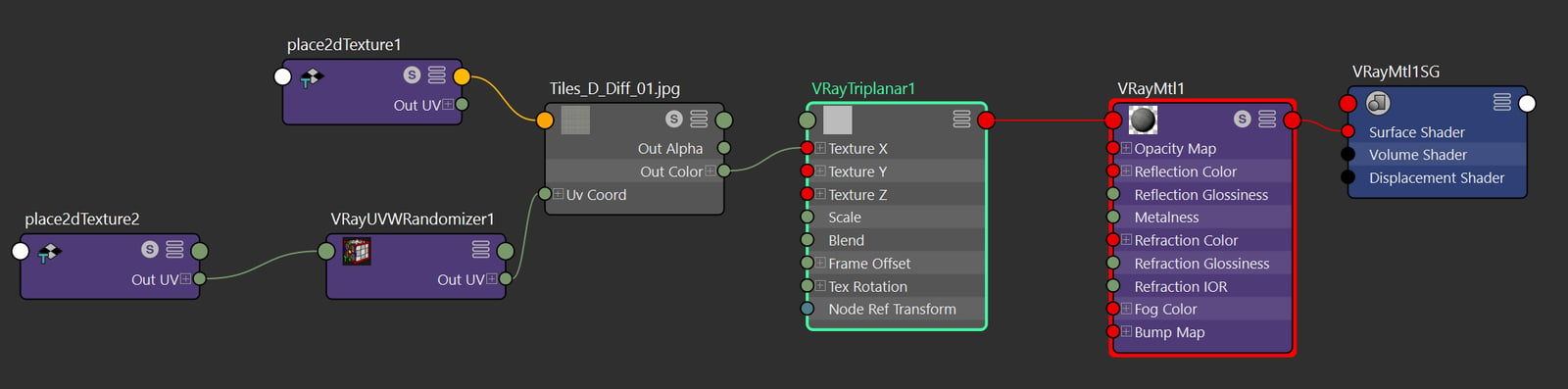
In the image shown here Randomize had its type set to By Node Name.
UI Path: ||Hypershade|| > Create panel > VRay section > Utilities > VRayUVWRandomizer


Parameters
Mode
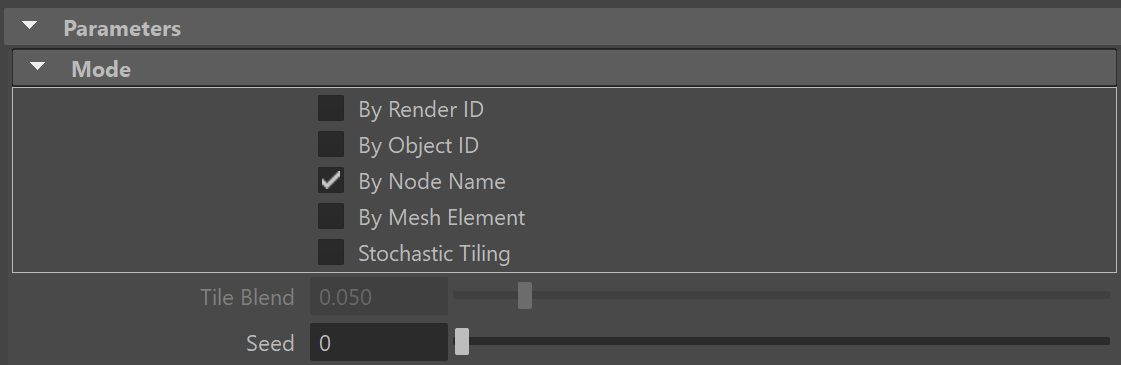
Mode– Specifies the meaning of the ID parameters.
By Render ID – Assign random colors based on RenderIDs;
By Object ID – Consider the Object IDs of the object when feeding the data (color or texture) to the material;
By Node Name – Generates the color index based on node names. This is useful, because the node name persists through scene editing - e.g. if you add/remove other objects, you will still get the same colors.
By Mesh Element – Assigns random colors based on mesh element.
Stochastic tiling – Changes the mapping based on the UV tile.
Tile blend – Edge blending between adjacent tiles when Stochastic tiling mode is used.
Seed – Allows the user to change the randomization pattern.
Variance
Random Flip U / V – Flips the texture on a random principle along the U or V axis.
Offset U/V Min/Max – Controls the position of the texture along the U or V axis.
Offset U/V Steps – Specifies the number of steps in which the variance interval is achieved.
UV Rotation Min/Max – Rotates the texture along the U or V axis.
UV Rotation Steps – Specifies the number of steps in which the variance interval is achieved. For example, if UV rotation is set from 0 to 360 with a Step of 5, the texture is rotated at an angle that is a multiple of 72 degrees (e.g. 72, 144, 216).
Scale U/V % Min/Max – Scales the texture along the U or V axis.
Scale U/V % Steps – Specifies the number of steps in which the variance interval is achieved.
Scale V% Unlocked – By default, the scale of the V axis is locked to the U axis. Enable this option to control it separately.

UV Coordinates
The UV Coordinates rollout provides easy access to the Input attribute (a place2dTexture by default).

How to Set up
The VRayUVWRandomizer is used with combination with another texture, most commonly - a Bitmap.
Connect the Out UV of the UVWRandomizer node to the Uv Coord slot of the texture.
You can use the same VRayUVWRandomizer node to randomize multiple textures at once. To do so, connect the Out UV of the UVWRandomizer node to all Uv Coord input slots of the texture nodes you want.

In this example, we use the place2dtexture node of the VRayUVWRandomizer to adjust the UV tiling of the texture.
Then, from the VRayUVWRandomizer node, we enable Stochastic Tiling.

You can use the VRayUVWRandomizer in combination with VRayTriplanar texture.
In such case, connect the Out Color of the Bitmap texture to the VRayTriplanar as means to the material.