V-Ray for Nuke
Introduction to Light Path Expressions
If you are not familiar with using Light Path Expressions (LPEs), this page is a good place to start. The sections below will try to explain what LPEs are, how they work and what are the possible use cases.
Last updated 18 September 2025
Overview
If you are not familiar with using Light Path Expressions (LPEs), this page is a good place to start. The sections below will try to explain what LPEs are, how they work and what are the possible use cases.
What are LPEs?
Light Path Expressions are a special type of render element with advanced capabilities. They use regular expression patterns to record selected events of light contribution along the path of a ray.
This can be used for very fine control in compositing by allowing you to tweak, for example, the GI coming from lights, the environment or self-illuminating objects separately, or each separate GI bounce, or the self-reflections of an object or the way SSS is seen behind refraction without re-rendering. The possible applications are practically endless.
Light Paths
Generally speaking, in ray tracing we shoot rays from a virtual camera. Those rays hit different surfaces in the scene and bounce between objects until they are finally terminated at a light source.
Light Path Expressions follow the path of a ray and allow us to ask specific ray hits (which we call events) to be recorded. A ray, and the way an expression is built, always starts from the camera and ends at a light source. The different ray hit events in between is what we capture with LPEs.
To understand how this works, let’s look at the different symbols that make up an expression.
- Starting from the camera, we use the C symbol to designate it.
- When the ray hits a surface and starts bouncing in the scene, we record these ray hit events. In the first series of simple examples, we will not look at the events themselves. We will look at the ray hit events in the next section , where we explain Ray Spawn events and Ray Scatting types.
- Finally, the ray path is always terminated at a light source, which can be a light (L), a self-illuminating object (O) or the background (B) and is designated with these 3 symbols at the end of the expression.
In a simple example, the path or a ray can be represented in this way: camera -> event -> light source.
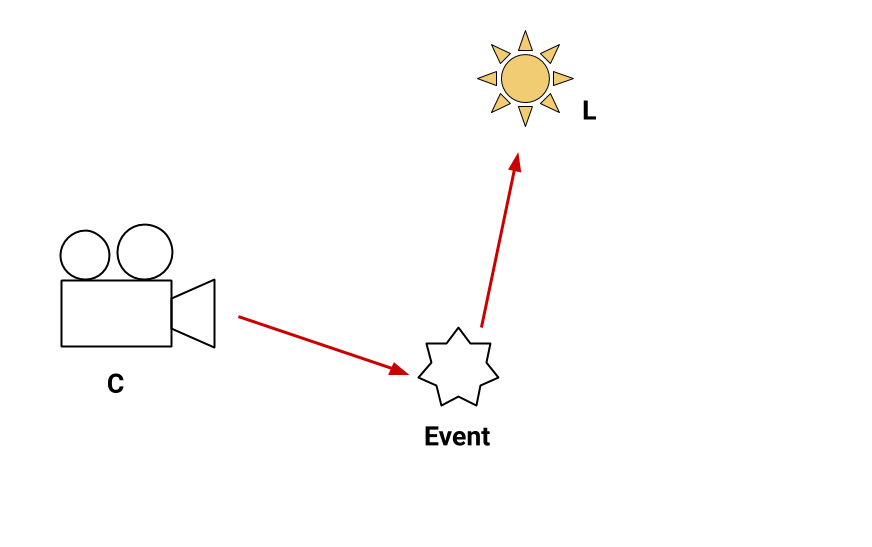
A single event example - the ray starts from the camera, an event (hit) occurs and the ray is terminated at a light source
In a more realistic scenario, multiple events can occur on a ray path. We can select which ones to record, or we can record the accumulation of subsequent events along a path.
For example, we can capture the diffuse reflection (GI) starting from the camera and ending at a light. Or we can record a path that goes through a number of refraction hits, then reflects off another object and ends at a light.

Multiple events example - the ray starts from the camera, makes multiple hits and ends at a light source
Ray Spawn Events and Scattering Types
Right click in the expression field to access a list of the available expression symbols and some presets to get you started.

A single diffuse reflection hit. C<RD>L (Lighting)

A single hit for glossy and singular reflection. C<R[GS]>L (Direct Specular)

Glossy and specular refraction. C<T[GS]>L (Refraction)

A single volumetric event. CVL

Multiple events: Glossy and specular refraction followed by diffuse reflection. C<T[SG]><RD>L