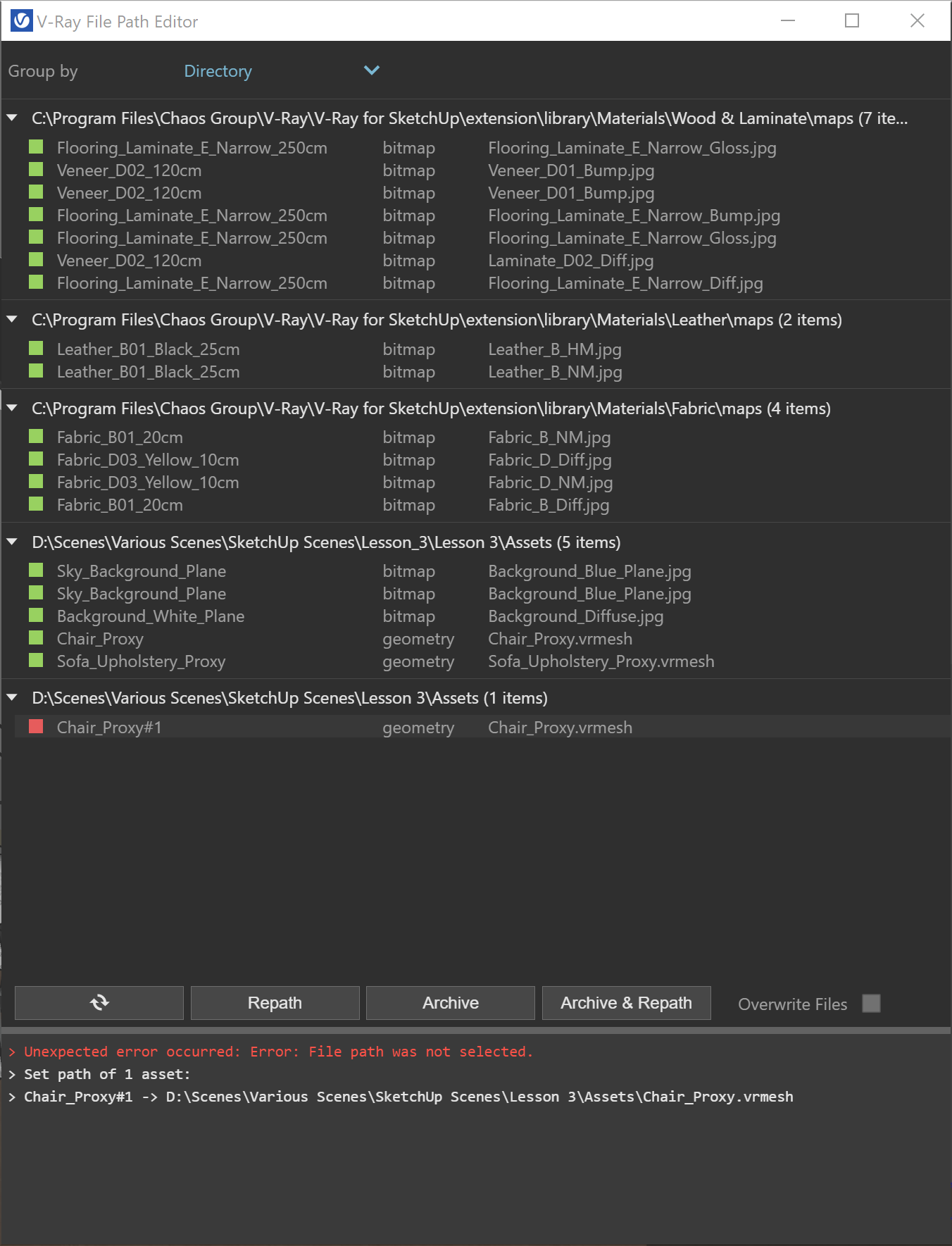
Use the V-Ray File Path Editor to manage file paths and assets in your V-Ray for SketchUp scene.
Overview
The V-Ray File Path Editor lets you set file paths, create scene archives and track assets such as textures, IES files and proxy objects.
You can see all available files in your scene in one place.

UI paths
||V-Ray Asset Editor|| > Shortcuts menu > Open V-Ray File Path Editor

SketchUp Menus Ribbon
||Extensions|| > V-Ray > File Path Editor
Assets
The window uses three colour marks to show the status of each file path.
Green means the file is available and V-Ray can see its path.
Yellow means the file is available but embedded in a temporary cache file.
Red means the file is missing or inaccessible.
Options
Group By sorts scene assets by Directory, State, Type or None.
Refresh updates the scene asset display.
Repath updates the selected asset's file path.
Archive saves the selected asset to disk.
Repath & Archive saves the selected asset to disk and automatically updates its file path to the chosen destination.
Overwrite files allows existing files to be overwritten when you repath assets.